
Last updated: November 11, 2026
Only 66% of web pages have an H1 heading with any text in it, and meta descriptions appear on just 67.7% of desktop pages. About a third of sites declare no canonical URL at all. Those figures come from an annual open-data report on how the web is built, published in January 2026 and drawn from a July 2025 crawl of 16.2 million websites that covered inner pages as well as home pages. A homepage check, or a tool's single health score, misses most of what holds a site back.

Almanac 2025 SEO chapter, published Jan 15, 2026, captured Nov 1, 2026.
A SaaS SEO audit has to cover the marketing site, the blog, the docs and every subdomain, then end in a short list of fixes that engineering will actually ship. This post walks through that process in eight steps, with a scoring example for deciding what goes first.
What a SaaS SEO audit is for
An audit answers one question: what is stopping this site from earning more qualified organic traffic, and which fixes are worth the engineering time? It is a diagnosis. The output is a ranked backlog that fits on one screen, where a 90-page PDF would sit unread.
SaaS sites need their own process because of how they are built. Marketing pages often run on a headless CMS, the blog on another system, docs on a third, and the app sits on a subdomain that should never be indexed. Integration, template and comparison pages are generated from data. Each of those layers breaks in its own way, and a generic crawl report lumps them together.
This post covers the classic search audit. Readiness for AI answers (crawler access for AI bots, how consistently the product is described across the site, passage-level structure) is a separate job, covered in the AEO audit guide. Run both, but keep the findings in separate lists so owners stay clear.
Step 1: Set the question and record baselines
Start by writing down why the audit is happening. "Traffic dropped 30% after the redesign" needs a different scope than "we're planning next year's SEO budget." The question decides how much time each step gets.
Then export a baseline before anyone changes anything:
Search Console clicks, impressions and indexed page counts for the last 16 months, split by subfolder.
Organic signups or demo requests by landing page from your analytics or CRM.
A list of the 20 pages that bring the most organic signups. These are the pages no fix is allowed to break.
The baseline makes the audit measurable later. Without it, a fix that coincides with a seasonal lift gets credit it didn't earn.
Step 2: Crawl the whole site, not the homepage
Crawl every hostname you own that serves public pages: www, blog, docs, help, developers, status and any regional domains. Feed the crawler your XML sitemaps and the URL list from Search Console as well, so pages with no internal links still show up.
Gaps like the ones above, such as empty H1s, missing descriptions and absent canonicals, usually live in templates, and one template can repeat the same mistake across hundreds of inner pages. Full crawls also surface orphan pages that no internal link reaches. None of that appears on a homepage.

Almanac 2025: non-empty H1 usage at 66%, captured Nov 1, 2026.
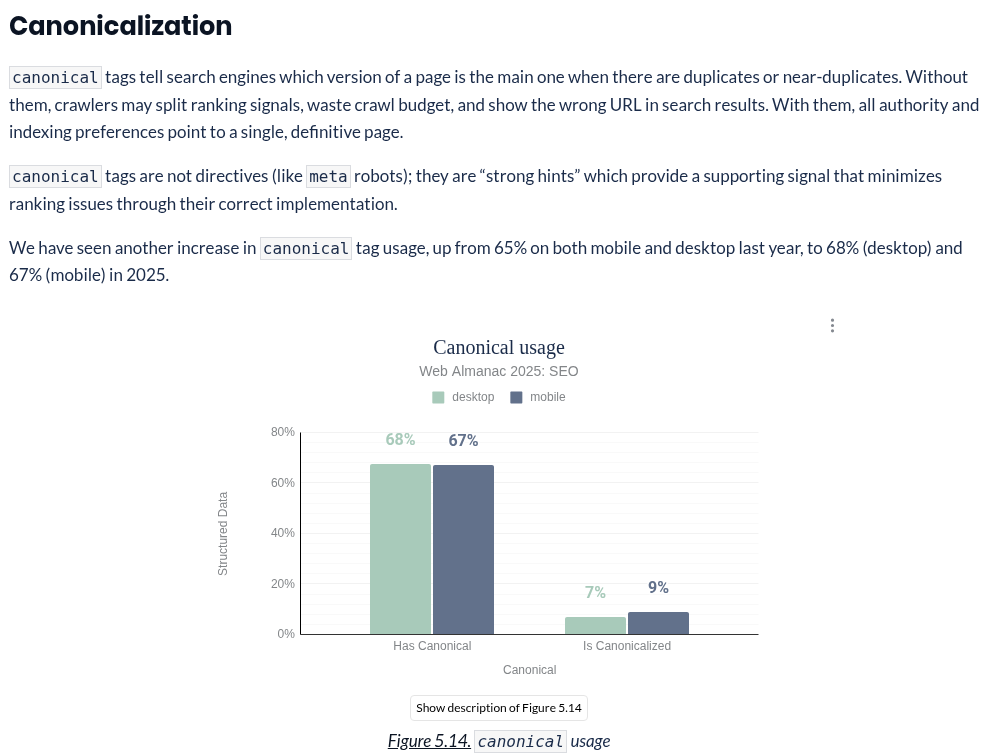
Almanac 2025: desktop canonical tag usage at 68%, captured Nov 1, 2026.
Group the crawl output by template before reading it. A SaaS site with 600 URLs typically has fewer than 15 templates (home, product, feature, pricing, integration, comparison, blog post, docs article, changelog entry). A missing H1 on the integration template is one fix, not 140.
Step 3: Check indexing against what you want indexed
Compare three lists: URLs you want in Google, URLs in your sitemaps, and URLs Google reports as indexed in the Page indexing report. The gaps are the findings.
Common SaaS gaps:
App, login, signup and staging URLs indexed because nobody added a noindex or password protection.
Parameter URLs from filters, UTM tags or pricing toggles indexed as duplicates.
Docs pages indexed on two hostnames after a docs platform switch.
Canonical tags pointing at the wrong URL, often the homepage, after a template change.
For duplicates, Google's canonicalization guide ranks the signals: redirects and rel="canonical" are strong, sitemap inclusion is weaker. It also advises against using noindex to choose a canonical within a site, because that removes the page from Search entirely. If your fix plan relies on noindex for duplicates, change the plan.
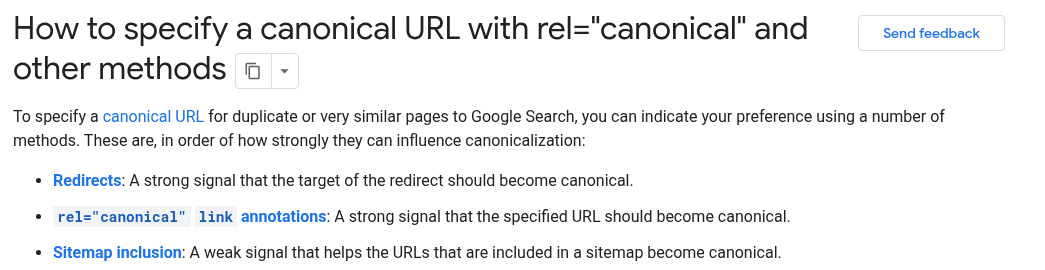
Google canonicalization guide: signals ranked strong to weak, captured Nov 1, 2026.
Step 4: Compare raw HTML with the rendered page
Fetch key templates twice: once as raw HTML, and once rendered in a browser. Check that the main text, title, meta description, canonical, internal links and structured data appear in the raw version.
Modern stacks slip here more than teams expect. In the same dataset, on 2.7% of desktop sites and 3.0% of mobile sites, the canonical tag changed after JavaScript ran, and at the median the rendered home page differed from the raw HTML by 18% in word count on desktop. Google can render JavaScript, but rendering is a second pass, and many other crawlers don't run JavaScript at all. A pricing page whose plans load from an API call may look empty to them.
Record findings per template and per route in the app router or CMS. The fixes (server-side rendering, static generation, prerendering) belong in the SaaS technical SEO checklist, which covers implementation. The audit's job is to find which templates fail.
Step 5: Review page types and keyword overlap
Map each template to the search intent it should serve. Then look for two problems.
Missing page types. Many B2B SaaS sites have strong feature pages and a busy blog, but no integration pages, no comparison or alternatives pages, and no use-case pages, which are the pages buyers search for late in their research. Note which are missing. Building them is strategy work, so they go on a separate list from the bug fixes.
Overlap. Two or more pages competing for the same query split clicks and links. It often shows up as a feature page and a blog post swapping positions week to week in Search Console. The keyword cannibalization guide covers how to confirm it and when to merge, redirect or differentiate.
Step 6: Map internal links and click depth
Export the internal link graph from the crawl. Look for:
Important pages more than three clicks from the homepage.
Internal links that pass through redirects, which waste crawl requests and slow pages down.
Broken internal links.
Product and pricing pages that receive few links from the blog, even though the blog gets most of the organic traffic.
The last one is the most common gap on SaaS sites, and the cheapest to fix. Blog posts that rank should link to the product pages they relate to, with descriptive anchor text.
Step 7: Look at authority last, and lightly
Check referring domains and how they compare with the sites outranking you for your core terms. Look for sudden spikes of low-quality links, which can signal a past link-building vendor. Don't let this step take over the audit. Authority gaps get closed over months through content, PR and partnerships, and they rarely explain a sudden drop. If traffic fell after a release, the cause is almost always in steps 3 to 6.
Step 8: Score the findings and build the backlog
Every finding gets three fields: impact (1 to 5, how much qualified traffic it affects), effort (1 to 5, engineering and content time), and an owner. Sort by impact divided by effort, then sanity-check the top of the list.
Worked example: scoring six findings
This example is illustrative, not a client case. Take a B2B SaaS company with about 600 marketing URLs and a docs subdomain. The audit produces six findings:
Finding | Impact | Effort | Score |
|---|---|---|---|
Pricing page canonical points to the homepage | 5 | 1 | 5.0 |
140 integration pages share one title template | 4 | 1 | 4.0 |
35 sitemap URLs redirect | 2 | 1 | 2.0 |
Feature page and blog post compete for the main category term | 3 | 2 | 1.5 |
Blog renders client-side, raw HTML has no body text | 4 | 4 | 1.0 |
90 old webinar pages under 300 words | 2 | 3 | 0.7 |
The first three are a single sprint. The canonical bug is one line in a template and affects the page with the highest buying intent on the site, so it ships first. The title template fix touches 140 pages at once.
The rendering problem scores low because of effort, but sorting by score alone would bury it. It affects every blog post, and the blog carries most organic traffic. Findings like that get split out as a scheduled project with its own estimate, so they don't sink to the bottom of a ticket queue.
The webinar pages are a judgment call. Merging the useful ones and redirecting the rest is cheap. Rewriting all 90 is not worth it.
Write each backlog item as a ticket engineering can act on: the URL pattern, what is wrong, what correct looks like, and how to verify the fix. "Improve SEO on integration pages" never ships. "Integration template: title should be '{Partner} integration | {Product}', currently '{Product}' on all 140 URLs" does.
How often to audit
Run a full audit once a year, and a lighter one after any redesign, CMS change, move to a new JavaScript stack or change of hostname. Between audits, a monthly look at Search Console's Page indexing report catches most regressions before they cost traffic. Sites that ship marketing pages weekly also benefit from an automated crawl after each release, compared against the last one.
What to watch out for
Health scores. A single number from a crawl tool weights all issues equally. A missing alt attribute and a canonical pointing at the homepage might cost the same points.
Homepage-only checks. The homepage is usually the best-maintained page on the site, which is why it hides problems.
Auditing the www hostname only. Docs and help centers often hold more indexed pages than the marketing site.
Findings without owners. An audit nobody owns becomes a document nobody opens.
Changing everything at once. Ship in batches and annotate each release in your analytics, so a drop can be traced to its cause.
Teams without in-house SEO engineering often bring in a technical SEO agency for the crawl, rendering and indexing steps, and keep page-type strategy in house.
FAQ
How long does a SaaS SEO audit take?
For a site with a few hundred marketing pages and a docs subdomain, the crawl and analysis usually take one to three weeks. The variable is access: getting Search Console, analytics and CMS permissions can take longer than the audit itself.
What tools do you need?
A crawler that can render JavaScript, Search Console for every property, your analytics or CRM data for conversions, and a backlink tool for step 7. Paid tools speed things up, but the method matters more than the tool.
Should the audit include AI search?
Yes, as a separate track. AI readiness has its own checks and owners, so it gets its own audit and its own list of fixes.
What should we fix first?
Anything that blocks indexing of high-intent pages: wrong canonicals, accidental noindex, pricing or product pages that render empty without JavaScript. Then template-level fixes that touch many pages at once.
Turning the audit into shipped fixes
An audit is finished when the first batch of fixes is live and measured, not when the report is delivered. Book the review with engineering before the crawl starts, agree on a sprint for the top items, and compare the baseline from step 1 against the same report six to eight weeks after the fixes ship.