
Last updated: November 14, 2026
Close to half of the crawling problems that site owners reported to the biggest search engine in 2025 came from faceted filtering, where filter and sort combinations turn one listing page into thousands of URLs. Close to a quarter came from action parameters, URLs that trigger actions such as add-to-cart, and about a tenth from irrelevant parameters such as tracking tags. The shares come from the search engine's own year-end review of crawl issue reports, discussed in a February 2026 episode of its search podcast. SaaS sites build the same traps into integration directories, template galleries, docs search and pricing toggles.

Search Off the Record episode on crawl challenges, captured Nov 1, 2026.
This checklist covers SaaS technical SEO fixes in the order they tend to matter: crawl access, indexing, rendering, architecture, redirects, sitemaps, structured data, performance, international setup and docs. Each item is a fix with a pass condition, so engineering can work through it directly.
Who this checklist is for
It's written for B2B SaaS teams whose marketing site, blog and docs are built and maintained by engineers or a web team, often on Next.js, Nuxt, Gatsby, Webflow or a headless CMS. It assumes you already know which problems you have, or plan to find out. The process for finding them (scoping, crawling, scoring, building a backlog) is covered in the SaaS SEO audit guide. This page is the fix list.
Crawl access
robots.txt returns 200 on every public hostname (www, blog, docs, help). A 5xx on robots.txt gets special handling from Google's crawlers and can pause crawling of the whole host.
robots.txt doesn't block CSS, JavaScript or API endpoints the page needs to render.
The CDN or bot-protection layer lets search crawlers through. Test with a plain HTTP client as well as a browser.
AI crawler rules are deliberate and set per bot, with nothing inherited from a template. The AI crawlers and robots.txt guide covers which bots to allow.
Server errors are rare. Google's HTTP status code documentation notes that 5xx and 429 responses make its crawlers slow down, and already indexed URLs are eventually dropped if errors persist.
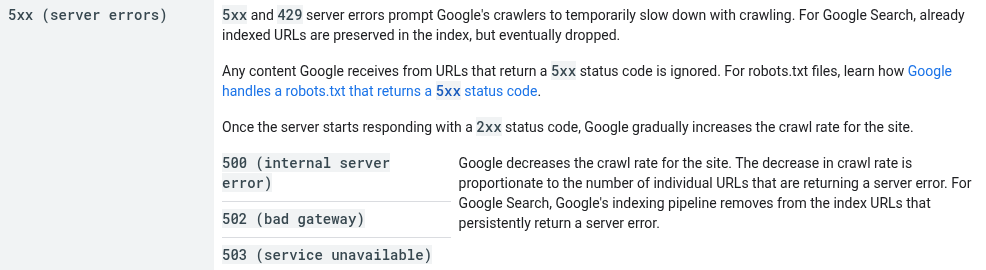
Status code doc: 5xx and 429 slow crawling, captured Nov 1, 2026.
Indexing controls
The app, login, signup and account URLs are noindexed or blocked, and none appear in Search Console's indexed pages.
Staging and preview deployments are password protected. A noindex on staging gets copied to production at launch more often than anyone admits, so check the production header after every release.
Every indexable page has a self-referencing canonical with an absolute URL.
Parameter URLs (utm tags, pricing toggles, filters, sort orders) canonicalize to the clean URL.
Trailing slash, uppercase and http versions redirect to one canonical form.
Thin tag pages, author archives and internal search results are noindexed or removed.
JavaScript rendering
Main body text, title, meta description, canonical and robots meta appear in the raw HTML response, before JavaScript runs.
Marketing and blog templates use server-side rendering or static generation. Google's JavaScript SEO guide still calls server-side or pre-rendering "a great idea because it makes your website faster for users and crawlers, and not all bots can run JavaScript."

Google JavaScript SEO guide on server-side or pre-rendering, captured Nov 1, 2026.
Menu, footer and in-content links are
<a>elements with an href. Google's link guidelines state that it can only reliably crawl those, not click handlers on divs or buttons.Pricing tables render in the HTML response. A table that appears only after an API call or a client-side toggle fails.
Missing pages return a real 404 status, not a 200 with a "not found" component. Single-page apps get this wrong often.
Tabs and accordions on feature pages have their content in the HTML on load, not fetched on click.
Site architecture
Blog, docs and resources live where you've decided they should, with the decision written down. The trade-offs are in subdomain vs subfolder for SEO.
Product, pricing and top integration pages are within three clicks of the homepage.
Blog posts link to the product pages they relate to, with descriptive anchors.
No orphan pages: every indexable URL has at least one internal link from a crawlable page.
Breadcrumbs on nested templates (docs, integrations, templates) reflect the URL hierarchy.
Redirects and migrations
All redirects are single-hop 301s or 308s. Chains get flattened.
Internal links point to final URLs, not to redirects.
Retired features and old pricing pages redirect to the closest live equivalent, not the homepage.
A redirect map exists for every past hostname or URL change and stays live. Planning a move is its own project, covered in the SaaS website migration guide.
XML sitemaps
Sitemaps list only indexable, canonical URLs that return 200. No redirects, no 404s, no noindexed pages.
Sitemaps are generated from the CMS or build, not edited by hand, and update when pages publish.
Each hostname has its own sitemap, referenced in its robots.txt and submitted in Search Console.
lastmod values change only when the content changes, not on every build.
Structured data
Organization schema on the homepage with name, logo, URL and sameAs profiles.
SoftwareApplication or Product schema on product pages where it describes the product accurately.
BreadcrumbList on templates with breadcrumbs, and Article on blog posts.
Markup is in the server-rendered HTML and matches visible content. Validate with the Rich Results Test. Which types matter for AI answers is covered in the schema markup for AI search guide.
Performance
Key templates meet Google's Core Web Vitals thresholds in field data: LCP within 2.5 seconds, INP under 200 milliseconds, CLS under 0.1.
Third-party scripts (chat widgets, analytics, A/B testing, tag managers) load after the main content. These are the usual cause of poor INP on SaaS pricing and demo pages.
International sites
Each language version lists itself and every other version in hreflang. Google's localized versions guide is strict: "If two pages don't both point to each other, the tags will be ignored."
Language versions aren't auto-redirected by IP, so crawlers can reach all of them.
Docs, changelog and programmatic pages
Docs sit on a crawlable, indexable setup with their own sitemap, versioned docs canonicalize to the current version, and old versions don't compete with it. The documentation SEO guide covers structure and content.
Programmatic pages (integrations, templates, alternatives) each have enough original content to stand alone, and empty or near-empty entries stay unpublished until they do. The programmatic SEO guide covers the content side.
Worked example: a Next.js SaaS site with 2,300 URLs
This is an illustration, not a client case. A B2B SaaS company runs its marketing site on Next.js with about 300 hand-built pages, plus 2,000 integration pages generated from a partner database. Organic traffic is flat, and the team suspects crawl budget.
Google's crawl budget guide is written for sites with more than a million pages that change weekly, or more than 10,000 pages that change daily. At 2,300 URLs, this site is nowhere near either line. Crawl budget isn't the problem, so the checklist points elsewhere.
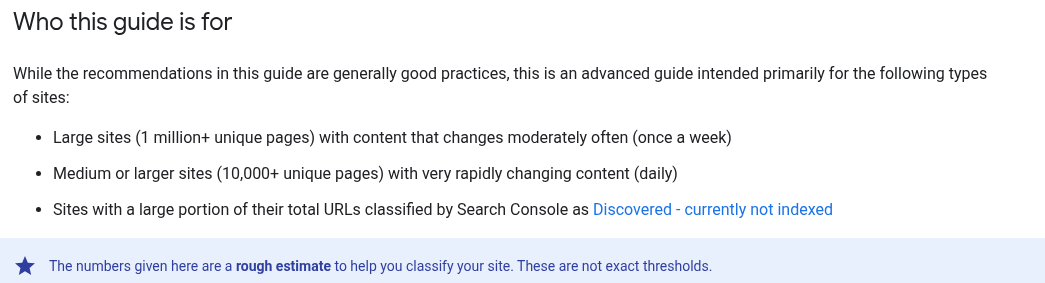
Google crawl budget guide: who it is for, captured Nov 1, 2026.
Working through the list, three items fail:
Item 40: about 1,400 of the integration pages have only a logo, a partner name and a "connect" button. They are near duplicates of each other.
Item 12: integration pages fetch their descriptions client-side, so the raw HTML is a template shell on all 2,000.
Item 27: the sitemap lists all 2,000, including 120 partners that were removed and now return 404.
The order of work follows from that. First, render integration descriptions on the server (item 12), since it's one template change that fixes 2,000 pages. Second, regenerate the sitemap from the live partner list (item 27). Third, noindex the 1,400 thin pages and add content to the top 100 by partner popularity, then lift the noindex as each one gets a real description (item 40). Flat traffic on a site this size usually traces back to quality and rendering.
What to fix first, by situation
Launching a new site or redesign: items 6 to 10, 12 to 16 and 23 to 27 before go-live. Indexing and redirect mistakes at launch are the expensive ones.
Traffic dropped after a release: check items 7, 8 and 12 first. An accidental noindex, a broken canonical or a template that stopped server-rendering explains most sudden drops.
Large programmatic section: items 12, 27 and 40. Thin, client-rendered pages at scale are a quality risk as much as a technical one.
Good rankings but low conversions from organic: items 15, 35 and 36. Slow, empty-looking pricing pages lose buyers who already found you.
Expanding to new languages: items 37 and 38 before translated pages publish.
Teams without SEO engineering capacity often hand the rendering, redirect and indexing work to a technical SEO agency and keep content in house.
FAQ
What is SaaS technical SEO?
It's the work that lets search engines and AI crawlers reach, render and index a software company's site: robots.txt, canonicals, rendering, redirects, sitemaps, schema and performance. SaaS sites need extra attention because marketing, blog, docs and app often run on different systems and hostnames.
Does Google render JavaScript-heavy SaaS sites?
Google can render JavaScript, but it's an extra step, and many other crawlers, including most AI crawlers, don't run it. Server-side rendering or static generation for public pages removes the risk.
How often should we run through this checklist?
After every redesign, CMS migration or Next.js or Nuxt version upgrade, and quarterly for items that regress quietly: sitemaps, redirects, noindex tags and Core Web Vitals.
Do we need a sitemap if the site is small?
Google's sitemap guide treats sites of about 500 pages or fewer, if well linked, as possibly not needing one. Most SaaS sites with docs and a blog are past that, and a sitemap is cheap to generate.
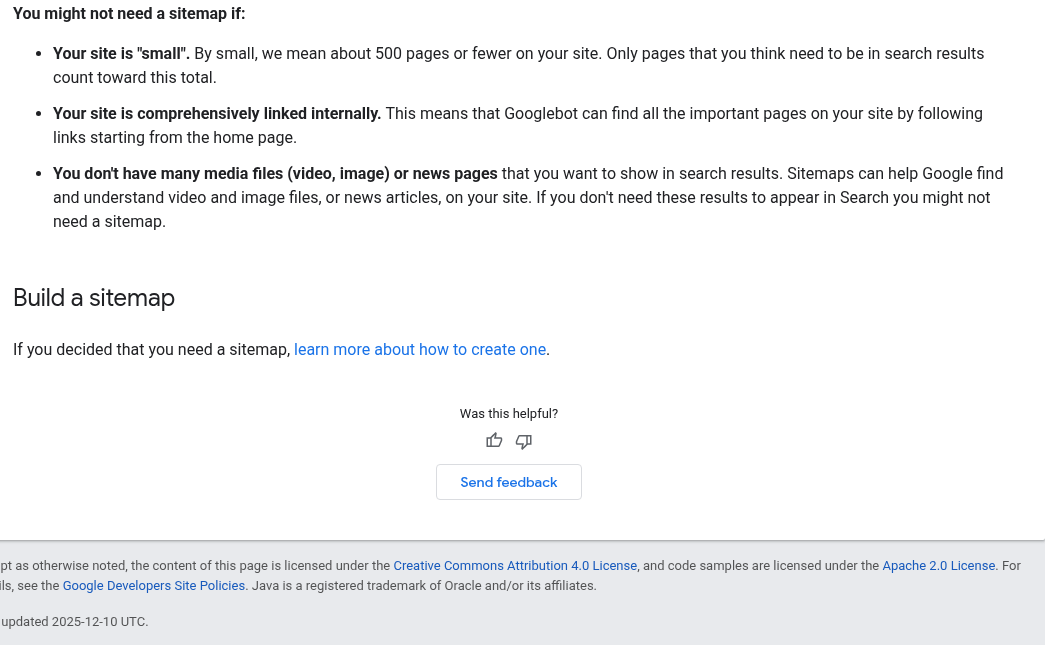
Sitemap guide: about 500 pages counts as small, captured Nov 1, 2026.
Keeping the checklist current
Technical SEO on a SaaS site regresses with every release, so the checklist works best as a pre-launch gate that runs in the deployment process on every release. Put items 7, 8, 12, 16 and 27 into automated tests on staging, and the most damaging regressions get caught before they reach Google.