
Last updated: November 18, 2026
A GTM software vendor surveyed 4,611 recent B2B buyers for a buyer study released on November 2, 2026, and found that buyers picked the vendor they already favored before contacting a seller 82% of the time. It's a vendor survey, run by a company that sells GTM software, so I read it as a direction more than an exact rate.
The same study puts LLM discovery lower than the hype suggests. Only 26% of buyers use LLMs to find vendors, even though 81% use one somewhere in an evaluation. Between purchases, vendor websites were the most common way buyers kept up with vendors, at 36%.
Put those together and SEO for B2B lead generation looks like preference work with a delayed receipt. A buyer reads your comparison page in March, forms a favorite, and books a demo in August through a branded search. The dashboard credits August.
So the useful questions are about the path. Which pages shape the favorite? Which ones turn it into a conversation with sales? And how do you see that in the numbers without fooling yourself?
Why most SEO leads never show up as pipeline
Most SEO reports count form fills. Sales counts conversations with a budget behind them. The gap between those two numbers is where SEO programs lose credibility.
Say, hypothetically, a glossary post collects 300 ebook downloads a month. It tops the lead report until sales calls a few and reaches students and job seekers. A comparison page with eleven demo requests sits lower in the same report, even if most of those eleven turn into deals.
For SEO reporting, I count a lead only when sales has accepted it. Everything before that is a subscriber or a hand-raiser, and both are worth tracking under their own names. Agree the definition with the sales lead before the first report goes out. If marketing calls a demo request an MQL and sales only counts it once a discovery call is booked, the two teams will argue about the same contact every month.
Timing makes the gap worse. In the buyer study above, buying groups spent roughly 60% of an average 10.3-month buying cycle in the selection phase, the stretch before they contact a seller. A page read in month two can become pipeline in month seven, long after the monthly report filed it as "no conversion."
The page types that bring in B2B leads from search
Some pages reach buyers who are close to a decision. Others reach people who are learning the problem. Both matter, but they do different jobs, and judging them on the same number hides that.
The pages that tend to produce leads directly:
Comparison and alternatives pages. The reader already has a shortlist. The study found 73% of buying groups start with two or more vendor preferences, and the winner is on that list 92% of the time, so these pages are where you either join the list or stay on it. Building them is covered in the comparison pages guide.
Integration pages. Someone searching "Gong Salesforce integration" is checking fit with the stack they run. That's an evaluation question.
Pricing-adjacent pages, meaning the pricing page itself, plan comparisons and "how much does payroll software cost" pages. These readers are often the ones building the internal business case.
Use-case pages by role or industry. A RevOps lead looking for a tool "for revenue teams" wants proof that people like them use it.
Blog posts sit in a different spot. They put your name in front of someone months before the shortlist exists, and that has value. They rarely convert on the spot, and a team that judges its blog on demo requests risks cutting the posts that shaped preference in the first place.
Where should a sales-led team with budget for ten new pages put them? I'd put most of them into comparison and integration pages before another round of blog posts, then fill use-case gaps for the segments sales already closes well. Picking the queries behind each page is its own job, and the high-intent keyword guide for SaaS covers it. The wider program those pages sit in is laid out in the B2B SaaS SEO guide.
Where AI citations fit in the lead path
Read the 26% figure next to the 81%. Most buyers use assistants to sort and check vendors they already know, and a smaller group uses them to find new ones.
That changes what a citation is worth. When a buyer asks an assistant to compare two tools on their shortlist, being named accurately in that answer helps you stay on the list. The buyer may never click. If they do act, the trace usually lands somewhere else: a branded Google search a week later, a direct visit, or a demo request with "ChatGPT" typed into the "how did you hear about us" box.
For the clicks that do come through, Google added an AI Assistant channel to the default channel group on May 13, 2026. A visit gets the medium "ai-assistant" when its referrer matches Google's list of recognized assistants, such as ChatGPT, Gemini or Claude.
Because the rule runs on the referrer, a visit that arrives without a recognized one never gets the label. Someone who reads an answer and then types your URL won't count as AI Assistant traffic.
I treat the AI Assistant number as a floor and read it next to branded search impressions in Search Console and the self-reported field on demo forms. If all three rise in the same quarter that your citations improved, that's a pattern worth reporting. One alone proves little.
The conversion path, page by page
Each page type answers a different buyer question, so the next step on the page should match that question. A single "Book a demo" button on every URL ignores that, and it's one of the cheaper fixes on a SaaS site.
Page type | What the reader is asking | Next step that fits | What breaks it |
|---|---|---|---|
Comparison or alternatives | Is this one better for us than the other one? | Demo or trial, plus a side-by-side table they can forward to the team | A newsletter box as the only offer |
Integration | Will it work with what we run? | Setup docs first, then a trial | Asking for a demo before showing how setup works |
Pricing-adjacent | What will this cost and what's included? | A plan picker, or "talk to sales" for a quote | Hiding every number behind a form |
Use-case | Do teams like mine use this? | A customer story from that segment, then a demo | Generic logos with no context |
Blog post | How do I fix this problem? | A related template or tool, with the product named where it solves the step | A demo pop-up on the first scroll |
Demo, trial or content offer? The answer follows the sales motion more than the page. A product with a free plan can send comparison readers straight to signup. A product that needs a scoping call should keep the demo, and give the reader something to forward internally, because in a buying group the person reading is often not the person who signs.
Content offers have a place on blog posts and some use-case pages. I'd keep them off comparison and pricing pages, where the reader is already asking to talk.
Getting the source into the CRM
Pipeline numbers only hold up if the landing page and original source travel with the contact into the CRM, alongside a self-reported "how did you hear about us" field that sales can see on handoff. Setting up those fields, and choosing a model that won't double count, is covered in the B2B SEO attribution guide.
A worked pipeline scenario: our math, assumed rates
Take a hypothetical mid-market SaaS that gets 130 organic demo requests a month. Every rate below is an assumption we picked to show the mechanics. None of them is a benchmark, and your own rates will differ.
We assume sales accepts half the demo requests from comparison, integration and pricing-adjacent pages, a quarter from use-case pages and one in eight from blog posts. We assume 60% of accepted leads become opportunities across the board, and an average deal size of $24,000.
Page type | Demo requests | Accepted by sales (assumed) | Sales-accepted leads | Opportunities (60%) | Pipeline at $24,000 |
|---|---|---|---|---|---|
Comparison and alternatives | 30 | 50% | 15 | 9 | $216,000 |
Integration | 20 | 50% | 10 | 6 | $144,000 |
Pricing-adjacent | 20 | 50% | 10 | 6 | $144,000 |
Use-case | 20 | 25% | 5 | 3 | $72,000 |
Blog posts | 40 | 12.5% | 5 | 3 | $72,000 |
Total | 130 | 45 | 27 | $648,000 |
On demo requests alone, the blog looks like the top performer, with 40 of 130, or about 31%. On pipeline it carries $72,000 of $648,000, about 11%. Comparison pages flip the other way: 23% of demo requests, a third of the pipeline.
The blog still earns its place here. In this scenario it's also where many of the comparison-page readers first heard the name, and a last-touch report can't show that. What the table does show is which pages to protect when a quarter gets tight, and which ones to judge on something other than demo volume.
The same math also prices the next move. If the blog's acceptance rate doubled to 25%, its 40 demo requests would produce 10 accepted leads, adding 5 accepted leads, 3 opportunities and $72,000. Ten more comparison-page demo requests at 50% would add the same 5 accepted leads, 3 opportunities and $72,000. So the question for the team is which one costs less: tightening who the blog pulls in, or writing the comparison pages that are still missing. For most sales-led teams I'd bet on the pages, because a missing comparison page is a gap a competitor can fill, and blog lead quality depends on readers you don't control.
To run the same check on real data in HubSpot, an independent tutorial from ECOM KNTRL, posted in May 2026, walks through the attribution report build. You start from Reports, choose Create report, then pick the attribution report type and build it from scratch with contacts as the data source. The configuration panel asks for the data source, an attribution model, a dimension such as source or campaign, and a grouping, in that order. Quick filters sit above the preview, and adding one for lifecycle stage is how you'd separate accepted leads from everyone else. Before saving, you can put the report on an existing dashboard or a new one, then set who can see it.
The walkthrough breaks results down by source or campaign. For a page-type view like the table above, page type needs to be recorded in one of those fields first.
8 ways to turn SEO traffic into qualified pipeline
I would turn that traffic into qualified pipeline with these eight moves.
Put the next pages into comparison, integration, pricing-adjacent and use-case URLs. That's the list in the page types section above.
Match the next step on the page to the question the reader is asking. The conversion path table already maps that. A public pricing page can hold a plan picker and a trial button, plus a "contact sales" path for a quote. A blog can hold a newsletter or a template, and keep the demo off the first scroll.
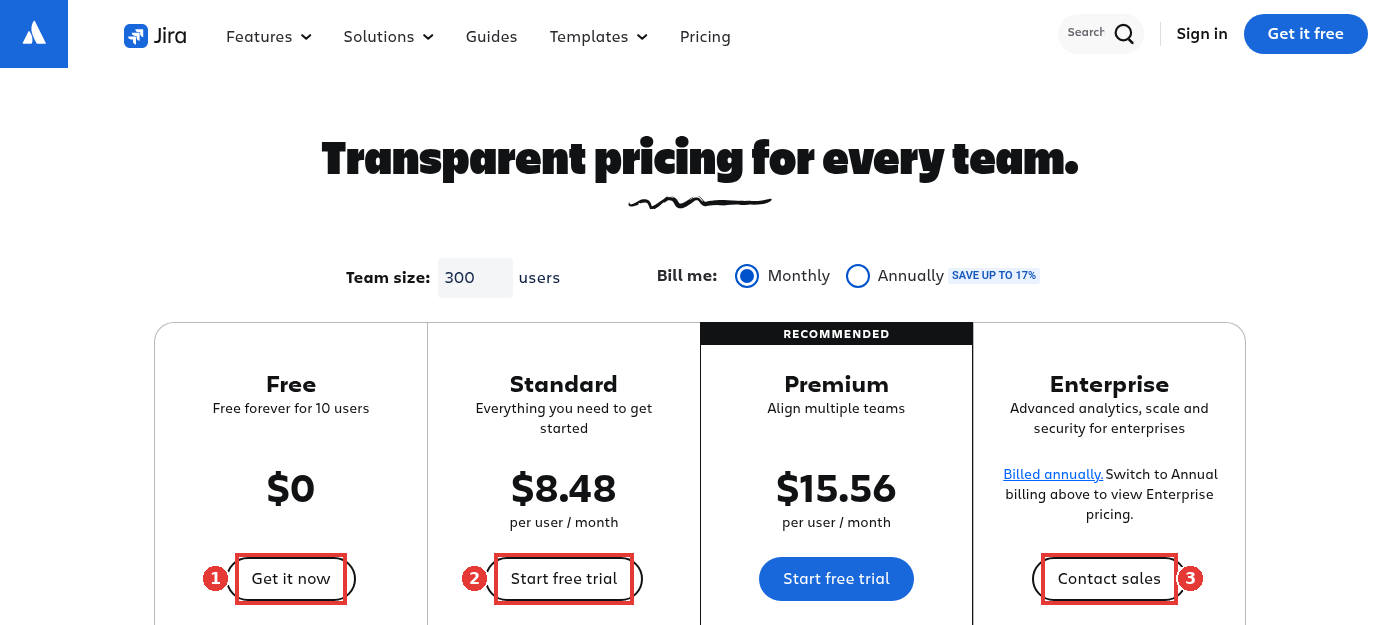
Jira pricing page, trial and contact sales, captured Nov 15, 2026.
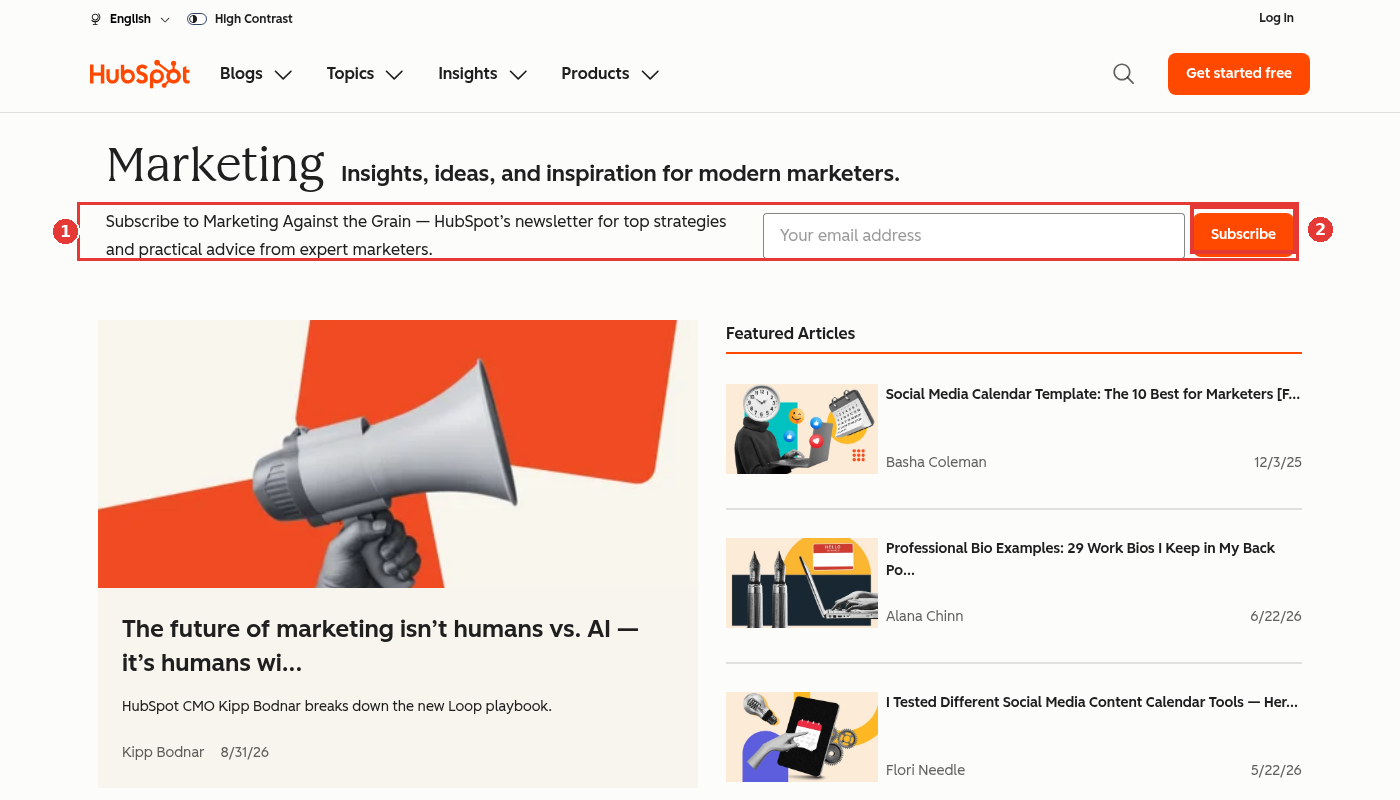
HubSpot marketing blog newsletter signup, captured Nov 15, 2026.
Count a lead only after sales has accepted it. The opening section is where I set that definition, and why a report full of ebook downloads will point you at the wrong pages.
Keep the landing page, the original source, and a self-reported "how did you hear about us" answer that sales can see. That's the CRM section, and the attribution guide it links to. HubSpot's Original Traffic Source property, on a knowledge base page last updated August 4, 2026, records the first web source it can attribute to the contact. The values include Organic search and AI Referrals. Drill-down fields add detail, such as the search term or the AI platform (for example, chatgpt.com). An ad blocker can blank those out, because it can block HubSpot's tracking cookies.
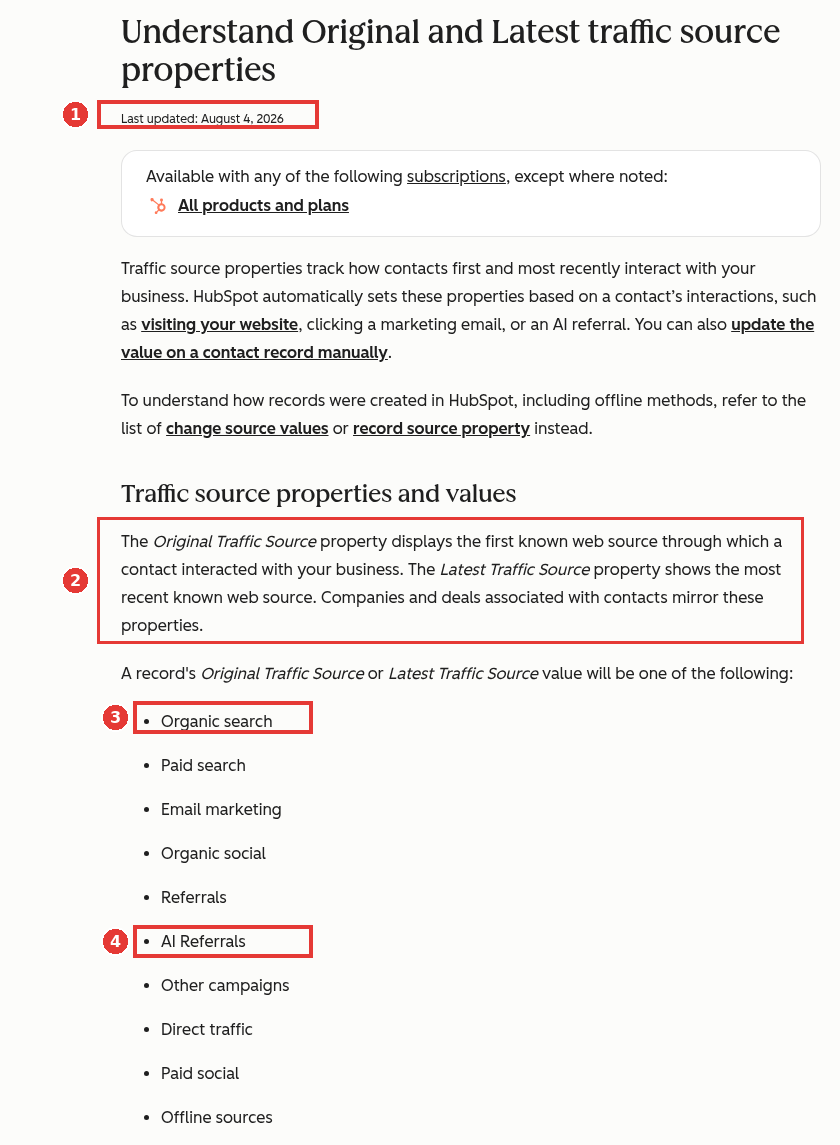
HubSpot Original Traffic Source values, captured Nov 15, 2026.
Treat AI citations as preference work, and read the AI Assistant channel as a floor. The AI section covers why a citation often shows up later as a branded search or a form answer, and why the channel misses visits that arrive without a recognized referrer.
Open the Pages tab in Search Console and look at which URLs already attract clicks. Put a fitting next step on the ones that should produce pipeline, and write down the commercial URLs that are still missing. The view below is miraa.io, used here as a healthy example. The figures stay in the image.
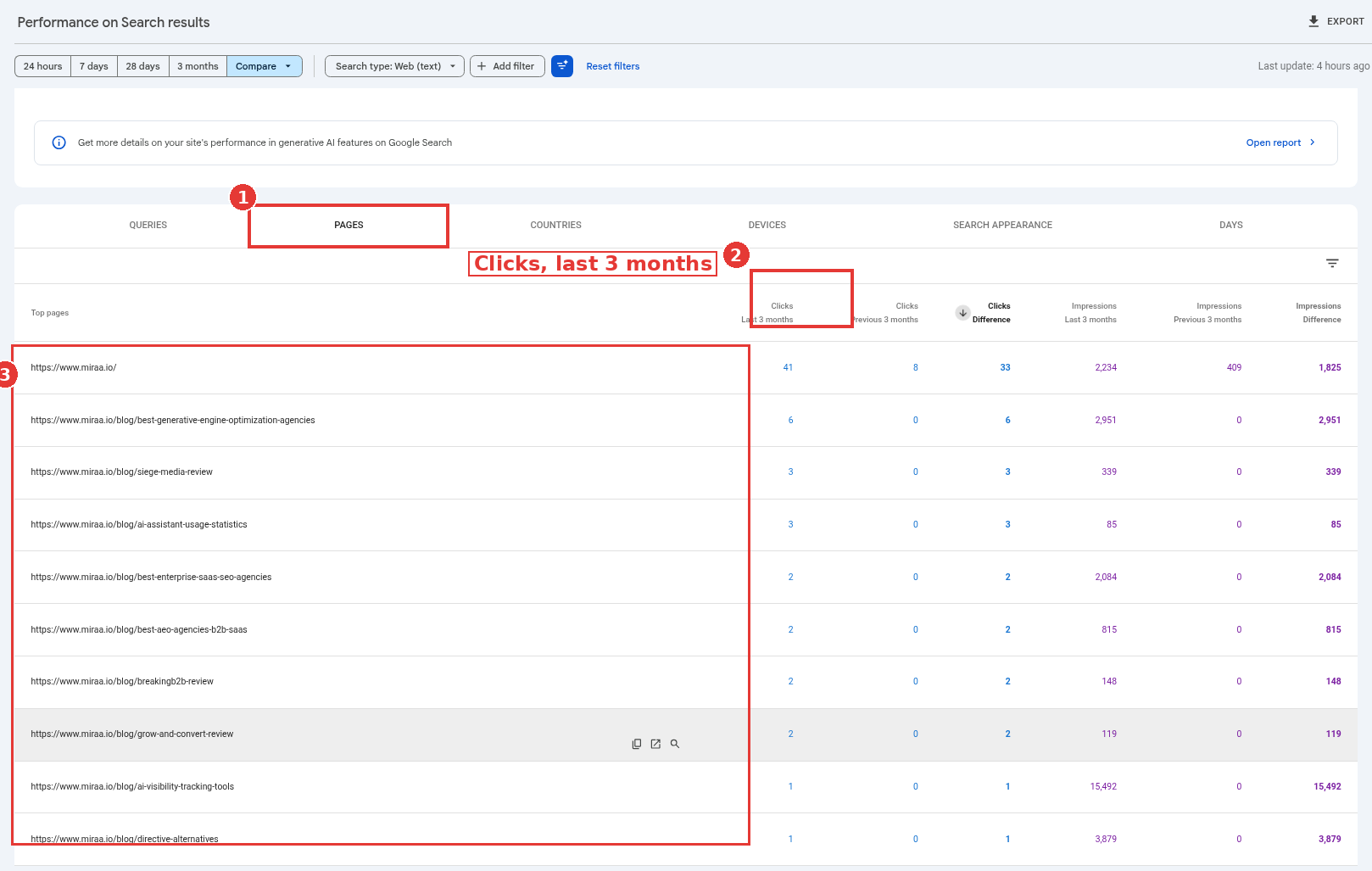
miraa.io Pages tab, healthy example, captured Nov 14, 2026.
Collect only the answers sales uses to accept or route a lead. HubSpot's form editor, last updated November 11, 2026, stores each field in a CRM property, which is what a later workflow or score can read. Its workflow guide, last updated November 12, 2026, can branch on properties such as country, company size and industry, then assign an owner. If sales routes by company size, that value has to be on the record before the workflow runs, and a form field is one way to collect it. I would leave budget and timeline for the call.
Route and prioritize follow-up by fit, and by the intent of the page that produced the request. A demo from a comparison or pricing page should not sit in the same queue as a blog newsletter signup. HubSpot's lead scoring guide, last updated November 3, 2026, includes a worked example named Sprocket that awards 15 points for a click on a demo page or pricing ad and two points for an email open, then uses a workflow to assign an owner once the contact hits a High threshold. I would point a score like that at the same page types in the table above. I would not treat those 15 and 2 figures as a benchmark; they are HubSpot's illustration.
What to watch out for
Counting form fills as leads. A report that mixes downloads with demo requests will keep rewarding the pages that produce the least pipeline.
Crediting the last blog post a buyer read. Last-touch models favor whatever page happened to be open before the form, which is often a post the buyer found through a branded search.
Ignoring branded lift from AI answers. If citation work improves and branded impressions rise with it, the AI Assistant channel alone will understate the effect.
Putting every guide behind a form. It inflates lead counts and slows down exactly the readers who were still forming a favorite.
Comparing the AI Assistant channel across its launch. Google's release note dates it to May 13, 2026, so any period before that has no AI Assistant row to compare against.
Treating one month as a trend. With a cycle measured in quarters, monthly swings in demo requests from one page type are mostly noise.
FAQ
Does SEO work for B2B lead generation?
It works best for sales-led products with a long cycle, because buyers spend months reading before they contact anyone. The leads arrive late and often under branded or direct channels, so it only looks like it works if you track pipeline by the page that first brought the contact in.
Which pages generate the most B2B leads from search?
Comparison and alternatives pages, integration pages, pricing-adjacent pages and use-case pages tend to produce sales conversations directly. Blog posts bring in more visitors and more top-of-funnel signups, and fewer accepted leads.
Can you track leads that come from ChatGPT or other AI assistants?
Partly. GA4's AI Assistant channel catches clicks where the referrer matches a recognized assistant. Visits without a recognized referrer never get that label, so pair the channel with a self-reported field on your forms and with branded search trends.
How long does it take for SEO to produce B2B pipeline?
Longer than most teams plan for. With buying cycles near ten months, a page can shape a buyer's preference a quarter or more before any demo request appears.
Should B2B companies gate their content to get more leads?
Gate the few assets someone would trade an email for, such as a template or a benchmark built from your own data. Leave comparison, pricing and integration pages open, since those readers are already deciding.
Who this approach suits
This page-first approach fits sales-led B2B products with a buying group and a cycle long enough that preference forms before the first call. A self-serve tool with a two-week trial can lean harder on signups and skip some of the page-type reporting, because the gap between first read and conversion is short enough to see in one report.
For the longer cycles, I'd judge SEO on sales-accepted leads by landing page type, read the AI Assistant channel as a minimum, and give comparison and integration pages first claim on the budget. That same page-first build is Miraa's approach as a B2B SaaS SEO agency.