

Last updated: November 1, 2026
Google's SEO Starter Guide, last updated December 10, 2025, gives the subdomain versus subdirectory question a single line: "From a business point of view, do whatever makes sense for your business."
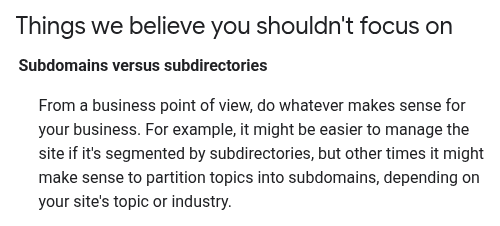
Google's Starter Guide on subdomains versus subdirectories.
The line sits among the things Google believes site owners shouldn't focus on, next to a note that subdirectories can make a site easier to manage, while subdomains can make sense for partitioning topics, "depending on your site's topic or industry." That's guidance for Google Search only. Other search engines and AI assistants get no mention.
So the choice comes down to what your team can run well. Google handles each subdomain as its own host for crawling, robots.txt and site names, which means a docs or help subdomain is a second site that someone has to look after. What a subdomain mostly costs you is upkeep.
Put the blog in a subfolder unless you have a strong reason not to. Docs and help centers can sit on a subdomain, as long as you run that subdomain as a site in its own right, with its own robots.txt, its own Search Console data and its own links back to the main domain.
How Google treats a subdomain
Nothing in Google's documentation ranks a subfolder above a subdomain. Four separate documents do treat a subdomain as its own host.
For crawling, a site is "a unique hostname" (crawl budget guide, last updated July 22, 2026), so www.example.com and code.example.com get separate crawl budgets.
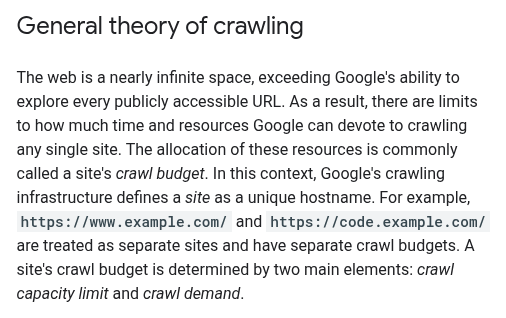
Each hostname gets its own crawl budget.
That guidance is written for sites with a million or more pages, or 10,000 or more that change daily. Below that scale, or when pages get crawled the same day they're published, an up-to-date sitemap and a regular look at the Page Indexing report are enough.
Put a number on it. A docs site with 4,000 pages that rebuilds every night sits well under the 10,000-pages-a-day line, even if every page changed on every build. Crawl budget isn't a reason to pick either structure for that site.
A robots.txt file on a subdomain is valid only for that subdomain (robots.txt specification, last updated October 23, 2026).
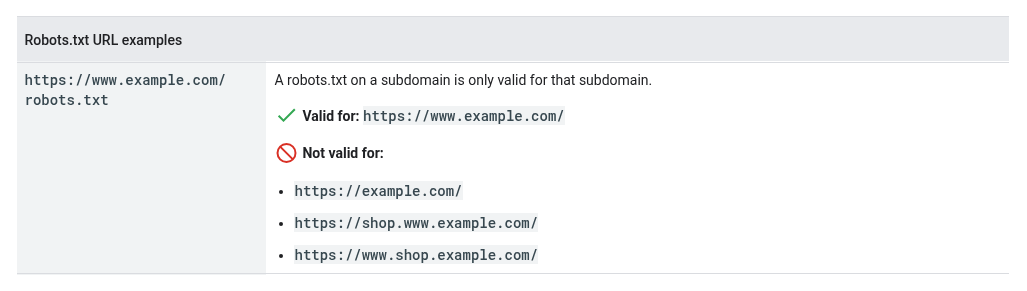
A robots.txt file covers only its own host.
A file at example.com/robots.txt doesn't apply to docs.example.com, and crawlers don't look for robots.txt files in subdirectories.
Site names work for domains and subdomains but not for subdirectories (site name documentation, last updated December 10, 2025).
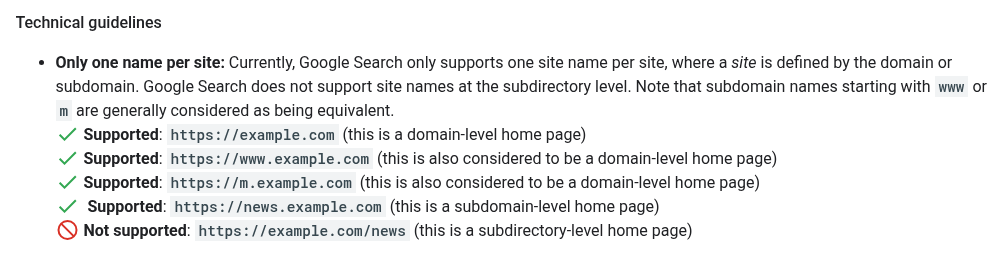
Site names work for subdomains but not subfolders.
A help center at example.com/help shows your main brand's site name. One at help.example.com can have its own.
The Change of Address tool is only for moves from one domain or subdomain to another (guide to site moves with URL changes, last updated August 20, 2026). Moving paths within the same domain doesn't need it.
On ranking signals there's much less. "Using existing or creating new subdomains, subdirectories, or sites" to keep violating Google's policies counts as circumvention (spam policies, last updated August 28, 2026), so neither structure hides a problem. The same policies also presume that individual pages generally match the quality of the rest of the domain. That line sits in the section on third-party content, so it tells you more about how Google sees whole domains than about subdomains.
When a team moves its blog from a subdomain to a subfolder and traffic rises, the move usually came with a redesign, new internal links and content cleanup, so it's hard to know which change did the work. The safer reading is narrower: a subfolder makes the blog easier to link into the rest of the site and harder to neglect.
Subfolder vs subdomain, side by side
Factor | Subfolder (example.com/blog) | Subdomain (blog.example.com) |
|---|---|---|
How Google counts it | Same host as the main site | A separate host and, for crawling, a separate site |
robots.txt | Covered by the main site's file | Needs its own file at its own root |
Crawl budget | Shared with the main host | Its own budget; rarely a constraint either way |
Internal links | Same menus and templates, easy to link | Often a different template; links back are easy to lose |
Site name in results | Shows the main site's name | Can carry its own site name |
Analytics | Covered by the main site's tag | Covered only if the subdomain carries the same tag |
Platform freedom | Usually the main CMS, or a reverse proxy | Any vendor or stack, pointed there with a DNS record |
Ownership | Marketing and web team | Often docs, support or engineering |
Moving later | Path changes only; no Change of Address | A move between hosts; redirects plus Change of Address |
The ownership row is the one to watch. A subdomain usually means a different team and a different tool. That's often why it exists, and also why it drifts: it ends up with its own templates and no links into pricing or the product pages that need them.
A subfolder has costs too. If the blog or docs run on a different system, serving them at example.com/blog means a reverse proxy that engineering has to set up and keep working. The main site's robots.txt also covers every subdirectory on the host, so one bad rule there can block the blog along with everything else.
Which setup fits your situation
You're launching or relaunching a blog
This is the case the subfolder default was made for. Blog posts earn most of your informational rankings, links and AI citations, and they should send readers on to product and pricing pages through the same menus as the rest of the site. If the blog runs on a separate CMS, a reverse proxy can still serve it at example.com/blog.
Your blog already lives on a subdomain
Moving isn't automatic. If the subdomain is well linked, shares menus with the main site and has its own Search Console and analytics setup, the gain from moving may not justify the risk of a site move. If it's cut off from the main site, with a different template and few links in either direction, fixing that is the real work, and a move into a subfolder is often the easiest way to force it.
Docs run on a separate platform
docs.example.com is common and usually fine. Docs often sit on a dedicated platform or a static site generator owned by engineering, and a subdomain gives them their own robots.txt, site name and crawl, which can suit docs that change every day. What docs need to rank and get cited, such as structure, versioning and code samples, is covered in the guide to documentation SEO.
Your help center sits on a support vendor
Support tools usually host the help center at help.example.com through a DNS record, or on the vendor's own domain. Prefer the subdomain on your domain, so the content and the links it earns stay with your brand. Before you commit, check whether the platform lets you edit robots.txt, set canonical tags and add structured data. Not every platform allows all three.
You also run an app, a status page or a community
app.example.com and status.example.com usually shouldn't be indexed at all, apart from the login page. Community forums are user-generated content on your domain, so keep them moderated. Spammy posts in forum threads count as user-generated spam under the same spam policies.
Any new host, whatever it's for
Before it launches, give it a robots.txt, a sitemap, Search Console coverage, the analytics tag, canonical tags, structured data, a link back to the main site and a named owner. With those in place, a subdomain is a reasonable choice. Without them, it tends to get forgotten.
AI crawlers and robots.txt work per host
Most crawler controls are set host by host.
Each subdomain needs its own robots.txt. Rules on the main domain don't carry over, so an AI crawler you blocked on example.com may be free to crawl docs.example.com, and the reverse.
CDN and firewall bot rules are often configured per hostname too. Check that your docs and help center have the setting you meant, not the vendor's default.
llms.txt also lives per host. A checker that reads only the root will report that you have none if yours sits on the docs subdomain. If you publish one, decide whether it belongs at the root, on the docs subdomain or both, and link between them.
Give each host a sitemap. List it in that host's robots.txt, or cross-submit it in Search Console for sites you've verified.
For crawler names and which ones to allow, see the guide to AI crawlers and robots.txt. For the file format and what it can and can't do, see what llms.txt is.
Moving from one to the other
If you've decided to move a blog from a subdomain into a subfolder, or the other way, plan it as a site move.
Map every old URL to its new URL, one to one.
Use permanent (301) redirects, and keep them as long as possible, generally at least a year.
Update internal links, canonical tags, hreflang and sitemaps to the new URLs before launch.
For a move between hosts, submit a Change of Address in Search Console. For a path change within the same domain, you don't need one.
Carry over robots.txt rules, structured data and analytics settings, so the new location isn't more open or more closed than the old one.
Watch indexing and traffic for both old and new URLs for several weeks.
The full checklist, including how to keep AI citations through a move, is in the guide to SaaS website migration SEO. Moves that touch several hosts or a large docs site are a technical SEO project in their own right, mostly redirect mapping and monitoring.
FAQ
Is a subfolder better than a subdomain for SEO?
For a SaaS blog, usually yes, mainly because a subfolder is easier to link into the rest of the site and to manage as one property. Subdomains don't rank worse under any published Google rule. They're separate hosts for crawling, robots.txt and site names. For where site structure fits in a wider SaaS plan, see the B2B SaaS SEO guide.
Does a subdomain inherit the main domain's authority?
Google hasn't published a rule either way. Links between the main site and the subdomain are the connection you control, so add lots of them, with anchor text that names the page.
Does each subdomain need its own robots.txt?
Yes. A robots.txt file applies only to its own host, so docs.example.com and help.example.com each need one.
Should docs move into a subfolder?
Only if the platform supports it and the docs team agrees. Moving docs is a site move with real risk. A well-run docs subdomain, with its own robots.txt, a sitemap and strong links to the main site, is a sound setup.
Where should a help center live?
On your own domain, as help.example.com or as a subfolder. Leaving it on the support vendor's domain means its links and visibility build someone else's site.