
Last updated: November 25, 2026
One popular CRM lists nine AI platforms whose visits it files as AI referrals, on a help page last updated August 1, 2026. Google Analytics names three, ChatGPT, Gemini and Claude, in the May 13, 2026 release note for its new AI Assistant channel. The note gives those three as examples and no full list.
So one click from an AI answer can sit in one bucket in your analytics and another in your CRM. Sorting that out comes first when you track ChatGPT traffic and leads in GA4 and want to follow them to revenue.
Why AI pipeline is hard to see, and the four layers a setup needs, are in the guide to B2B SEO attribution. Getting cited in the first place is covered in measuring AI search visibility.
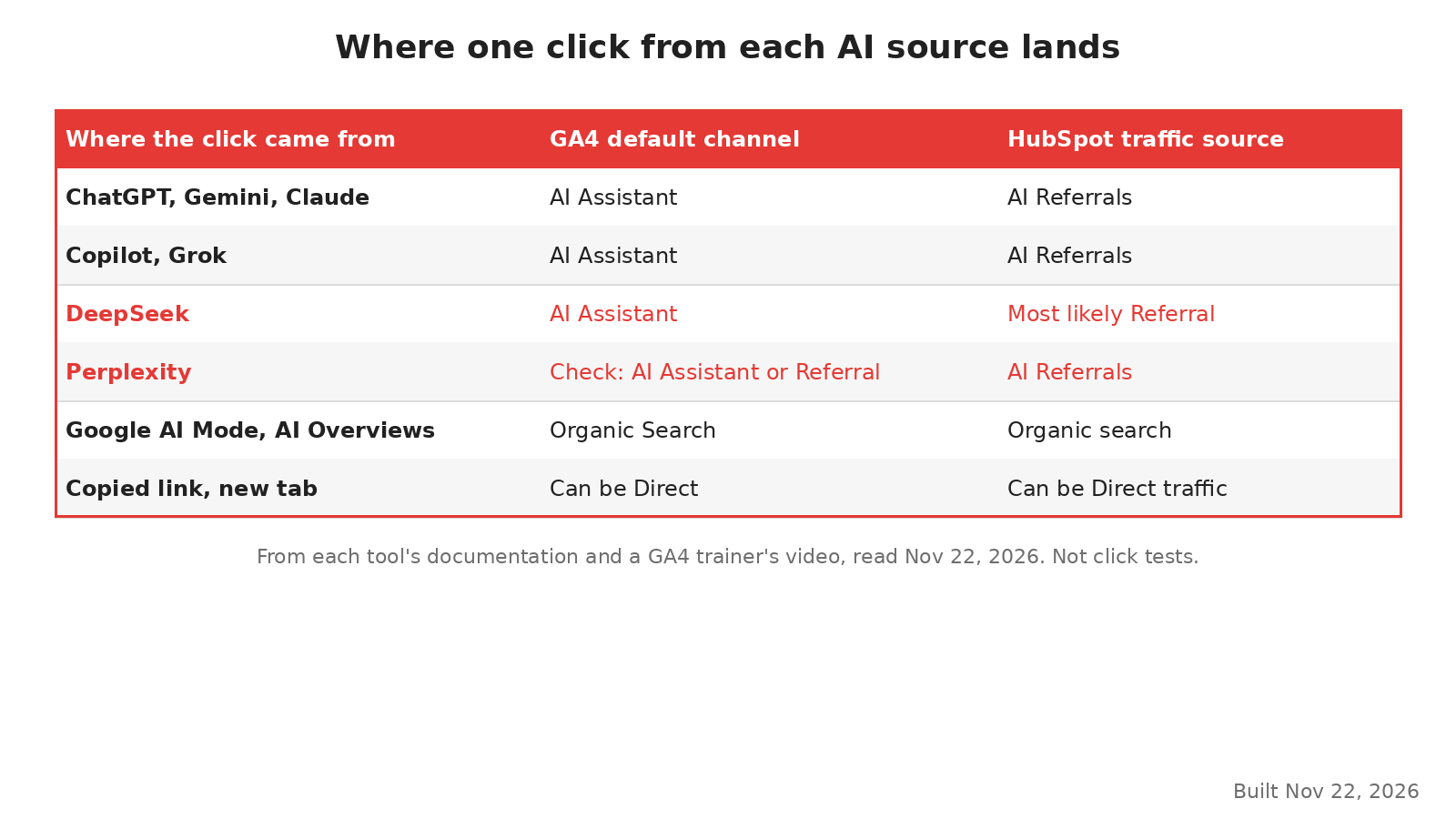
Based on each tool's docs, not click tests. Built Nov 22, 2026.
Where each AI source lands today
ChatGPT, Gemini and Claude
These three are the easy ones. Google's May 13, 2026 release note for the AI Assistant channel sets the medium to "ai-assistant" when a visit's referrer matches a recognized AI assistant. The campaign becomes "(ai-assistant)" and the session goes into the AI Assistant channel.
The CRM files the same visits as AI Referrals. Click into that source and it splits the sessions by platform, so chatgpt.com and claude.ai show up as separate rows.
Copilot, Grok and DeepSeek
The release note names only three. A GA4 trainer says Google's own description lists these as examples too, in a video posted on November 18, 2026 (00:35 to 00:40). Copilot and Grok are also on the CRM's list of nine. DeepSeek is not, so in that CRM it would most likely fall to Referral.
Perplexity
This is where the two tools can disagree. The CRM names Perplexity. Google's examples don't. The same trainer points out that Google doesn't print its full list. So a tool that isn't on it can show up as Referral (02:01 to 02:11).
Check your own property before you assume either way. Open Traffic acquisition, switch the dimension to session source / medium and look for perplexity. The medium next to it tells you which bucket Google used.
Google AI Mode and AI Overviews
Neither one lands in an AI channel. Those visits come from Google Search, so Google keeps them out of AI Assistant, as the trainer notes (00:40 to 00:47). The CRM also keeps regular Google search as Organic search.
Google's page on identifying Search traffic, last updated November 12, 2026, shows why you can't split them out yourself. Google Search sends only the scheme and host of the page, such as https://www.google.com/, with no path. Most analytics tools file that value as organic search from Google. The page lists no separate value for AI Mode.
To count those clicks, use the Search Console generative AI report. In Google's October 26, 2026 news video, the host notes that this reporting has rolled out to all sites (01:25 to 01:33).
Visits with no referrer at all
Someone reads an answer, copies your URL and opens it in a new tab. That visit arrives with no referrer. In GA4 it can land in Direct, the trainer explains (01:45 to 01:58). In the CRM's rules, a visit with no referring site and no tracking URL is Direct traffic.
Google's referrer page lists similar gaps for its own search: private browsing, new tabs in some browsers and privacy extensions can all blank the referrer. Analytics cannot recover these visits. The self-reported field on your forms is one place they can still turn up.
The CRM's help page, dated August 1, 2026, lists the nine platforms. It also keeps regular Google and Bing search under Organic search.
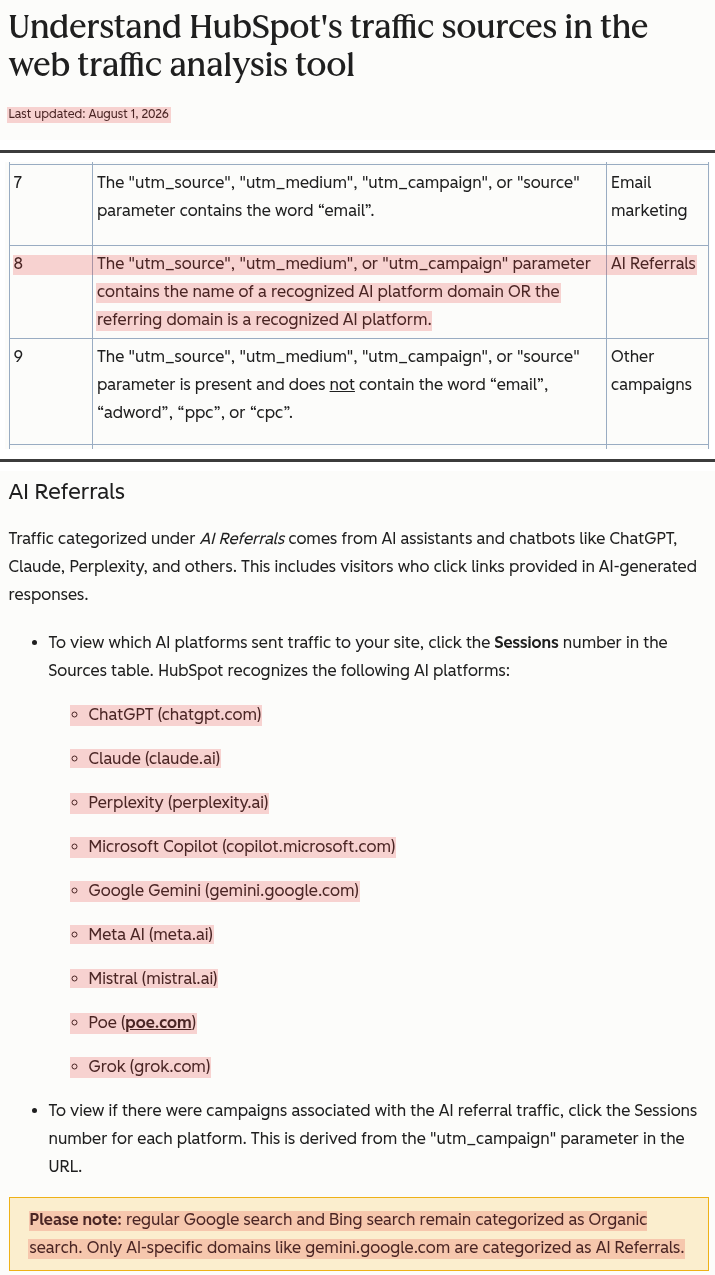
Three parts of the same page, captured Nov 22, 2026.
See more of it in GA4
The AI Assistant channel only catches what Google's list catches. To widen it, build your own channel group.
Go to Admin, open Channel groups and create a new group.
Add a channel for AI traffic. Set the condition to source, matches regex, and paste a pattern with the domains you care about.
Drag the new channel above Referral. Channels are checked in order, so Referral would claim the visit first.
Save it and pick the new group from the dimension menu in Traffic acquisition.
The trainer walks through these steps in the same video (02:56 to 03:39). He adds that a standard property gets two custom channel groups, so don't spend one on a test. He also notes that custom groups apply to past data, so you can read the last few months straight away.
Here is a pattern built from the nine web addresses on the CRM's list.
`` chatgpt\.com|claude\.ai|perplexity\.ai|copilot\.microsoft\.com|gemini\.google\.com|meta\.ai|mistral\.ai|poe\.com|grok\.com ``
A channel group also beats a report filter on length. Another GA4 trainer, in a February 10, 2026 tutorial, points out that regex filters in reports stop at 250 characters (05:03 to 05:12). A channel group holds a longer list. Once the group exists, you can filter any report by it.
Review the list every quarter. New assistants appear, and some change domains.
Keep three source fields on every lead
GA4 shows visits and key events. Revenue lives in the CRM, so that is where AI leads have to be counted. The attribution guide covers passing first touch into the CRM with hidden fields. Here is what I would keep on each lead once that is in place.
The CRM's own first source, with the platform drill-down (for example AI Referrals, chatgpt.com).
The GA4 channel of the visit that brought the lead, passed in a hidden field. If you built the custom channel group, pass that channel.
The answer to your "how did you hear about us" field, with AI tools as options and a free-text box.
Keep them as three separate fields. Don't merge them into one "lead source" that someone edits by hand. When they disagree, the disagreement is the useful part.
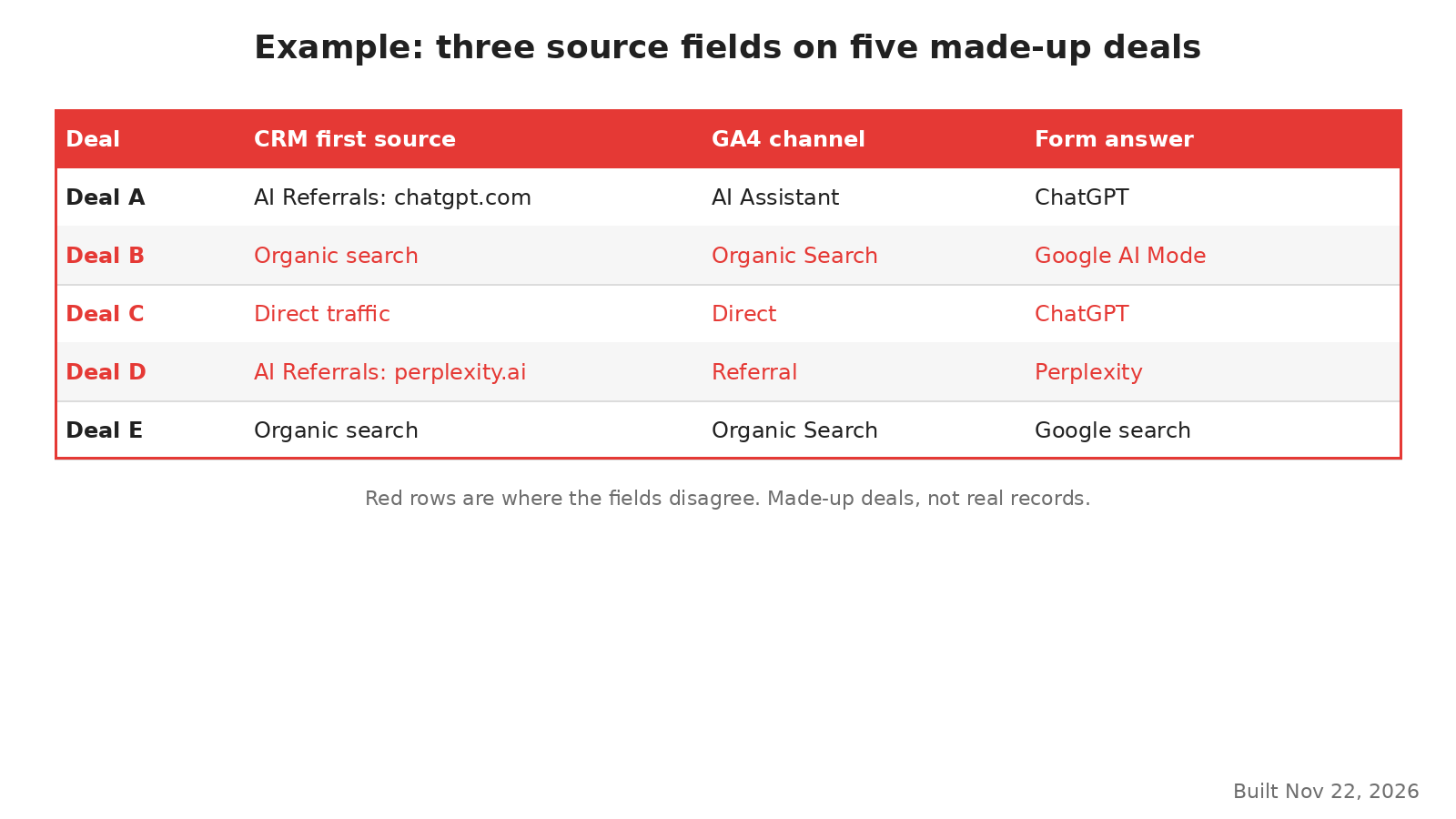
Made-up deals, not real records. Built Nov 22, 2026.
A deal can show Organic search in both tools while the buyer typed "AI Mode" into the form. Another shows Direct everywhere, and the buyer wrote "ChatGPT". A Perplexity lead can be AI Referrals in the CRM and Referral in GA4. Reading the three fields side by side is the only way to see those patterns.
Build the revenue report
The report I would show a leadership team has three short tables. All of them start from closed-won deals in the last two quarters, plus open pipeline in a separate column.
First table: revenue by the CRM's first source, with AI Referrals split by platform.
Second table: revenue by the self-reported answer, grouped into Google search, AI assistant, peer or community, and other.
Third table: deals where the first source says Organic search or Direct but the buyer named an AI tool. This is where AI Mode and copied links show up.
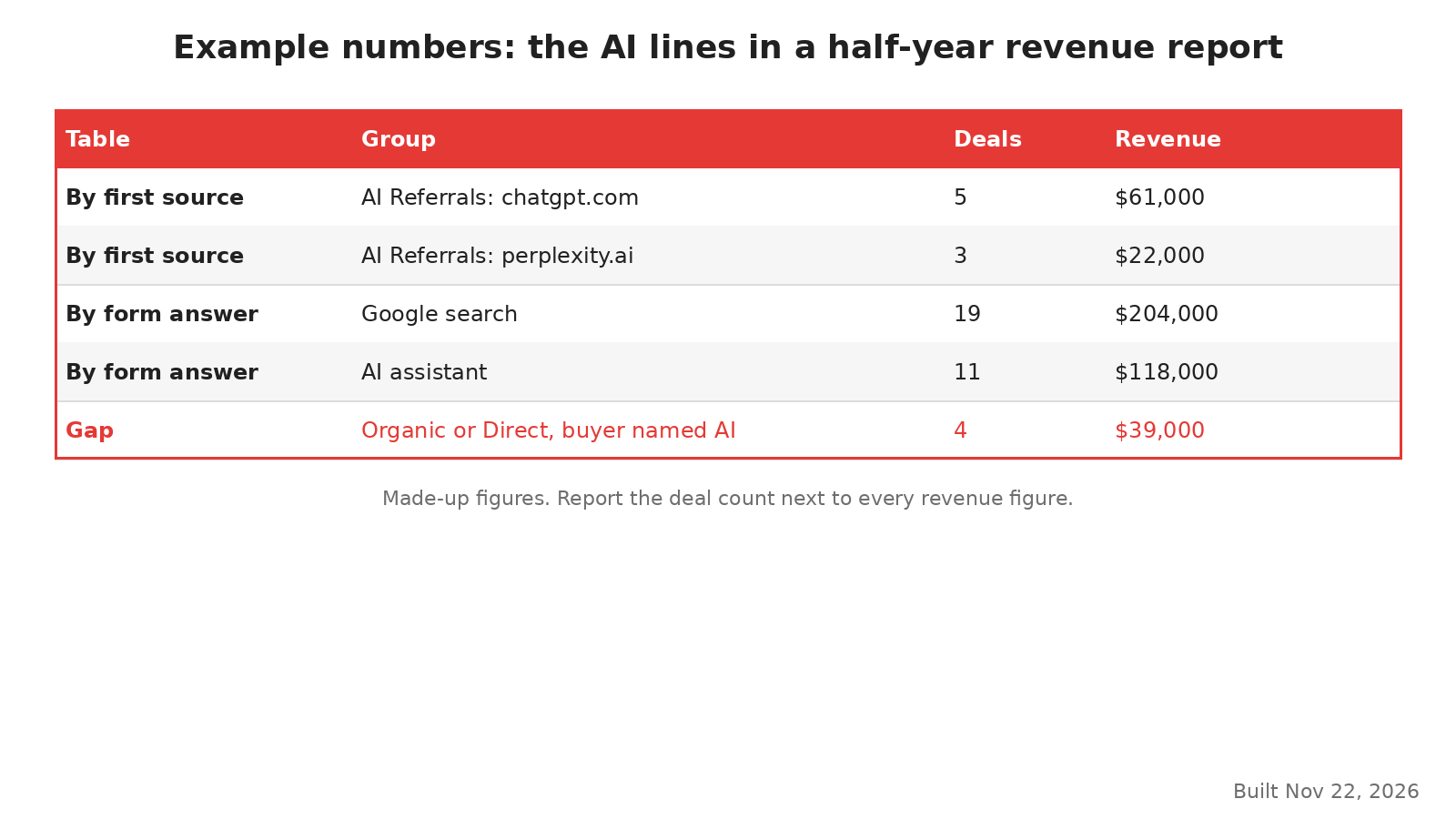
Example numbers, not a real company. Built Nov 22, 2026.
Read the counts as well as the money. With eight AI-sourced deals in a half year, one large contract can double the total. I would report the deal count next to every revenue figure.
Keep the SaaS SEO KPI report as the main view. These three tables sit under it as the AI line. The next job is getting AI answers to send more buyers. For that, our answer engine optimization team works on the pages and mentions that AI tools cite.
Click your own links from each assistant this week
The fastest way to learn your own setup is a test click from each tool. It should take about an hour.
In ChatGPT, Perplexity, Claude, Gemini and Copilot, ask a question your site answers until the reply links to one of your pages.
Open the link in the same tab and check the GA4 Realtime report for the source and medium.
Fill in a test form with a test email address on that visit, then open the contact in the CRM and note its first source.
Write each result into a sheet with the date: tool, GA4 channel, CRM source.
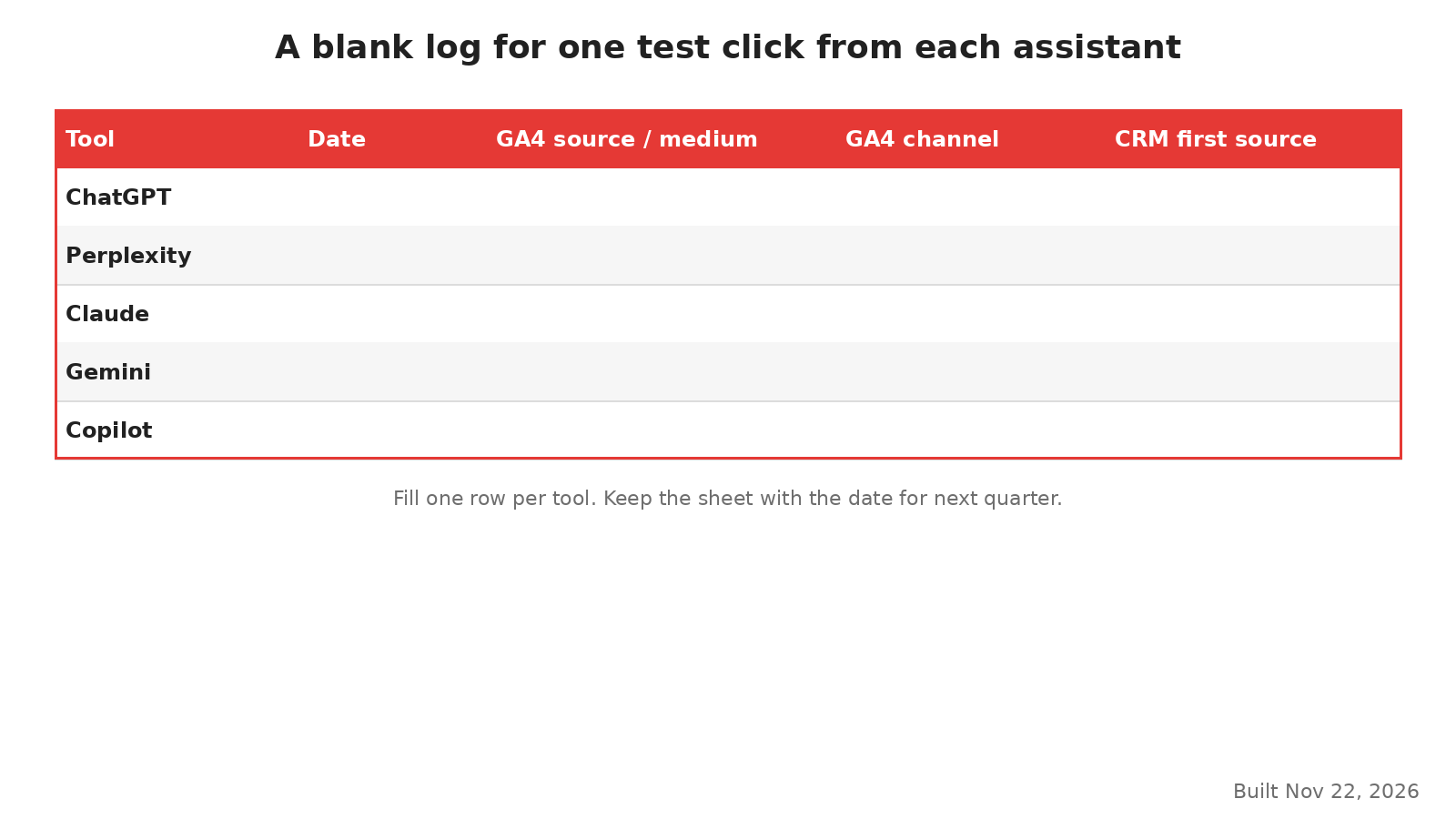
A blank log for the test clicks. Built Nov 22, 2026.
The sheet tells you which rows of the first table hold for your property and which don't. It is also the note you will want when someone asks next quarter why the AI number changed.