
Last updated: November 19, 2026
Video and community sites took a median 21.3% of the citations in one search engine's two AI answer features. On four other AI answer tools, their median share was 2.1%. Those figures come from a preprint posted on November 14, 2026 by a doctoral researcher. He used one SEO tool vendor's index of AI answers about large US companies, read in October 2026.
The search engine in that study is Google, and the features are AI Overviews and AI Mode. So if you want to know how to get cited in Google AI Overviews, start with a wider view. Your own page matters most. Still, the summary also draws on what others publish about you, in places your blog does not reach.
A citation here means a link to your page inside the AI Overview, shown as a source card or an inline link. This guide covers AI Overviews only. For the separate chat-style mode, read the AI Mode citation guide.
What a citation is worth
Be clear about the benefit before you plan the work. A Pew Research Center paper posted on August 5, 2026 looked at clicks on cited sources. Those clicks happened in about 1% of visits to results pages with an AI Overview. The browsing data behind it is older, from March 2025, so treat it as a direction.
The AI features documentation makes a different point. It reports that clicks from results pages with AI Overviews are higher quality, meaning people spend more time on the site. Both can be true. A citation brings few clicks, but the people who do click tend to stay.
I would treat a citation as brand exposure first and a traffic source second. For the traffic side, the AI Overviews keyword audit shows which queries still send clicks.
A ranking also does not guarantee a citation. A Northwestern University study posted on October 29, 2026 ran 3,611 health questions in September 2026. The AI Overview cited only 44.4% of the top five regular results. Health is a special topic, but the gap is a useful warning for any field.
Make the page eligible
1. Clear the three eligibility checks
The official guide to generative AI features in Search lists the basic conditions. The page must be indexed. It must also be eligible to show with a snippet, which is the short text under a result. The site must also be included in Search generative AI features through a setting in Search Console.
That third check is new. In a June 2026 Search Central news video, Google introduced the control that lets a site choose whether it appears in these features. Check the setting before you change any content.
Google's AI features page and its AI optimization guide both ask for crawlable content. Allow crawling in robots.txt and in your CDN or hosting infrastructure. Keep important content in text, since a phrase inside an image is hard to quote.

Google's crawling advice for AI features, captured Nov 17, 2026.
2. Remove snippet limits from the pages you want cited
Some sites set snippet rules years ago and forgot them. Google's robots meta tag documentation is direct about the effect:
nosnippetstops the content from being a direct input for AI Overviews and AI Mode.max-snippetlimits how much of the content can be used as a direct input.data-nosnippeton an HTML element hides only that part.
Search your templates for these rules. Keep data-nosnippet for parts you truly want hidden, such as a pricing note that changes weekly. Remove the page-wide rules from guides and product pages you want quoted.
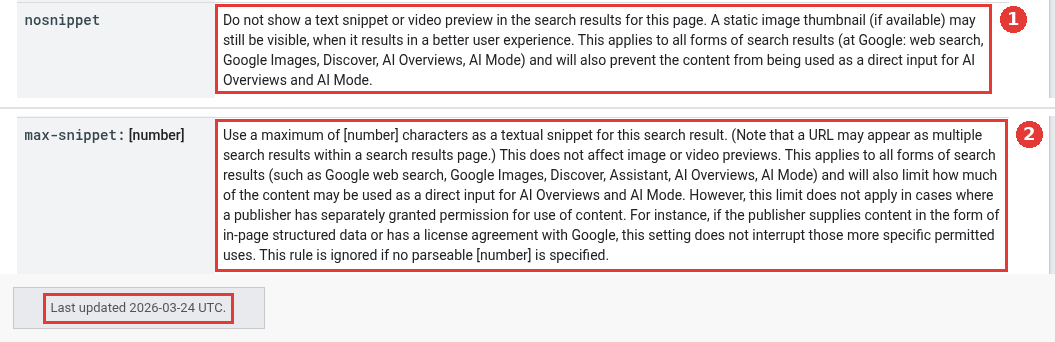
Snippet rules that affect AI Overviews, captured Nov 17, 2026.
Make the page worth quoting
3. Answer the follow-up questions on the same page
AI Overviews can use query fan-out. Google describes this as a set of related searches the model runs at the same time to gather more results. A buyer who searches "SOC 2 audit cost" may also trigger searches about timelines, auditors and readiness tools.
Cover the likely follow-ups in sections on one strong page. Do not build a separate page for every variation. The AI optimization guide warns that doing this mainly to change rankings or AI answers breaks its scaled content abuse policy.
4. Add something only your team can say
The guide calls the wanted type "non-commodity content". It means content with an expert or first-hand take that goes past common knowledge. Commodity content restates what every other page already covers.
For a SaaS company, that might be setup times from your own support tickets, a real price table, or a failure case your engineers explained. Generic "tips" posts give the summary nothing new to cite. I would pick one page with real numbers over five lists anyone could write.
5. Put the answer where the summary reads first
A Google search lead spoke about this in a Search Off the Record episode from May 1, 2026. He described AI Overviews as normal search plus a few fan-out queries. He said the feature then combines text from the sources, including their snippets and titles.
That makes the title and the opening lines of each section part of the pitch. State the answer in the first one or two sentences under a heading. Use a title that names the question. Put the detail and the proof below it.
6. Support the text with real images and video
According to the AI optimization guide, these features can show relevant images and video. If you already follow its image and video SEO guidance, you are already covering this.
Use screenshots of your actual product, diagrams with readable labels and short demo videos. Add useful alt text, the written description of an image. Stock photos add little.
Take a hypothetical payroll SaaS help page
Take a hypothetical payroll SaaS with a help page on "how to run an off-cycle payroll". The page ranks in the top five but never shows as a source. The team runs the checks in this guide in order.
The page has a max-snippet:50 rule left over from an old template, which caps the quotable text at 50 characters. The first answer sits under a long intro about the company. The steps live in a video with no text version.
The team removes the snippet cap and moves a two-line answer to the top. It adds a five-step text list under the video and a screenshot of the approval screen. It also adds a short section on tax timing, a likely fan-out question.
None of this guarantees a citation. Google's guide notes that indexing and serving are not guaranteed, even when a page meets every rule. But each fix removes a reason the page could not be used.
Show up on other sites too
7. Earn real mentions where people discuss your field
The preprint in the intro found that Google's AI features cite video and community sites far more than other AI tools do. In the June 2026 news video, Google also said its AI features now show more links to first-hand advice from online discussions.
So a clear product walkthrough on a video platform can help. So can a real answer from your engineer in a community thread. Be honest about who is posting. The guide warns that chasing inauthentic mentions is less helpful than it seems, because its ranking and spam systems also feed these features.
8. Track the Generative AI performance report and adjust
Search Console added a Generative AI performance report, announced on June 3, 2026 and rolled out to all websites by August 31, 2026. It shows impressions, pages, countries, devices and dates for AI Overviews and AI Mode. In the June news video, an impression in this report means a page from your site was linked in one of these features.
Check which pages appear, then compare them with the pages you worked on. A page that gains impressions after a fix is a sign the change helped. Clicks from these features still sit inside the main Performance report, under the Web search type. The Generative AI report guide covers the setup.
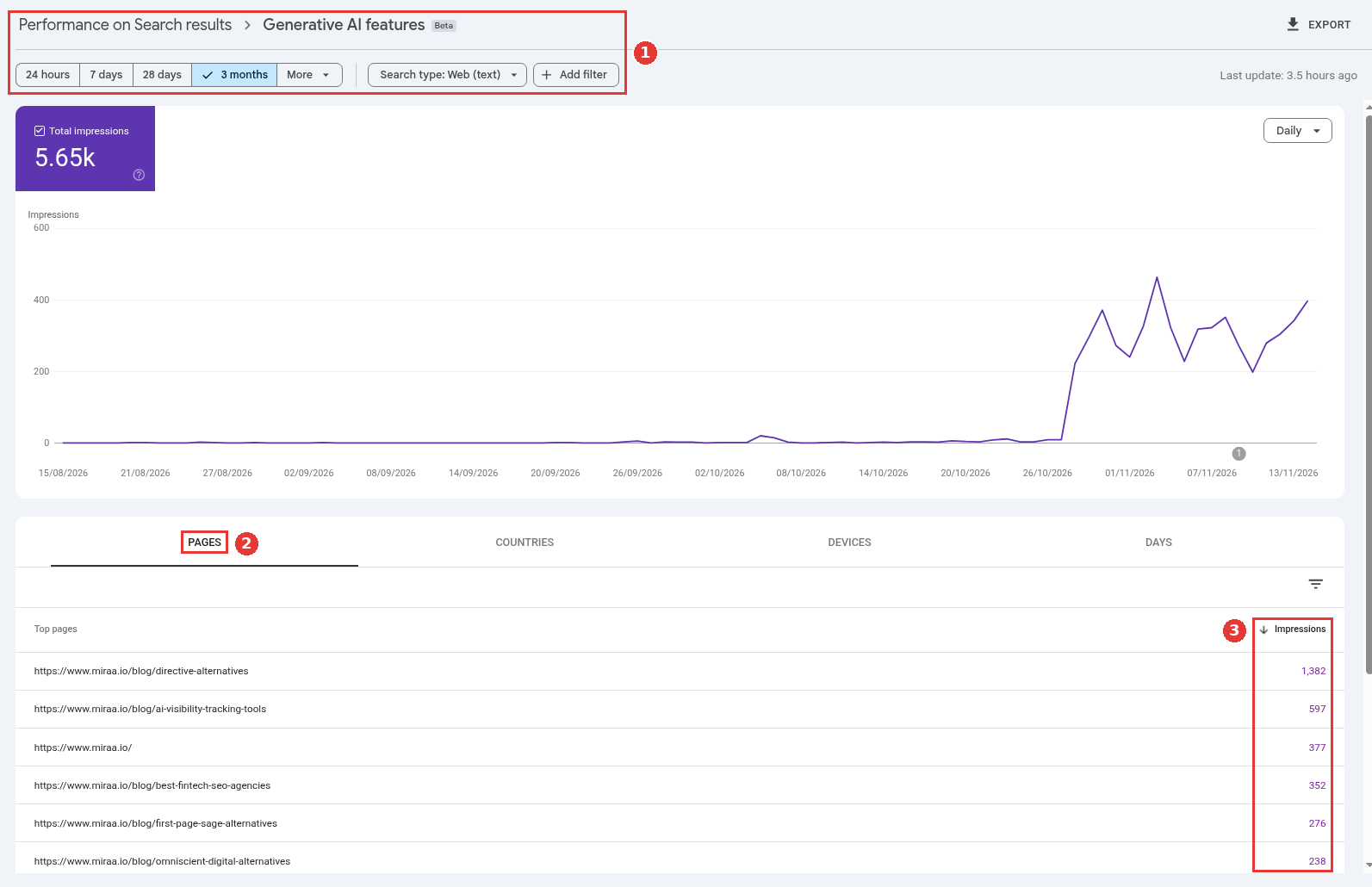
Generative AI report pages view, healthy property, captured Nov 17, 2026.
If AI answers are now a large part of how buyers find you, this kind of tracking becomes ongoing work. That is a fair point to bring in an answer engine optimization agency next to your content team.
Things Google tells you to skip
The guide also lists several popular tactics that Search does not use. You do not need an llms.txt file, a special markup or a Markdown copy of your site. You do not need to split pages into tiny chunks. There is also no special schema for AI features, although structured data still helps with rich results.
A Search Off the Record episode from June 2026 went deeper on Markdown copies. The hosts argued that a second version made only for AI systems brings back the problems of running two versions of a page.
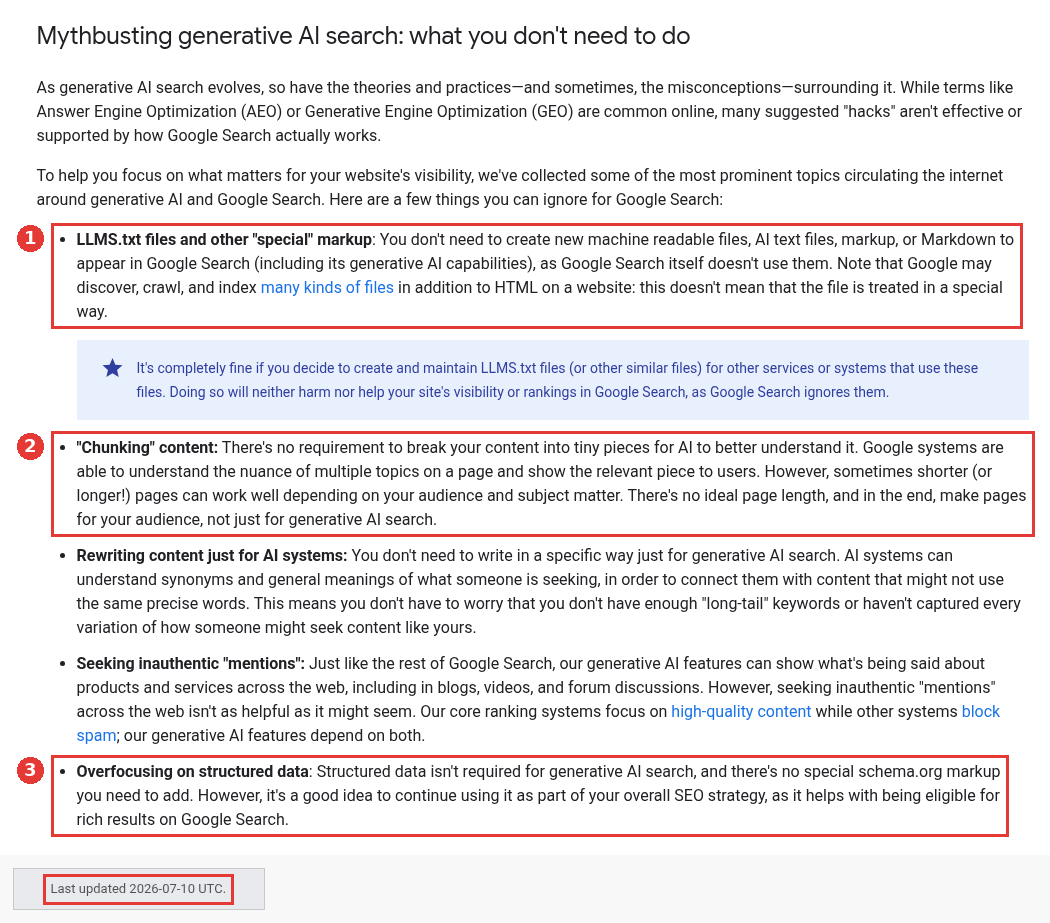
What Google lists as safe to ignore, captured Nov 17, 2026.
FAQ
Can I pay or apply to be cited in AI Overviews?
No. There is no application or paid route. A page must meet the normal Search rules and the Search Console setting, and Google then picks sources.
Do I need to rank first to be cited?
No. In the Northwestern health study above, the AI Overview cited fewer than half of the top five results. A strong ranking helps. A citation is still a separate outcome.
Will blocking AI training stop my AI Overview citations?
Google-Extended controls training and grounding in some of Google's other AI systems. For AI features in Search, the controls are Googlebot access, snippet rules and the Search Console setting.