
Last updated: November 18, 2026
A three-day logging error, dated November 9 to 11, 2026, cut reported impressions on the Generative AI performance report in Search, according to the public log of known data issues. The issue affected data logging only. That is the newest reminder that an impressions line can move while clicks do not, and that the first job is to check which report you are reading. The pattern this post unpacks is the other way around: impressions up clicks down, on the main Search results Performance report.
If the whole site is down, start with the organic traffic drop checklist and use it for Compare dates, search type and annotations. I will not repeat that setup here. This guide is only for the split where impressions rise and clicks fall, or impressions hold while clicks drop.
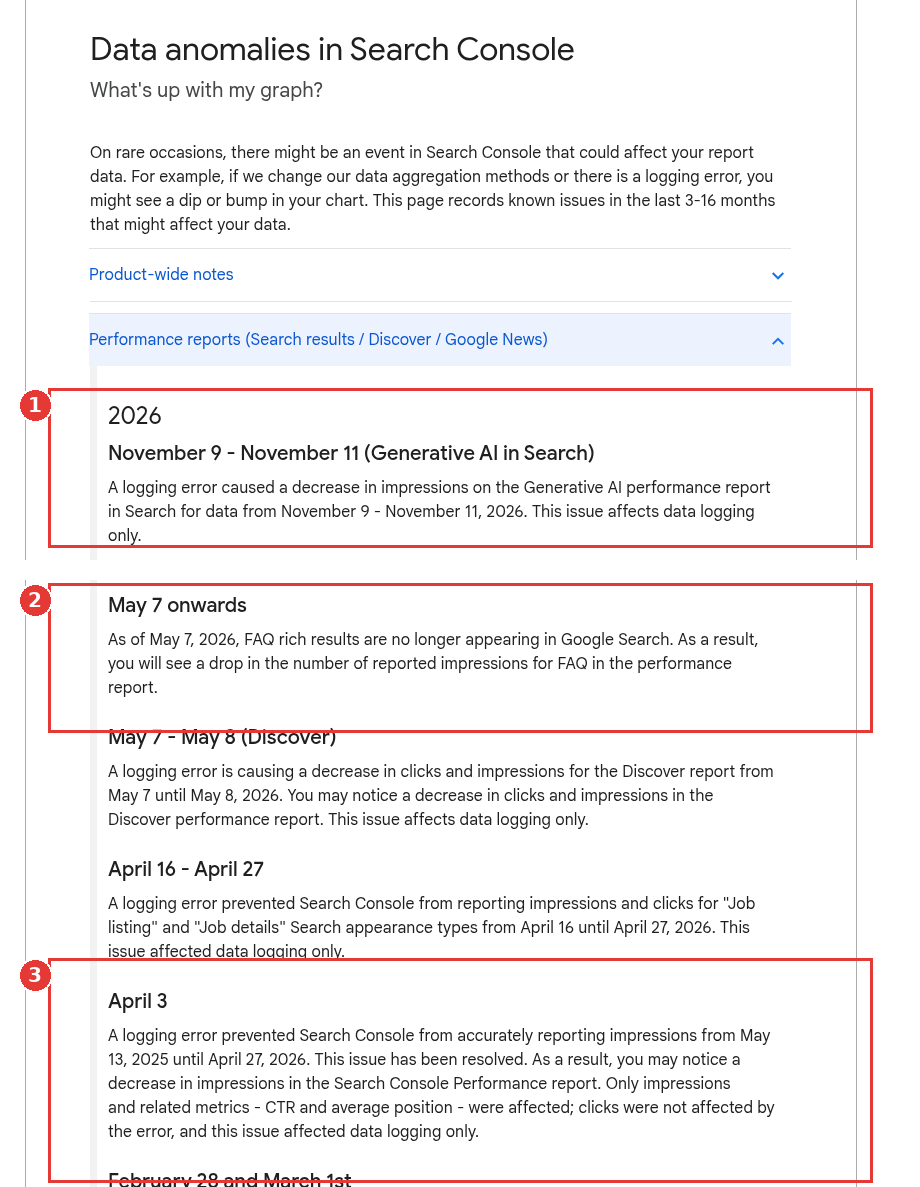
Data anomalies page, three 2026 entries boxed, captured Nov 15, 2026.
Why impressions up clicks down shows up in the Performance report
In a December 2025 Search Central walkthrough on the Performance report, the presenter shows that you click the metric cards to add or remove impressions, clicks, average CTR and average position, and that the table below the chart updates with them. Tick all four, then read the lines together before you open the tables.
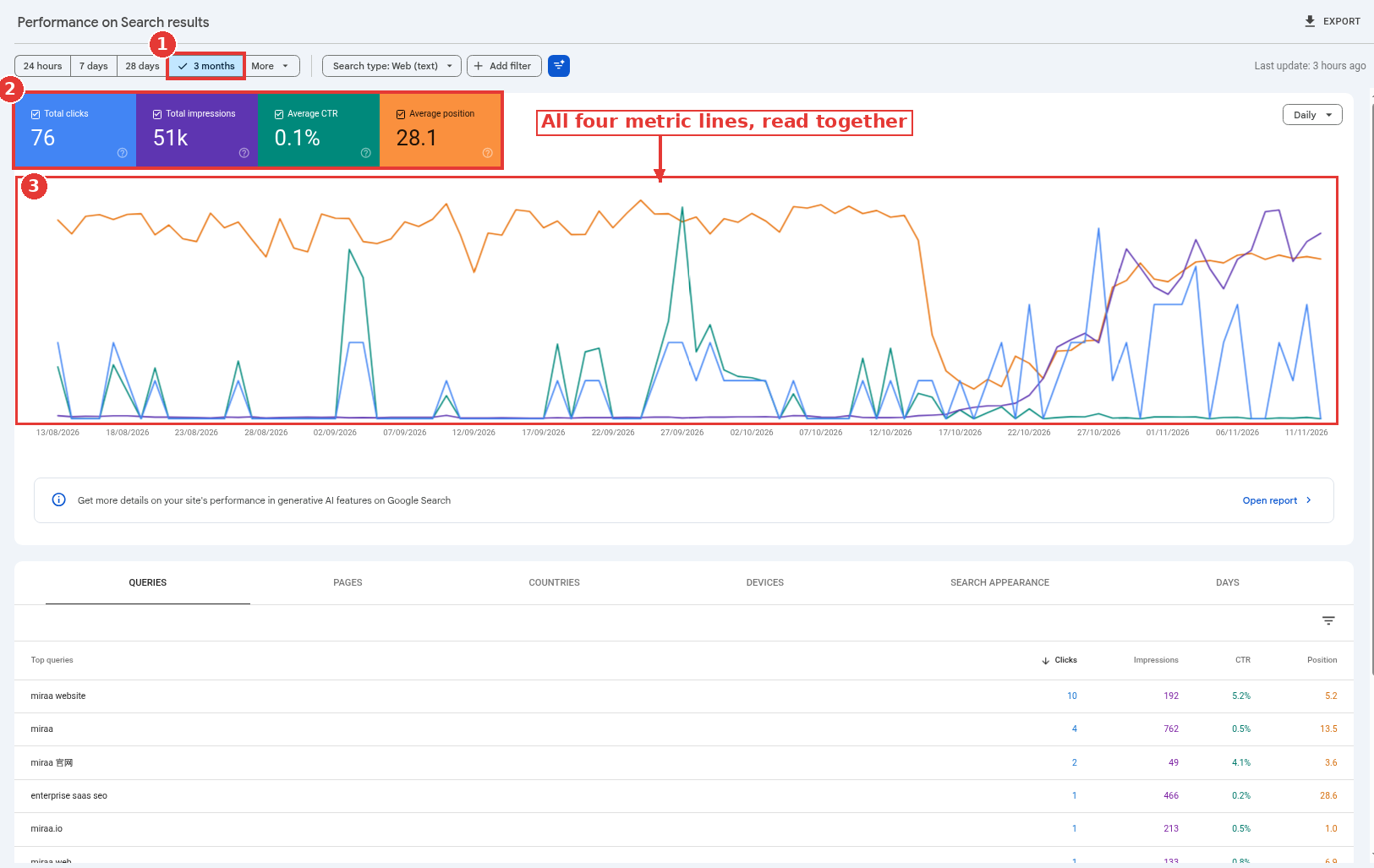
Performance report with all four metrics ticked, captured Nov 15, 2026.
miraa.io appears here as a healthy baseline, not as a hit site.
A useful first split, from the traffic-drop documentation (last updated December 10, 2025): if impressions stay the same and clicks drop, the title or snippet may not be earning the click, or another site may have a more appealing rich result. Impressions that are rising, not flat, need a few more checks on top of that one.
1. You're looking at a reporting glitch, or at the wrong report
Open the data anomalies page before you change a title. Three dated entries matter for this pattern:
April 3, 2026: a logging error made impressions inaccurate from May 13, 2025 until April 27, 2026. Clicks were not affected. After the fix, the log warned that impressions, CTR and average position might fall in the Performance report. During the bug window, inflated impressions next to unchanged clicks could look like this pattern. On a chart that crosses April 27, 2026, a later drop in impressions is often the correction, not a real loss of visibility.
May 7, 2026 onwards: FAQ rich results no longer show in Google Search, and the Performance report's FAQ impression count dropped. That one usually moves impressions down, not up. It is still the first place to look if a FAQ-heavy site changed shape in May.
November 9 to 11, 2026: a logging error cut impressions on the Generative AI performance report in Search, for those three days only, and the log calls it a logging issue. It does not describe a change to the main Search results Performance report. If the dip sits only on the Generative AI performance report, do not read it as a site-wide CTR problem.
None of these entries, on their own, explain a fresh impressions rise in mid-November 2026. They are the rule-outs you run so you do not rewrite pages because of a logging line.
2. AI Overviews and AI Mode are adding impressions to the same report
As of a June 3, 2026 Search Central post, impressions in generative AI features on Search, including AI Overviews and AI Mode, are included in the overall Performance report, in the Web search type, and also have their own report. The reports were rolled out to all websites worldwide as of August 31, 2026. So a new AI Overview appearance can raise the impressions line in the same chart you use for classic blue links.
The AI features documentation (last updated December 10, 2025) is careful about clicks. It notes that sites appearing in these features are counted in overall search traffic, and that clicks from results pages with AI Overviews have been higher quality, meaning people are more likely to spend more time on the site. It does not give a single CTR rate for those features.
The query-level work, and which B2B keywords actually trigger an AI Overview, lives in the AI Overviews keyword audit. I am not repeating that audit here. Use that post to see which queries are in an Overview, then come back to this list for the other six causes.
3. The title or snippet is not earning the click
When impressions hold and clicks fall, the official traffic-drop guide points at titles and snippets first. Title links are often the primary piece of information people use to decide which result to click, according to the title-link documentation (last updated December 10, 2025). Those title links are generated automatically from the title element, the visible heading, other large text and references on the web, and they can differ from the title you wrote.
Common issues in that documentation include outdated years, inaccurate titles, boilerplate repeated across a set of pages, and no clear main heading. If the title link in the results does not match the page, fix the on-page title and the visible H1 so they agree, then request a recrawl and wait days to weeks.
Snippets have their own documentation, last updated April 20, 2026, and they are built from page content and meta descriptions. A vague meta description will not always show. A clear one is still the preference you can set.
The December 2025 walkthrough adds a practical next step for a very low CTR on a query or a page: consider adding images or structured data to make the result more useful to the person scanning the page (08:39 to 08:53). That is a workflow note from the walkthrough, not presented as our testing.
4. Another result has a more appealing rich result, or a search appearance type changed
The same traffic-drop paragraph names a second possibility: other sites may have a more appealing rich result. The place to see your own search appearance types is the Search appearance tab on the Performance report.
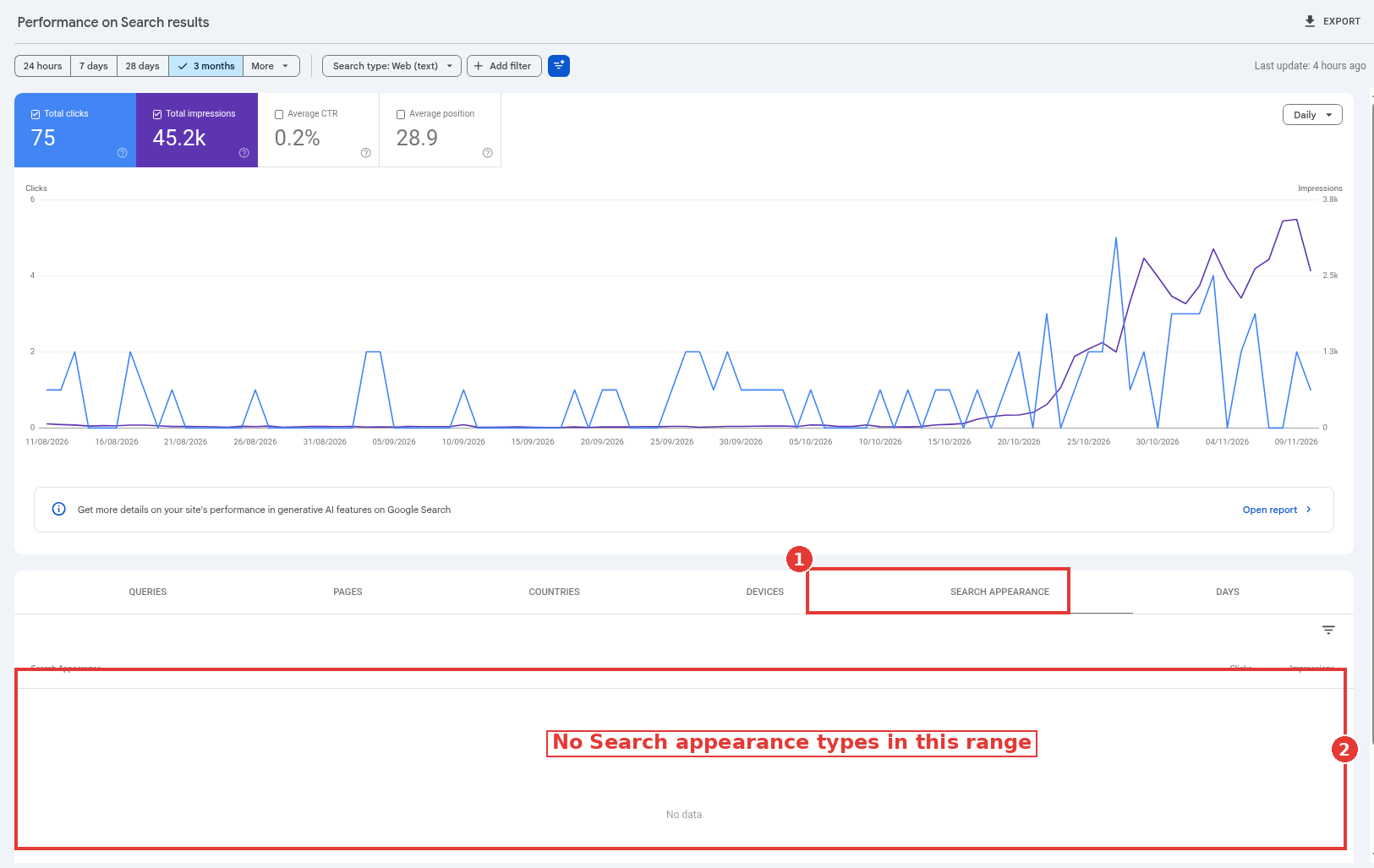
Search appearance tab and empty table boxed, captured Nov 14, 2026.
The property in the screenshot is a healthy baseline, and the table happens to show no Search appearance types in that range. That empty state is the reading for this property, not a loss. On a site that had FAQ rich results, the May 7, 2026 entry is the dated reason those impressions would have fallen. For every other type, compare the Search appearance tab across the same two date ranges you use for the main chart, and look at which types gained or lost.
5. Average position slipped, and the result is still being shown
A page can keep picking up impressions after it slides from position 2 to 4, or from the top of page one to the lower half, because it is still being shown. Clicks often fall faster than impressions in that range. The traffic-drop documentation treats a small position move as something not to over-correct, and a large move, such as 4 to 29 across many terms, as the one that needs a deeper look.
This is why the Average position card has to be on. Without it, the Queries table will not show a position column. Tick Average position, sort by impressions, and look for queries where impressions rose and position weakened.
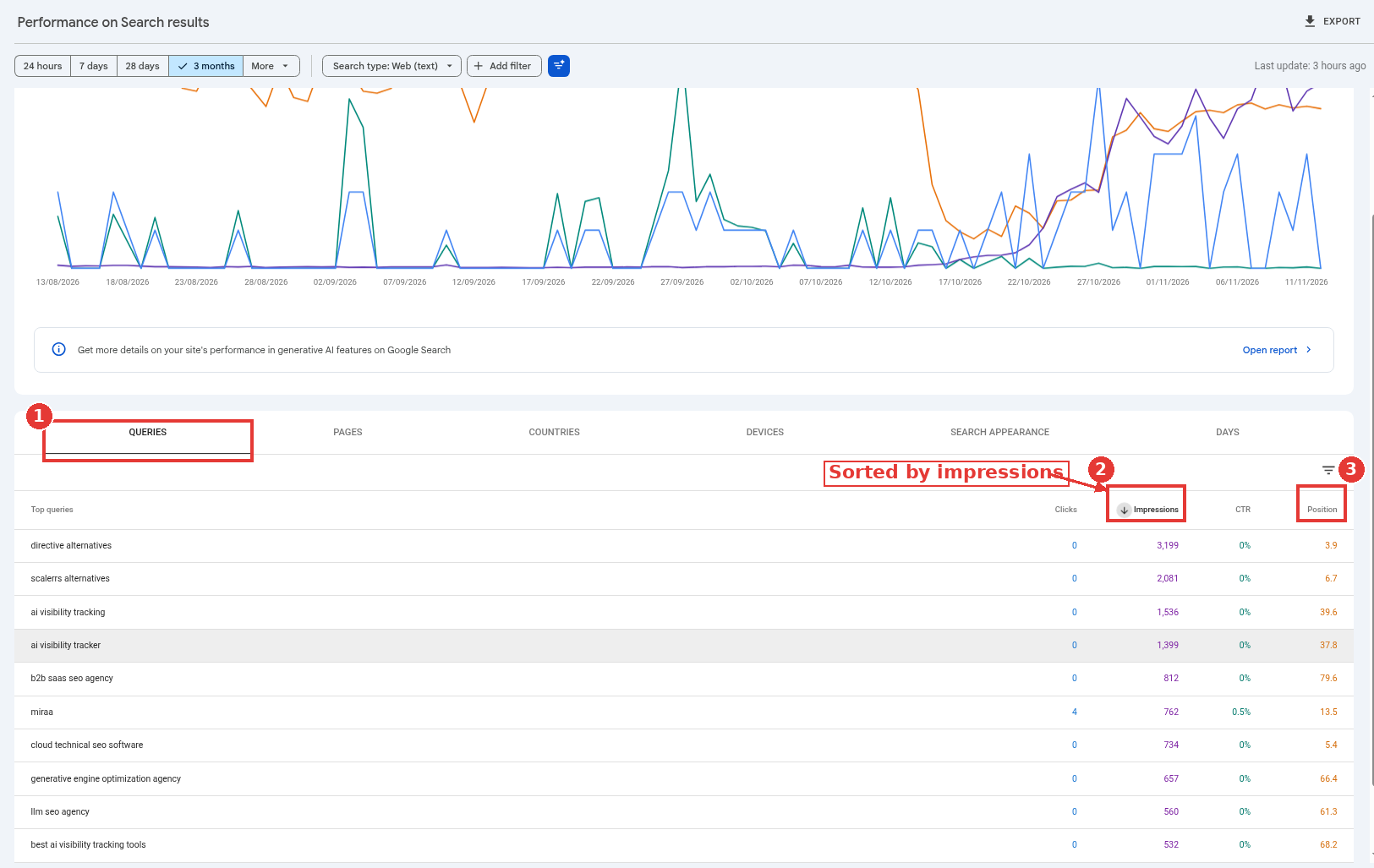
Queries tab sorted by impressions, position column on, captured Nov 15, 2026.
I would not rewrite a page that only slipped two spots. I would rewrite the brief for a query that fell out of the top results and still collects a lot of impressions.
6. The mix of queries changed
A site can gain impressions from broader, lower-intent queries and lose clicks on the narrower ones that used to convert in the same chart. The site total then looks like a CTR problem when it is a mix problem.
Filter the Queries table to one group at a time. Branded queries, product-name queries and generic "what is" queries do not have the same click rate, and a shift toward the generic set will pull average CTR down even if each group is stable. Compare the same filter in both date ranges, and do not explain the total until you have seen the groups.
If a new set of informational queries appeared after you started showing in AI features, check those queries in the audit post, not as a title bug.
7. You're showing up for more queries, at weaker positions
The last cause is coverage, not a worse snippet on the same terms. A new page, a wider index, or query fan-out around an AI feature can put you in front of searches you barely ranked for before. Impressions go up. Clicks per impression stay low because many of those results sit on page two, or they answer only part of the question.
The AI features documentation describes how AI Overviews and AI Mode may issue multiple related searches across subtopics, and how that can surface a wider set of links than a classic results page. That is one way a site can pick up new impressions. It is not, on its own, a ranking loss.
Sort the Queries tab by how much impressions moved, then look at the new rows at the bottom of the position range. If the old head terms are stable and the new terms are the ones inflating impressions, the work is to decide which of those terms deserve a page, and which are noise.
A worked split, with our math
Take a hypothetical billing-software blog that, over 28 days, went from 20,000 impressions and 800 clicks (4.0% CTR) to 28,000 impressions and 700 clicks (2.5% CTR). The team saw impressions up clicks down and rewrote every title in a week.
Our math on that scene: 8,000 of the new impressions came from 40 queries the site barely ranked for before, at an average position past 15, and those 40 queries produced 40 clicks. The original 20,000-impression set actually went to 20,000 impressions and 660 clicks, a 17.5% click drop (140 / 800) on a flat impression base. That second number is the title, snippet, position and search-appearance problem. The first number is coverage. Treating them as one CTR problem sent the team after the wrong 40 queries.
What to do once you know which reason it is
Rule out the anomalies, then tick all four metrics and split the Queries tab as in the worked example. Titles, snippets and rich results are the right work when the original query set lost clicks. Position and mix decide the next move: improve a page, leave it, or write a new one. AI Overview queries go to the audit.
For teams whose informational queries now sit inside AI Overviews and AI Mode, and whose commercial pages still need to earn the click under those results, that split is the kind of work an answer engine optimization agency can run with the in-house SEO team.
FAQ
Is impressions up clicks down always a problem?
No. New queries at weaker positions can raise impressions without meaning the head terms got worse. Split the query set before you change anything.
Can a Search Console anomaly cause this pattern?
Yes, inside the dated windows on the anomalies page. The April 3, 2026 logging error is the one that could inflate impressions while clicks stayed put, through April 27, 2026. The November 9 to 11, 2026 entry applies to the Generative AI report, not as a described change to the main Performance report.
Do AI Overviews always reduce CTR?
The official AI features documentation does not give a single CTR figure, and it notes that clicks from results pages with AI Overviews have been higher quality. Use the AI Overviews keyword audit for the query-level pattern, and this list for the other causes.
Where do I start in Search Console?
Tick clicks, impressions, CTR and position. Compare two clean date ranges, then open Queries, Pages and Search appearance. The organic traffic drop checklist covers the setup; this post covers how to read the split.