

Last updated: November 24, 2026
B2B buyers spend about 220 days learning on their own before they show up in a sales pipeline. Dreamdata, which sells attribution software, reported that figure on March 10, 2026, from 3.5 million customer journeys.
Seven months is a long time to wait for a lead. It also means a blog can do early work that pays off much later. When SEO content is not generating leads, I check whether the content plan only serves those first months. A team that publishes 30 articles a month can fill every slot with early reading and still never meet a buyer who is ready to talk.
This guide is about the plan itself: the sheet your team fills in before anyone writes. What happens on the page after a reader arrives is covered in the guide to SEO for B2B lead generation. Picking the keywords is covered in the guide to high-intent keywords.
Most content plans have a topic, a keyword, a writer and a due date. I would add six columns. Each section below covers one of them and the fixes that go with it.
Column | What it asks | A row that leaks | A row that can bring leads |
|---|---|---|---|
Job | What does this post do for the buyer? | Explain the problem | Help choose between two ways to solve it |
Page type | Is this a post, a comparison or a product page? | Blog post, every time | Comparison page for a rival buyers name |
Product | Where does the product show up? | Nowhere | In step 3, where it does the step |
Next step | What should the reader do after? | Generic demo banner | A template that only works in the product |
Links out | Which money page does it link to? | None | The feature page, with a clear anchor |
Success | What counts as a win? | Sessions | Sign-ups and demos started from the post |
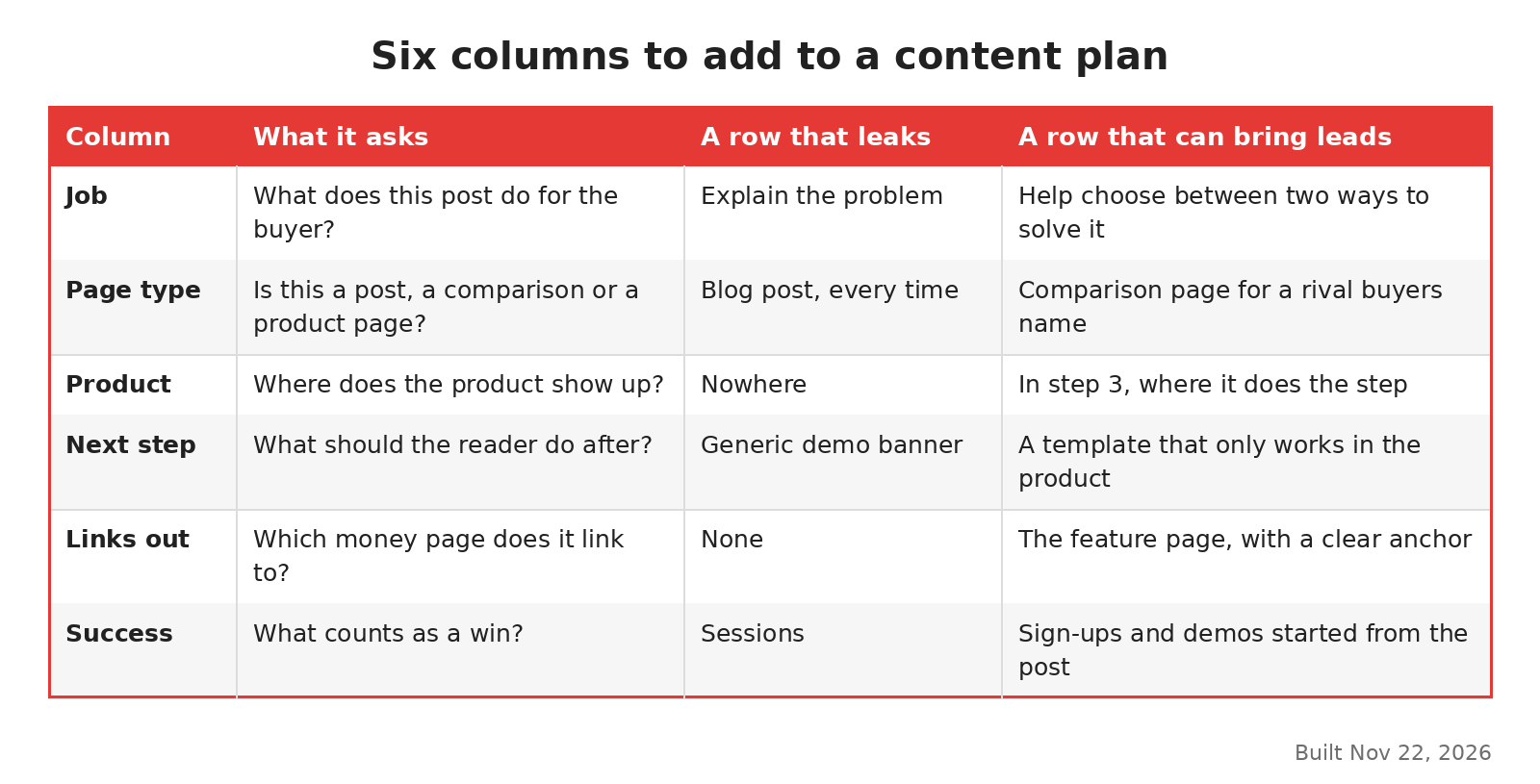
Six columns to add to the plan, built Nov 22, 2026.
Job: what the post does for the buyer
1. Most posts explain a problem, and few help a buyer choose.
Tag last quarter's posts with one of four jobs: explain the problem, compare ways to solve it, choose a product, or use the product. Then count. On many blogs I would expect the first group to swamp the others, because those topics have the biggest search numbers.
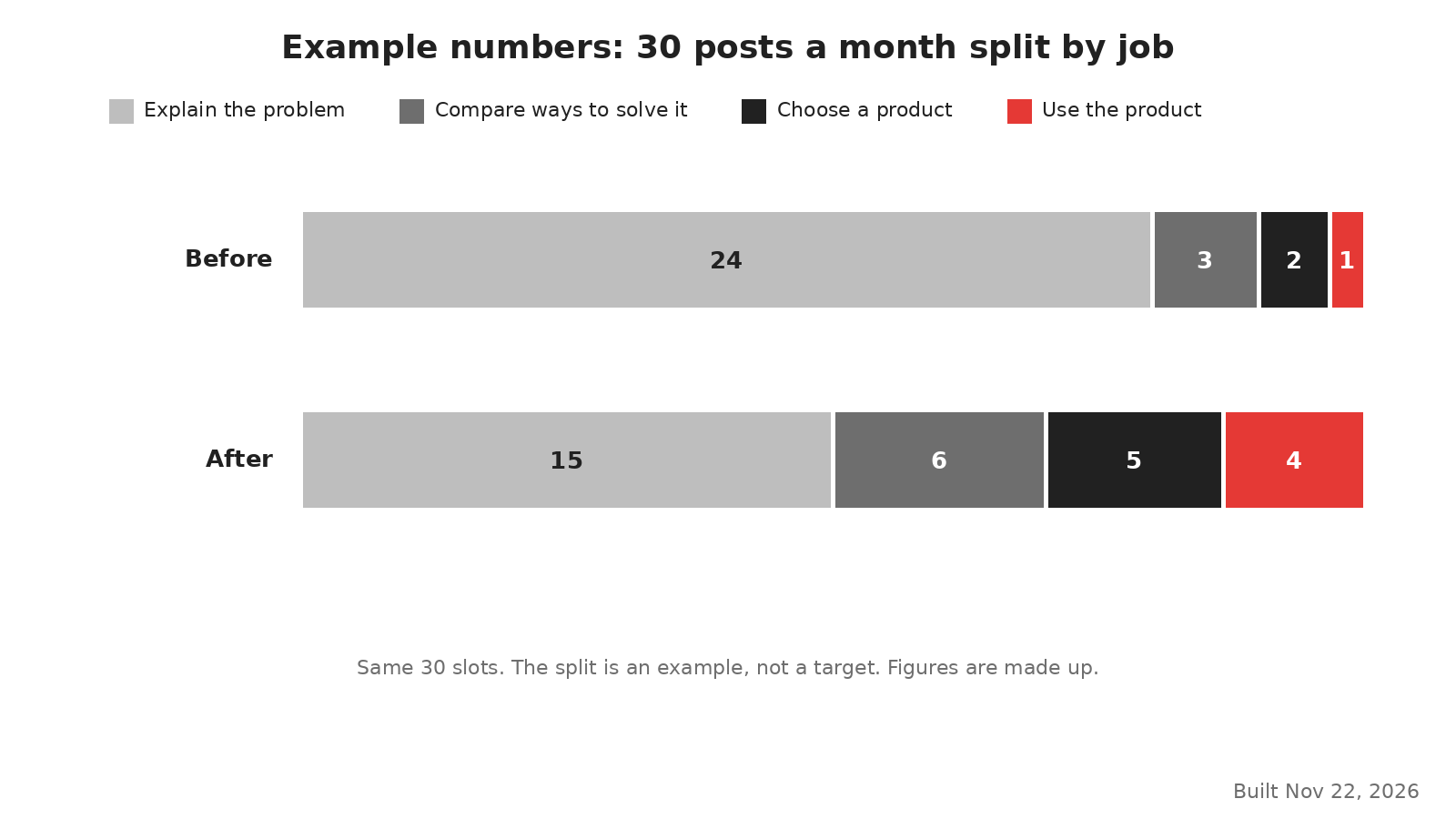
Example numbers, not a real blog. Built Nov 22, 2026.
The fix is a quota. Keep the explain posts, because they start the long research period in the intro. But hold a fixed share of each month for the other three jobs. The split above is an example, not a target. Set yours from how long your sales cycle runs.
2. Topics come from keyword tools, and nobody asks sales.
A keyword tool shows what people search. It does not show what your prospects ask on calls. Once a month, ask two salespeople for the five questions they heard most. Ask support for the setup questions that come up again and again. Those questions often have small search numbers and a buyer behind them.
Google's guide to helpful content, last updated October 5, 2026, asks whether a page would be useful to people who came to you directly. Sales questions pass that test almost by default.
Page type: what kind of page it is
3. Every slot is a blog post, so buyers who compare find nobody.
A buyer near a decision searches for your name next to a rival's name. They also search for alternatives, or for whether you work with a tool they already use. A blog post rarely answers those searches well. An integration page, as shown below, answers the tool question directly. The lead generation guide lists which page types bring in B2B leads, and the guide to comparison and alternatives pages shows how to build them.
My fix for the plan is simple. Give those pages slots in the same calendar, with the same deadlines. If they live in a separate "someday" list, they rarely ship. Most of them need product marketing to check claims, so add that review to the schedule.
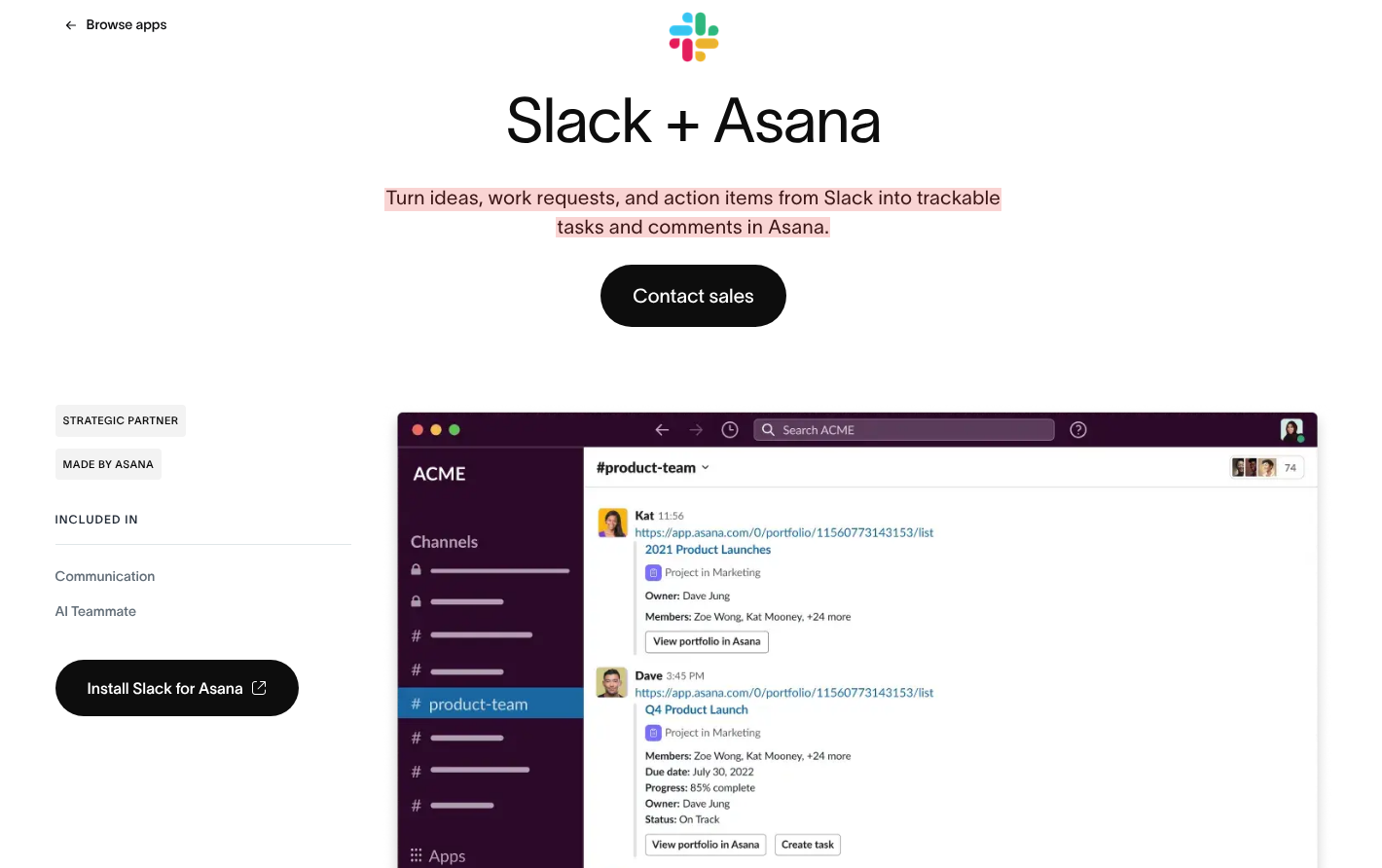
Top of Asana's Slack integration page, captured Nov 22, 2026.
Product: where the product shows up
4. The post solves the problem without ever showing the product.
Many SaaS posts read as if the company sold nothing. The steps work with any tool, so the reader learns and leaves. Pick the step where your product saves the most time and show it doing that step, with a screenshot or a short clip.
Google's helpful content guide asks whether a page shows first-hand expertise, such as knowledge that comes from actually using a product. Your team has that for your own product and nobody else does. A post that shows the real setup screen is more useful than one that describes a tool in general terms.
Keep it honest. If your product does not handle a step, say which tool does. Readers trust the rest of the post more when it admits a limit.
Next step: what the reader does after
5. The call to action is decided by a site-wide banner, not by the writer.
The lead generation guide already maps which next step fits which page type. The plan fix is to make the next step a column the writer fills in before drafting. When the writer knows the post ends with a template, a calculator or a trial, the post can build toward it.
A good next step continues the task the reader came for. A post about building an onboarding checklist can end with that checklist as a template in the product. A demo request on the same post asks for a much bigger step from someone who is still learning.
Links out: which money page it points to
6. Posts link to other posts and never to the pages that sell.
Money pages are the pages that turn visits into revenue: features, integrations, pricing, use cases. Many blogs link heavily between posts and rarely link to these.
Add a "links out" column with one money page per post, chosen before writing. Then write the link into a sentence that explains why the reader would click.
Google's link guide, last updated December 10, 2025, calls good anchor text descriptive, reasonably short and relevant to both pages. "Click here" and "read more" are its examples of too generic, and the words around a link matter too. "Our feature page" tells Google and the reader little. "Approval rules for purchase orders" tells both what is on the other side.
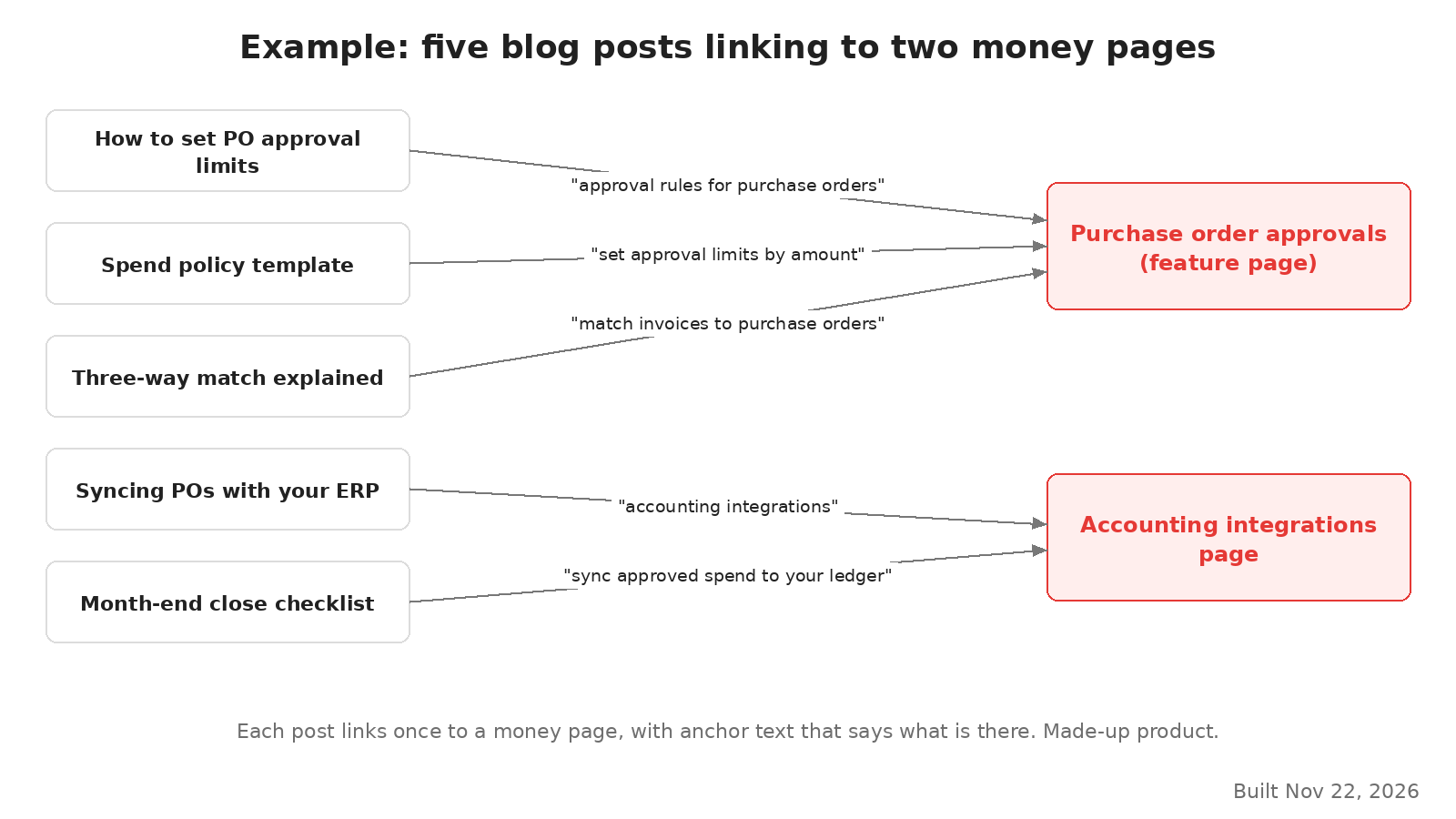
Example links for a made-up product. Built Nov 22, 2026.
Success: what counts as a win
7. The report counts sessions, so the plan chases sessions.
A content team gets more of what it is measured on. If the monthly report leads with traffic, the next plan fills with high-volume explain posts. The guide to SaaS SEO KPIs covers which numbers belong in that report.
One change I like comes from a GA4 trainer's video posted on November 10, 2026. He suggests putting actions next to sessions as separate columns. In his example, one blog post gets 200 article reads and zero form submissions. Another gets 40 reads and three submissions. A single engagement percentage would hide the gap between them.
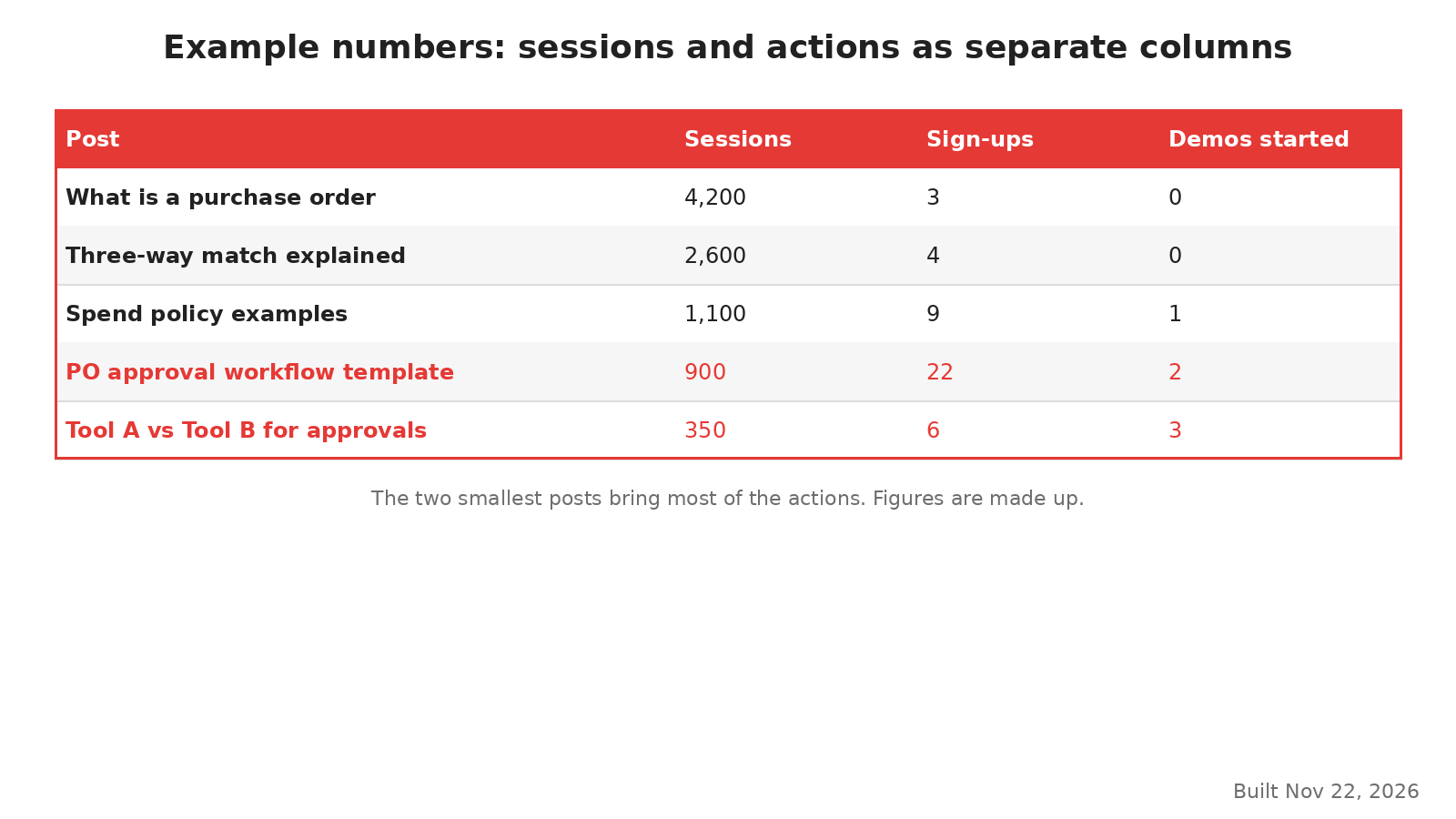
Example numbers, not a real blog. Built Nov 22, 2026.
If organic visitors arrive and still do not turn into demos, the problem may sit on the site. The same-day guide to organic traffic that brings no demos walks through that funnel in GA4.
8. Sales never hears about the posts.
The last fix costs nothing. Send sales a short list of new comparison, product and use posts each month, with one line on when each one helps. Ask them which posts prospects mention on calls. Those answers feed back into fix 2, and they often find a lead that no report credited to content.
Try the new columns on one month
If your team would rather hand off the writing and keep the planning, our SEO content agency writes these pages for B2B SaaS teams. Either way, do not rebuild the whole calendar at once.
Take next month's 30 slots and fill in the six columns for each one. Then move a few slots from explain posts to the page types that are missing.