

Last updated: November 22, 2026
Google's Search Console API sends back at most 25,000 rows per request, and 1,000 if you do not ask for more. Its reference page, last updated November 16, 2026, lists both numbers. For a blog with 500 posts, one row per page fits easily. Add queries to each page and the table grows past either limit fast.
That is the shape of a large content audit. The hard part is the join. You need every post on one row, with its search data, links and leads beside it, before any judgment makes sense.
This guide covers the content side only: what each post is worth and what to do with it. Crawling, speed and site structure belong in a B2B SaaS SEO audit, so run that separately. The seven steps fall into three blocks of work. If one editor reviews 35 posts a day, 500 posts take 15 working days, or about three weeks.
The sheet you will build
Everything in the audit lands in one sheet, one row per URL. Set up these columns before you pull any data.
Column | Where it comes from | What it tells you |
|---|---|---|
URL | Sitemap and CMS export | The full list, including posts with no traffic |
Published and last updated | CMS export | How old the post is and when anyone last touched it |
Topic | Tagged by hand, or taken from the URL folder | Which posts compete with each other |
Clicks and impressions, 12 months | Search Console, Performance report, Pages tab | How much demand exists and how much of it you win |
Main query | Search Console, page filter, Queries tab | What Google thinks the post is about |
Referring domains | Your backlink tool's export | Whether removing the post would lose links |
Internal links in | A site crawler | How easy the post is to reach |
Leads | Your analytics tool, by landing page | Whether the post brings in business |
Score | Step 4 | Order of work |
Action | Step 6 | Keep, refresh, merge, redirect, noindex or remove |
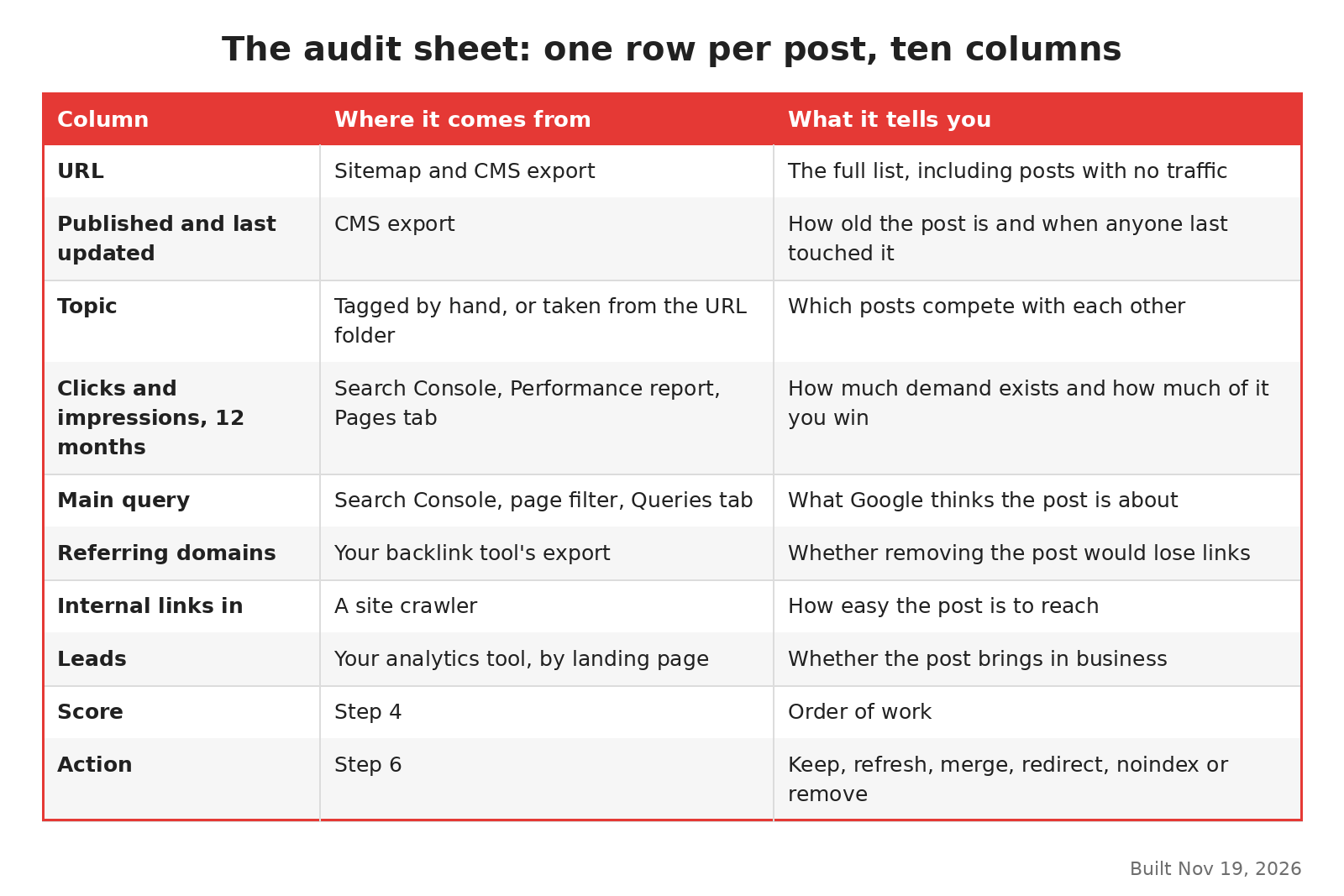
Columns for a large blog content audit, built Nov 19, 2026.
First block: build the list
The first three steps produce the raw sheet. Nobody reads a post yet.
Step 1: List every post from two places
Export the URL list from your sitemap and from your CMS, then put both in the sheet. The two rarely match. The CMS will hold drafts, private posts and old URLs that now redirect. The sitemap may miss posts that someone forgot to add.
Keep one row per live post. Mark redirected and deleted URLs in a separate tab, since they still matter when you check old links later.
Step 2: Pull 12 months of search data by page
In Search Console, open the Performance report and pick the 12 months date range. A full year means a seasonal dip in one month does not mislead you. Open the Pages tab and use the Export button, marked in the image below.

Export button, two parts of one page, captured Nov 19, 2026.
Google's video on analyzing performance, posted December 4, 2025, splits the report into three parts: the data controls, the chart and the tables. It suggests going through them in that order, so you know what the data covers before you read it.
If your blog has more pages than one export covers, pull the data through the Search Analytics API instead. Ask for the page dimension alone and set the row limit as high as you need. Since a November 16, 2026 update, the API can also split branded searches from the rest for eligible sites. That split helps, because a post that only ranks for your brand name is doing a different job.

Row limit, two parts of the same page, captured Nov 19, 2026.
For the main query column, filter the report to one page and read the top query. Do this for the posts that matter most. Doing it for all 500 is slow, and the API can fill the rest.
Step 3: Add links and leads
Export referring domains per URL from whatever backlink tool you already use. Crawl the site to count internal links pointing at each post. Then pull leads or sign-ups by landing page from your analytics tool.
Match every source on the exact URL. Trailing slashes, upper case letters and tracking codes break the join, so clean them first. Give a post with no match a zero, so empty cells do not break the scores later.
Second block: score and tag
Now the sheet has numbers. The next three steps turn them into decisions, and this is where someone has to read posts.
Step 4: Score each post on four things
Give each post 0, 1 or 2 points on four measures. Set the cutoffs from your own sheet, for example by splitting each column into thirds. A fixed number from another site means little on yours.
Measure | 0 points | 1 point | 2 points |
|---|---|---|---|
Search demand (impressions) | Bottom third | Middle third | Top third |
Clicks won for that demand | Bottom third | Middle third | Top third |
Business value | Topic unrelated to the product | Related topic, no leads | Brings in leads or sign-ups |
Page quality, after a read | Thin or out of date | Fair but missing detail | Full, current and specific |
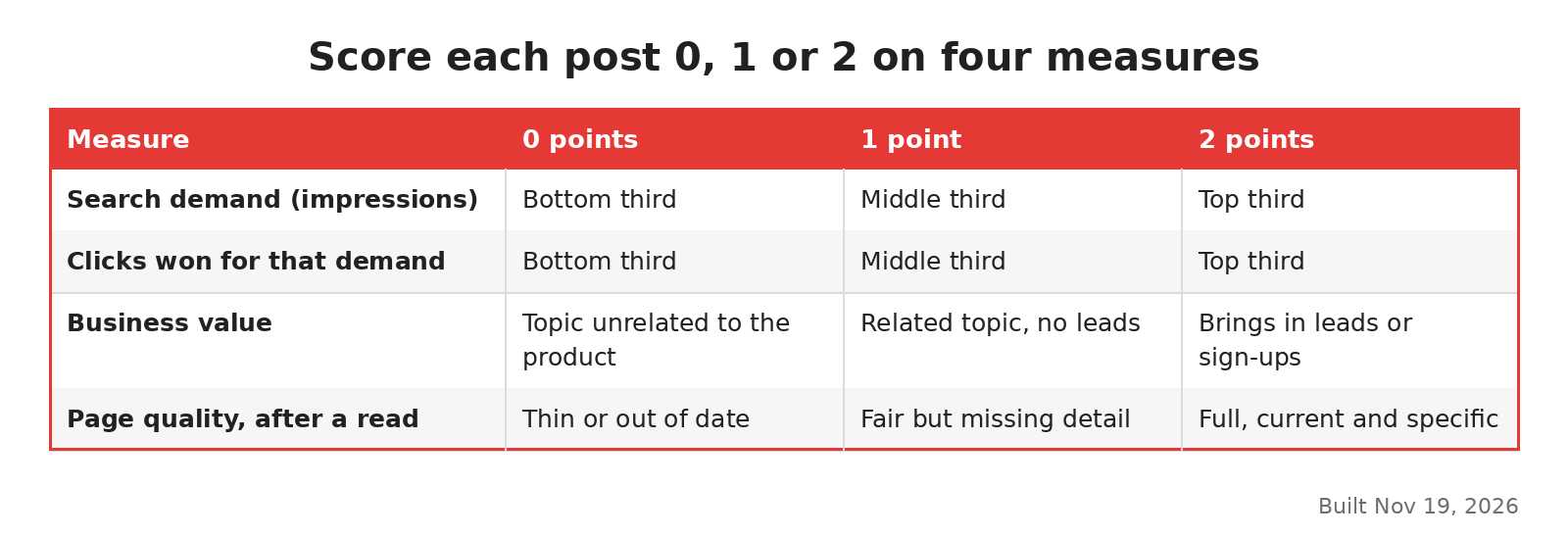
Four measures, three scores each, built Nov 19, 2026.
The quality score is the slow one. Read each post with the top results for its main query open beside it. The signs of thin content give you a quick list of what to look for.
Step 5: Group posts by topic and look for overlap
Sort the sheet by topic, then by main query. Posts that share a main query are competing. Usually one of them gets most of the clicks and the others sit far behind.
Mark each group's strongest post as the keeper. The keyword cannibalization guide shows how to confirm the overlap in Search Console before you merge anything.
Step 6: Tag one action per post
Each row gets exactly one action. These rules cover most rows:
Keep: high score, nothing to fix. Leave it alone.
Refresh: high demand or business value, low quality. Rewrite it in place.
Merge: part of an overlap group, but not the keeper. Move the useful parts into the keeper.
Redirect: merged posts, and old posts with links but no purpose. Send them to the closest live page.
Noindex: still read by people who have the link, such as release notes, but not worth a search result.
Remove: scores near zero, no links, no leads. Return a 404.
The guide to deleting, rewriting or noindexing weak pages explains when each option fits and how to carry it out.
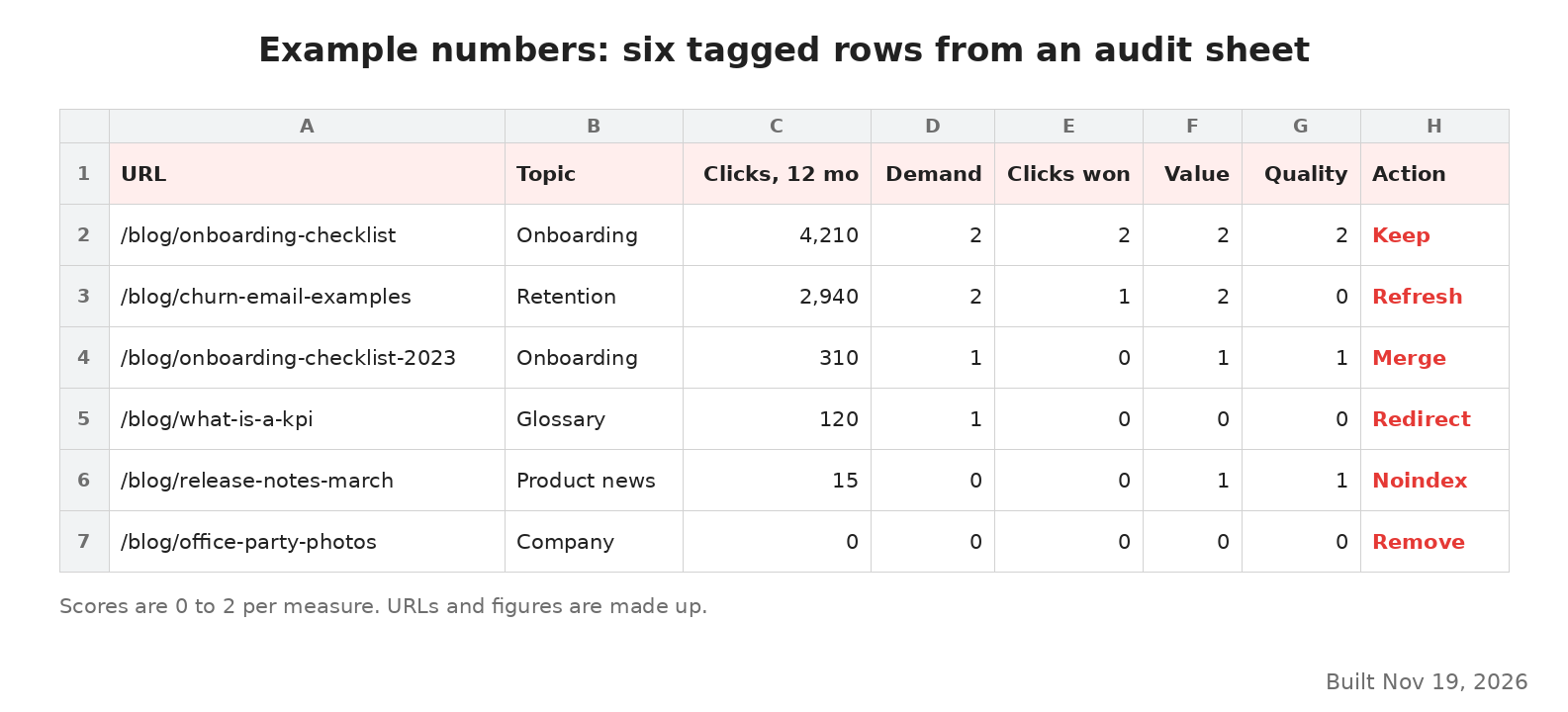
Example numbers: six tagged audit rows, built Nov 19, 2026.
The image above uses example numbers to show how the sheet looks once tagged. Each row carries its four scores and one action.
Third block: work the list
The last step is the one most audits skip. A tagged sheet changes nothing until someone acts on it.
Step 7: Act in order of value and mark the dates
Start with refreshes on posts that score high on business value. I would start there, since those posts already have demand and a link to revenue. Do merges and redirects next, one topic group at a time. Leave removals for last, after you have checked that no removed URL has links you want to keep.
Record each change in the audit sheet as you go, with the date, the URL and what you did. Three months later, you can line up each traffic change with the work that came before it.
If many refreshed posts still sit outside the index after a few weeks, check the crawled, currently not indexed guide. It covers what to look at when Google reads a page and still leaves it out.
Who should do the work
An audit of 500 posts needs three kinds of knowledge. Someone has to own the sheet and the data joins. Someone has to read posts and judge quality against the top results. And someone has to know which topics matter to buyers, which is usually a product marketer.
One person can hold two of those roles. Few people hold all three, and the audit slows down when the reader has to guess at business value. If your team is short on writing time once the tags are in, our B2B SaaS SEO agency takes on the refresh and merge work.