

Last updated: November 19, 2026
About 5% of the pages on one large developer documentation site are indexed. A search advocate gave that rough figure in an official search podcast episode posted on July 16, 2026. He added that the site is fine. Many of the other URLs carry noindex tags, return 404 errors or point to a canonical copy, and the important pages are all indexed.
That number is a useful start for anyone who needs to delete or noindex low quality content. A page that is out of the index is not a problem by itself. The real question is what each weak page should become. There are seven answers, and you choose one for each URL.
Start once you know a Google update caused the drop. If you are not sure, check the five signs of an update hit first. If the timing matches a spam update, the spam update recovery guide covers policy cleanup. For a core update that has not lifted, read the reasons a site has not recovered.
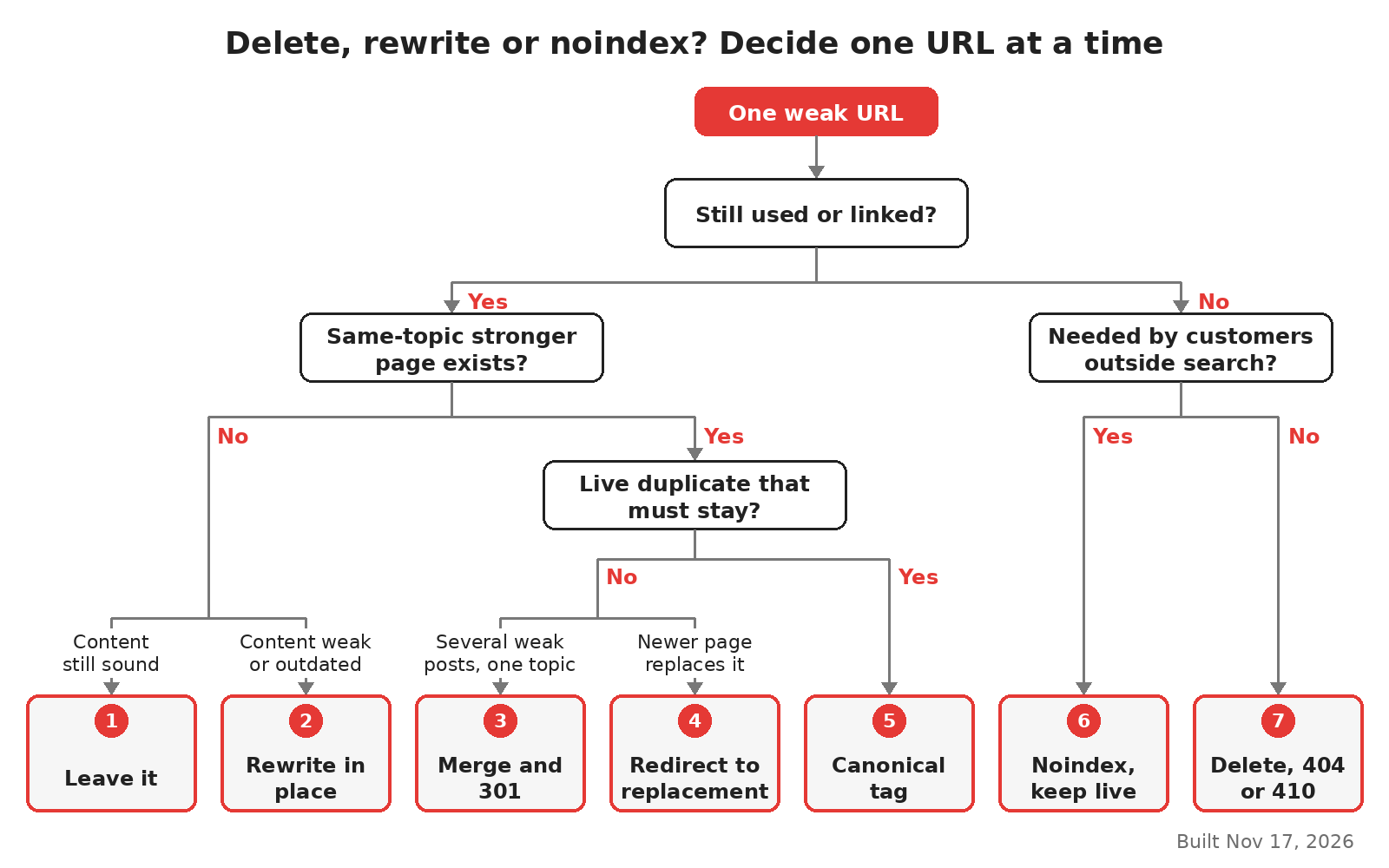
Seven options for one weak URL, built Nov 17, 2026.
Three facts to collect for each URL
You need three facts per page before you choose. Get them from Search Console and your own analytics.
Fact | Where to find it | Why it matters |
|---|---|---|
Does anyone still use the page? | Search Console Performance, Pages tab, last 16 months | Clicks and impressions show if searchers still find it |
Is there a better page on the same topic? | Your sitemap and your own site search | A stronger page can take its place |
Does the page have a job outside search? | Sales, support and product teams | Some pages serve customers who never arrive from Google |
Low quality here means a page that gives readers little. Think of thin copies, outdated advice, pages written mainly for keywords, or a post that repeats three others. Google's core update guidance asks you to judge content by whether it helps people. It also calls deleting content a last resort.
The seven ways, from lightest to heaviest
1. Leave the page as it is
Some pages look weak in a report but do no harm. A short changelog entry, an old event page or a niche how-to can stay. The page indexing report is easy to misread here. In the July 2026 podcast, the Search Console team's advice was to look for unexpected patterns. The report is not a list of things to fix.
I would leave a page alone when it still gets a few clicks, has no better page on the same topic and contains nothing false. Changing it adds noise to your before and after numbers.
2. Rewrite it in place
Rewrite when the URL still matters and the topic still fits your product. Search demand should be there, and the page should be the only one on the site for that question.
A real rewrite changes what the reader gets. Add the steps, numbers, screenshots or examples that are missing. Remove claims you cannot back up. Google's people-first content page lists questions for this check, such as whether the page adds original information. A new title and a fresh date do not count as a rewrite. The same page warns that changing dates to look fresh does not help.
If your team lacks the hours or the subject experts, this is where outside help makes sense. A content-focused SEO agency can take the rewrite queue while your team keeps the product pages.
3. Merge two or more weak pages into one
Merging fits when several posts answer the same question, and none of them is strong alone. Take the best parts of each and put them on the URL with the most links or clicks. Then send the other URLs to that page with a 301 redirect, which is a permanent move.
This is also one fix for keyword cannibalization, where two of your pages compete for one search. Merge the text first. Add the redirects on the same day, so readers never land on a half-empty page.
4. Redirect it to a true replacement
Sometimes a page is out of date, and a newer page already exists. In that case, skip the rewrite and redirect the old URL to the new one. Use a permanent 301 or 308 redirect. Google's redirect documentation explains that a permanent redirect tells Google the target should be the main URL in results.
A Search Central video from November 4, 2026 makes the same point in plain terms. A 301 passes the old page's signals to the new one. A 302 keeps the old URL in results.
Keep the target close in meaning. Do not send every dead page to the homepage. A Search Central video posted on October 28, 2026 warns that mass homepage redirects confuse people and make your data hard to read.
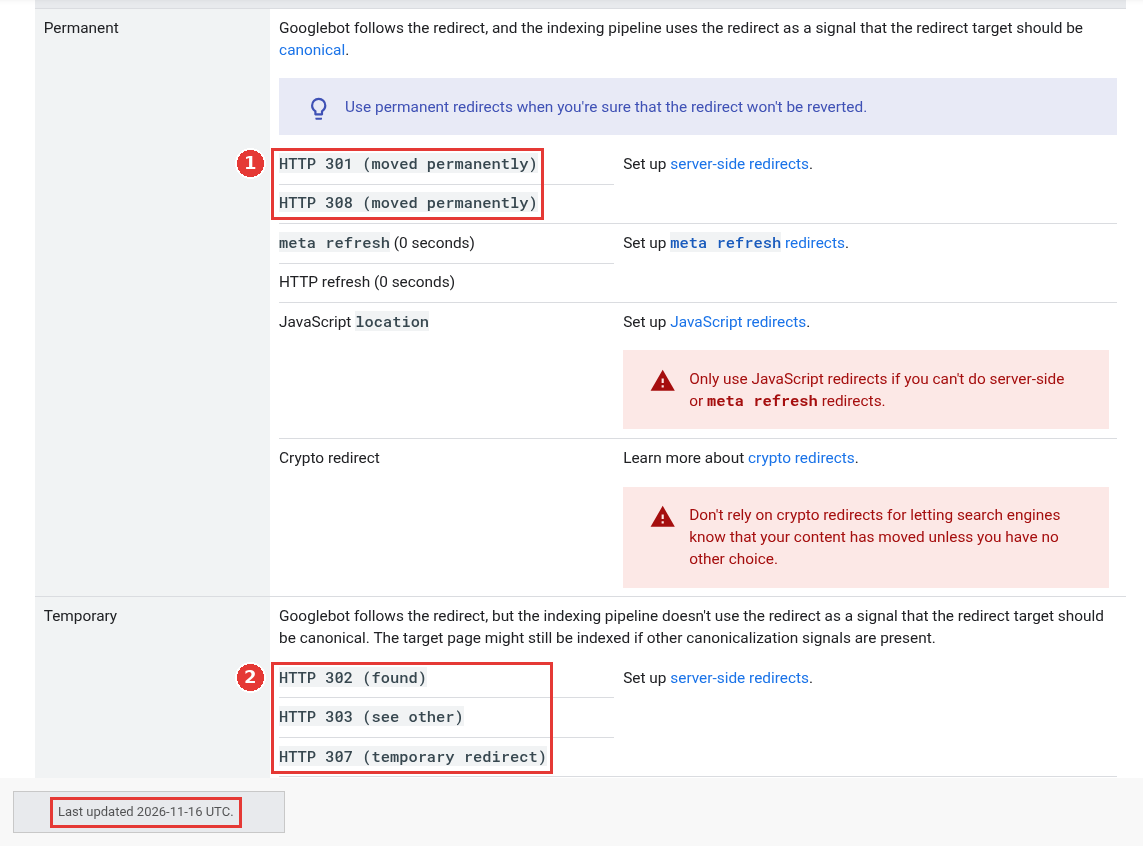
Google's permanent and temporary redirect types, captured Nov 17, 2026.
5. Point it to a canonical copy
Use a canonical tag when two near-identical pages must both stay live. One example is a print version and a normal version of the same guide. The tag rel="canonical" asks Google to treat one URL as the main copy.
Google treats this tag as a strong signal, though a redirect is stronger. A canonical tag is a hint, so Google can still choose a different URL. Use it only for real duplicates. It will not hide a thin page that has its own topic.
6. Noindex it but keep it live
A noindex tag asks search engines not to show the page in results. The page still works for anyone who has the link. This fits pages that customers need but searchers do not. Think of internal-only feature notes, thin tag archives or a page for one partner.
Two rules from Google's noindex documentation are easy to miss:
Do not also block the page in robots.txt, your site's crawl rules file. If Google cannot crawl the page, it never sees the noindex tag, and the URL can still appear in results.
Use the
X-Robots-Tagheader for PDFs and other files without HTML.
Google's spam policies add one more case. If your site hosts pages made at scale mainly to rank, the policy asks you to keep them out of Search. Noindex is one way to do that while you decide on rewrites.
7. Delete it and return a 404 or 410
Delete a page when it has no users, no useful links and no replacement. Return a 404 (not found) or 410 (gone) status code. Google treats all 4xx errors (status codes from 400 to 499) except 429 the same way. The URL leaves the index, and crawling of it slows down over time.
So a 410 is not a faster route out than a 404 for Google. Pick whichever your server handles cleanly.
The October 2026 video adds two points. A 404 brings no penalty to your other pages. Many 404s also do not use up your crawl budget. Crawl budget is the number of URLs Google is willing to fetch from your site in a given time. Make your 404 page helpful with search and links, so a person who lands there can find the next step.
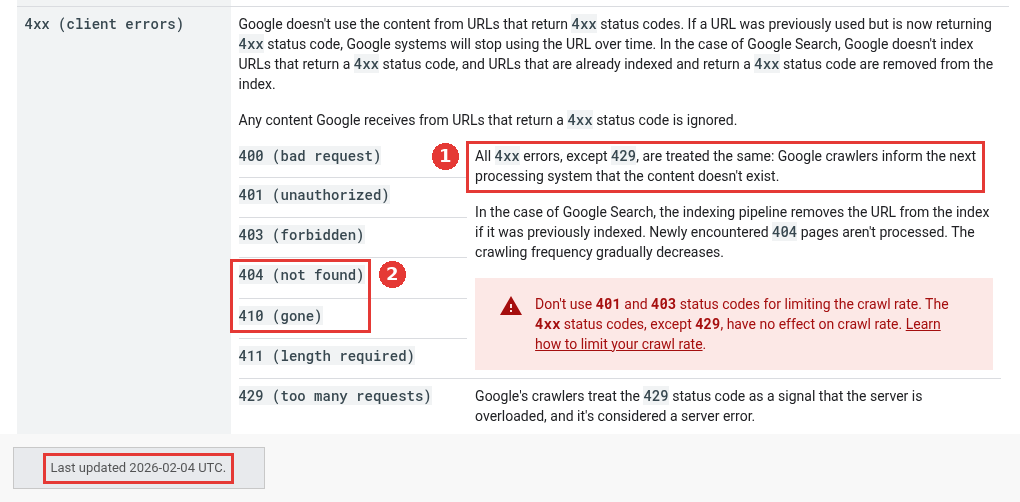
Google's 4xx status code guidance, captured Nov 17, 2026.
Which option fits which page
What you see | Option |
|---|---|
Few clicks, no duplicate, nothing wrong | 1. Leave it |
Real demand, weak or outdated content | 2. Rewrite in place |
Three posts on one question | 3. Merge and 301 |
Old page, newer page already live | 4. Redirect |
Two live versions of the same page | 5. Canonical tag |
Needed by customers, useless in search | 6. Noindex |
No users, no links, no replacement | 7. Delete with 404 or 410 |
Sorting a hypothetical 400-post SaaS blog
The example is a project management SaaS with 400 blog posts. The team sorts every URL with the three facts above. These counts are made up for this example, not data from a real site.
120 posts still earn clicks and have no duplicate. Leave 80 alone and put 40 on the rewrite list.
90 posts fall into 30 groups of three on the same topic. Merge each group into one URL and redirect the other 60.
25 posts describe features the product has since replaced. Redirect each one to the current feature page.
40 posts are partner and webinar pages that sales still sends out. Noindex them and keep them live.
125 posts have no clicks, no links and no replacement. Delete them and return a 404.
None of these groups overlap, so the five add up to 400.
Our math: the site ends with 400 minus 60 merged, 25 redirected and 125 deleted. That leaves 190 live URLs, and 40 of them are noindexed, so 150 pages stay in search. The team deleted under a third of the blog. Most of the work went into the 40 rewrites and 30 merges.
Ship this in batches and log each one, as the 90-day recovery plan describes. A single big cleanup leaves you unable to tell which change did what.
Mistakes that make the cleanup worse
Mass deletion for its own sake is the first one. Google's helpful content page asks if you remove a lot of old content mainly to seem fresh, and it answers that this will not help. The core update guidance goes further. If you plan to delete whole sections, those sections were likely made for search engines first.
Other slips to avoid:
A noindex tag on a page that robots.txt also blocks.
Pressing "Validate fix" in Search Console for a 404 you meant to create. That button is for real errors.
Rewriting pages that only slipped a few positions. Google's core update guidance says a small drop needs no drastic action.
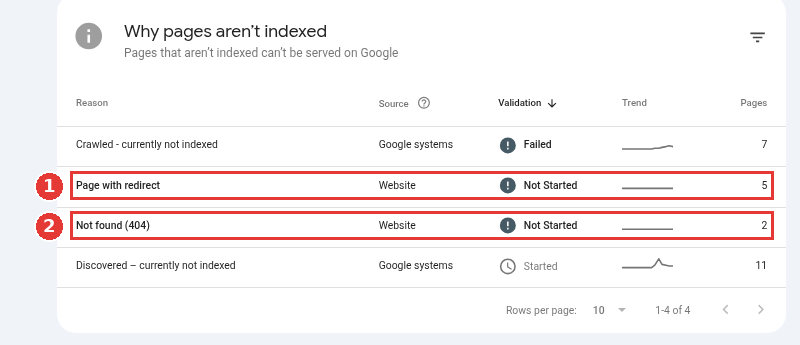
Page indexing reasons on a healthy property, captured Nov 17, 2026.
How to tell the changes took effect
Use URL Inspection on a sample from each batch. A noindexed URL should read as excluded by the noindex tag. A redirected URL should show the target as the chosen canonical. A deleted URL should report a 404 or 410.
In the page indexing report, expect the "Page with redirect", "Not found (404)" and "Excluded by noindex tag" rows to grow after a batch ships. That growth is the change you made, so it is not a fault. The July 2026 podcast gives this exact case. A planned rise in redirects is what you want to see. A site that has never used noindex shows no noindex row at all.
Give traffic weeks before you judge. Core update guidance allows several months for Google's systems to reassess a whole site.
FAQ
Is noindex better than deleting a weak page?
Noindex is better when people still need the page outside search. Deleting is better when nobody needs it. Both take the URL out of Google's results.
Does a 410 remove a page faster than a 404?
For Google, no. Its documentation treats all 4xx codes except 429 the same way, so use the one your server returns cleanly.
Should I redirect deleted posts to my homepage?
No. Redirect only to a page with the same purpose. If no such page exists, let the URL return a 404.
How many low quality pages should I remove after an update?
There is no target number. Decide page by page with the seven options above, and expect most pages to be kept, rewritten or merged.