

Last updated: November 22, 2026
Pages with little or moderate AI text earned two to three times the search impressions of pages that were mostly AI text. Ahrefs found that gap in a July 2026 study of about 81,000 pages, sorted by how much AI text a detector found. AI detection is a guess, so treat the figure as a direction.
Thin content is the plainest kind of bad page. Length is not the test. Google's guide to helpful content says plainly that it has no preferred word count. So a short page can be fine, and a long one can still be thin.
The seven signs below tell you where to look. Each one is a reason to read a page more closely. None of them proves a page is thin on its own.
The seven signs in one table
Sign | Where you see it | What it usually points to |
|---|---|---|
1. A page pulls in almost no searches | Search Console, Performance report | The page answers too little to match many queries |
2. Posts pile up as crawled but not indexed | Search Console, Page indexing report | Google read the page and saw little reason to keep it |
3. Several of your URLs take turns for one search | Search Console, Queries filtered to one search | Pages that say the same thing |
4. The page delivers less than its title promises | Reading the page | A heading written for a keyword, with no answer behind it |
5. Nothing on it beats the pages already ranking | Reading the top results next to yours | Nothing the reader cannot get from the pages above it |
6. The same template with a few words swapped | Reading pages side by side | Pages made at scale for search, close to spam policy |
7. Output went up while time per post went down | Your publishing calendar | Quality drift across the whole blog |
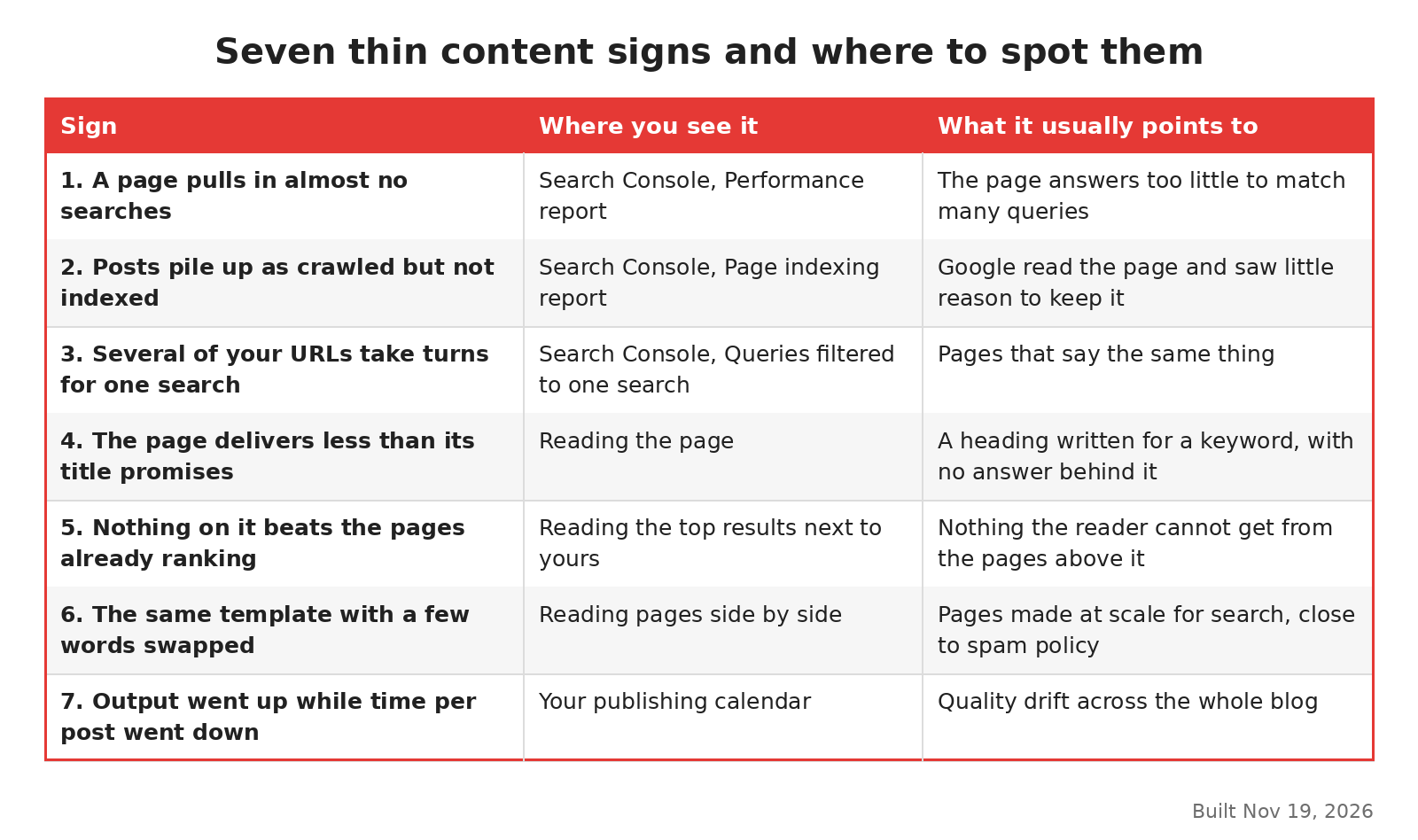
Seven thin content signs, built Nov 19, 2026.
What Search Console shows you
Three of the signs show up in reports before anyone reads the page. They are the cheapest to check, so start here.
A page pulls in almost no searches
Open the Performance report, go to the Pages tab and click a post. Then switch to the Queries tab. A full guide usually draws a long list of related searches. A thin page draws one or two, or none at all.
Search Console Insights has a quicker route. In Google's Insights walkthrough, posted December 2, 2025, clicking a page row in the Your content card opens the Performance report for that page alone. From there you can see which searches brought visitors to it.
Compare a few of your strongest posts with a few of your weakest. The shape of each list matters more than its totals. A post that ranks for its own title and nothing else is worth a closer read.
Posts pile up as crawled but not indexed
In the Page indexing report, watch the "Crawled, currently not indexed" line over a few months. A count that climbs as you publish more blog posts is the pattern to look for.
Read a sample of those URLs before you change anything. Some will be thin. Others will be near copies of a stronger post, or tag and archive pages you never meant to rank. The guide to crawled, currently not indexed sorts them, and pages not indexed covers the other reasons in that report.
Several of your URLs take turns for one search
Filter the Performance report to one query and open the Pages tab. If three or four of your posts appear for it, they probably cover the same topic. Each one ends up thinner than a single merged page would be.
This is where thin content meets cannibalization, which is when several of your pages compete for one search. The keyword cannibalization guide shows how to pick the page that should win. If the posts are close to word for word, the duplicate content guide explains how Google picks one copy.
What a careful read shows you
Reports only point. The next three signs need a person to read the page with the search results open beside it.
The page delivers less than its title promises
Read the title, then the first screen of text. Does the page answer the question in the title? Thin pages often open with a definition, list some general tips and stop. The reader has to search again.
Google's helpful content guide asks exactly this. Will a reader leave feeling they learned enough to reach their goal? Or will they feel they need to search again? If the second is true, the page is thin for that search, however long it is.
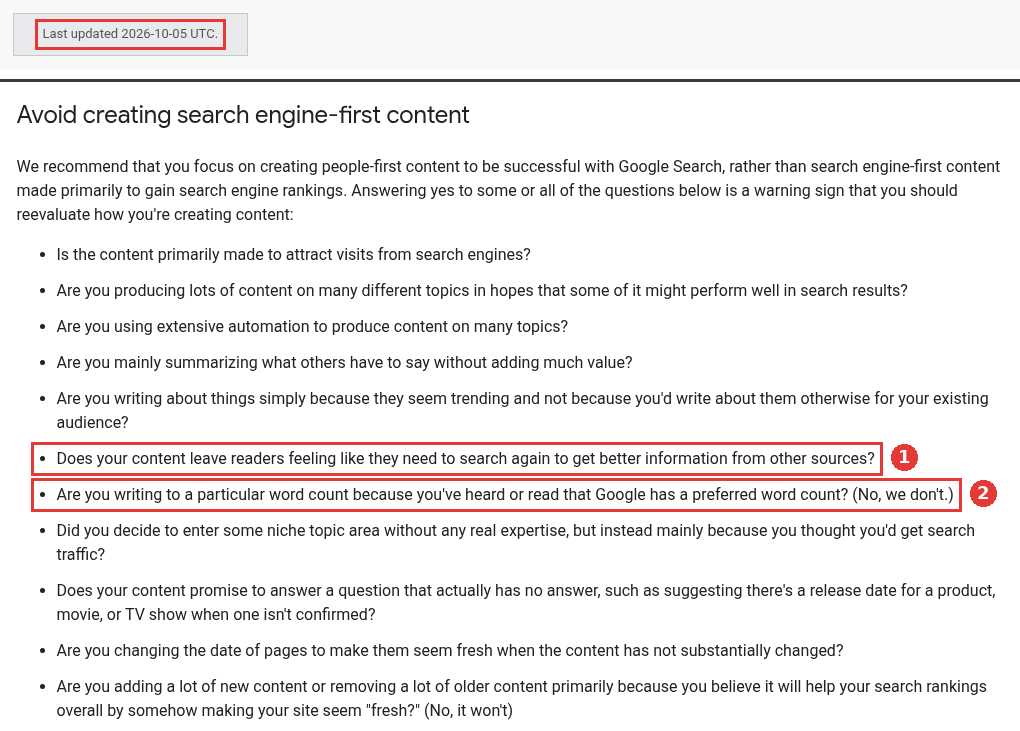
Warning questions, two parts of the same page, captured Nov 19, 2026.
Nothing on it beats the pages already ranking
Search the main keyword and open the top three results. Then list what your page has that they do not. It might be a screenshot of your own product, a number from your own data, a worked example or a clear opinion. If the list is empty, the page adds nothing the reader could not already find.
On a SaaS blog, I would check this sign first. Posts written from the same top results tend to end up as summaries of them. The guide on whether Google penalizes AI content covers the same point for drafts written with AI tools.
The same template with a few words swapped
Open five pages from one template side by side. Comparison pages, glossary entries and "best tools for" pages are common examples. Count the sentences that appear on only one of the five. If almost none do, you have thin content at scale.
Google's spam policies give examples of scaled content abuse. Two fit template sets well. One is stitching or combining content from different pages without adding value. The other is making many pages that make little sense to a reader but contain search keywords.
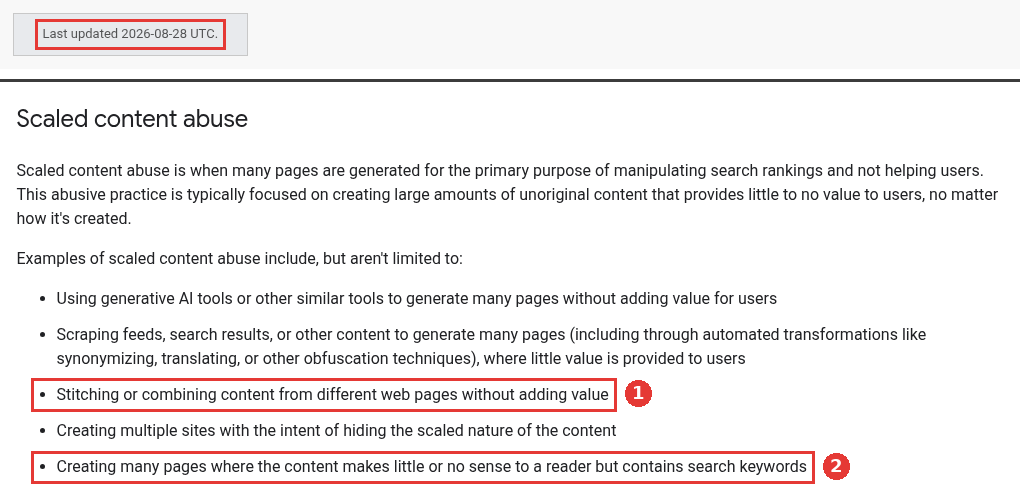
Scaled content, two parts of the same page, captured Nov 19, 2026.
What the publishing calendar shows you
The last sign is about the blog as a whole, so no single page shows it.
Output went up while time per post went down
Put two numbers side by side for the last year: posts published each month and hours spent on each post. If the first went up and the second went down, quality has probably slipped across many pages at once. Google's guide asks whether content is mass produced or outsourced to many writers, so that each page gets less care.
This sign can show up before the others. The guide on publishing more content while traffic drops looks at what volume does to a blog. It covers six reasons, and thin pages are one of them.
A thin page and a full page side by side
The image below shows two versions of the same post. Both target the same search and use the same title. The thin version restates the question, lists generic tips and ends with a sign-up box. The full version answers in the first lines, shows the steps with real screens and adds one example from the company's own data.
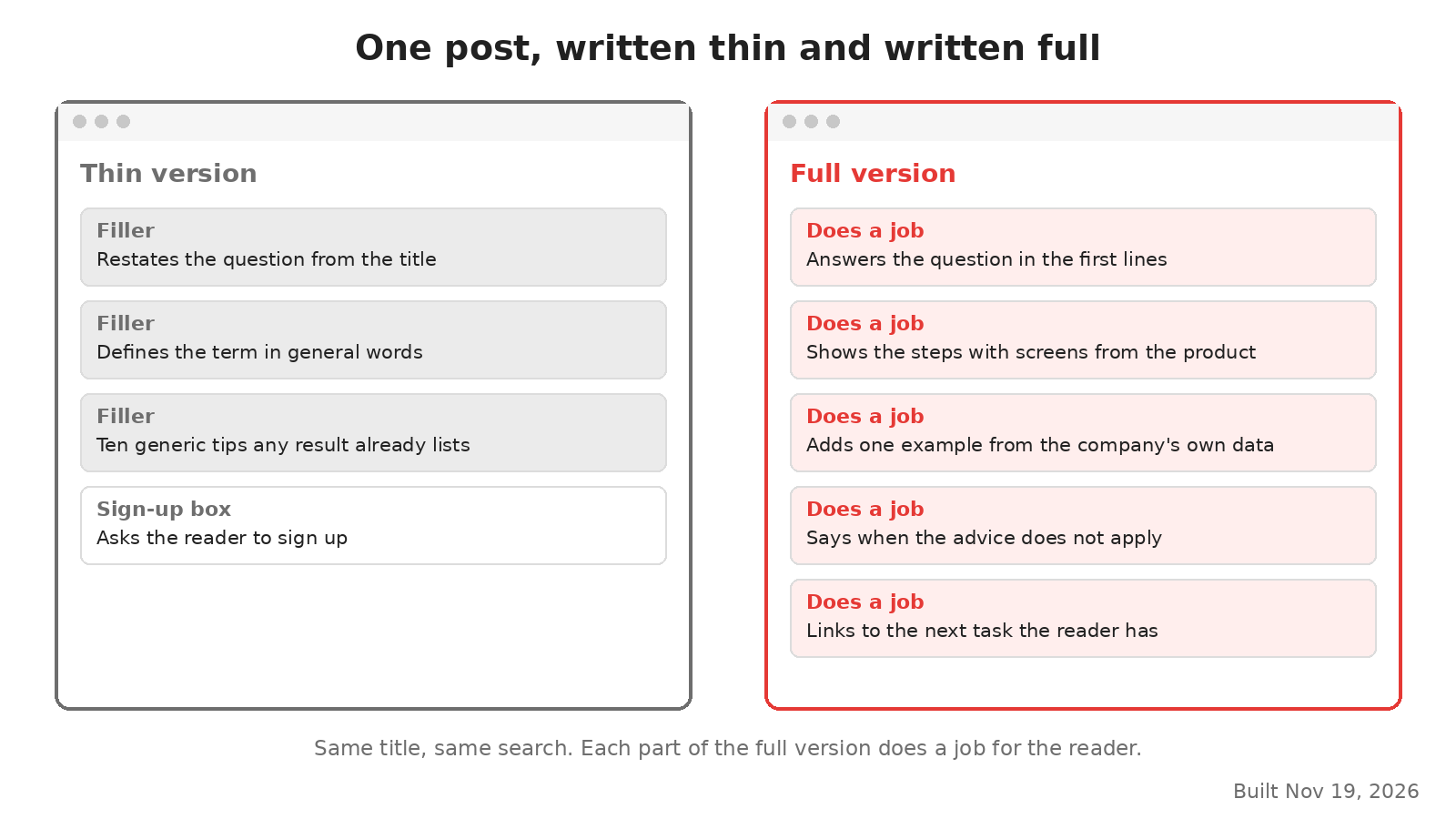
One post written thin and written full, built Nov 19, 2026.
Length is a side effect here. What makes the full version work is that each part does a job for the reader. Use that as a test for your own pages. For each section, ask what the reader can do after reading it.
From sign to fix
A sign tells you which pages to read first. The fix depends on what you find on each one.
If the page has a real purpose but too little in it, rewrite it with the detail it lacks. If two or more posts cover the same search, combine them on the URL with the most clicks, and send the others there.
A page that serves readers but answers no search can stay online with a noindex tag, which keeps it out of search results. A page that helps no one can go, or redirect it if it has links. Many template pages that differ only by a name need a smaller set. Keep the pages with real search demand, then build those out one at a time.
The guide to deleting, rewriting or noindexing weak pages walks through each option in detail. To find these pages across hundreds of posts, run the content audit for large blogs first and tag each URL as you go. If you would rather hand the rewrites to a team that writes from product knowledge, see how our SEO content agency works on SaaS blogs.