
Last updated: November 17, 2026
Four spam updates ran in 2026, and the public status log records how long each took to roll out. The March update finished in 19 hours and 30 minutes. The September update ran about 13 days and 16 hours. June and August each ran a little over two days.
That spread matters for Google spam update recovery, because the date you pick as "before" and "after" decides what you think happened. A drop that starts on September 30 sits inside the September window. The same drop in a March-length rollout would sit days outside it.
This guide covers spam updates and Google's spam policies only. It walks through ruling out a manual action, matching your losses to one policy, cleaning that problem up across the site and setting a timeline your team can live with. If you haven't confirmed that an update caused the drop at all, read the five signs of an update hit first.
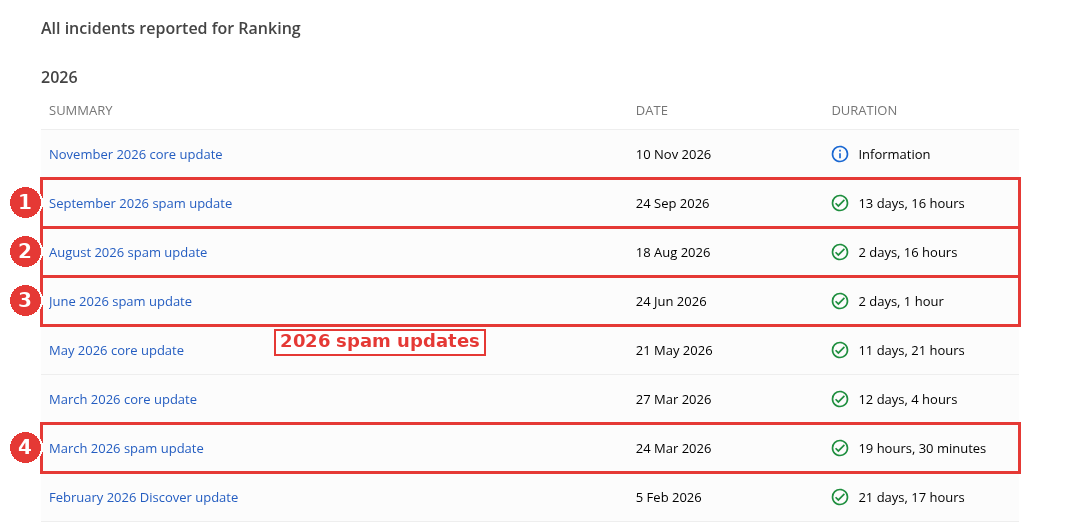
Ranking history, 2026 spam updates numbered, captured Nov 15, 2026.
Step 1: Rule out a manual action
A spam update and a manual action can produce similar charts and need different fixes, so check which one you have before anything else.
Google's spam updates documentation (last updated December 10, 2025) describes a spam update as a notable improvement to its automated spam detection systems, such as the AI-based one it calls SpamBrain. Sites that break the policies may rank lower or drop out of results. The spam policies page adds a second route: human review, which "can result in a manual action".
Open Search Console, go to Security & Manual Actions, then Manual actions. Our capture shows three things:
The report sits in the left menu, in the Security & Manual Actions group.
The property's status reads "No issues detected", with a green tick.
Nothing listed for this property.
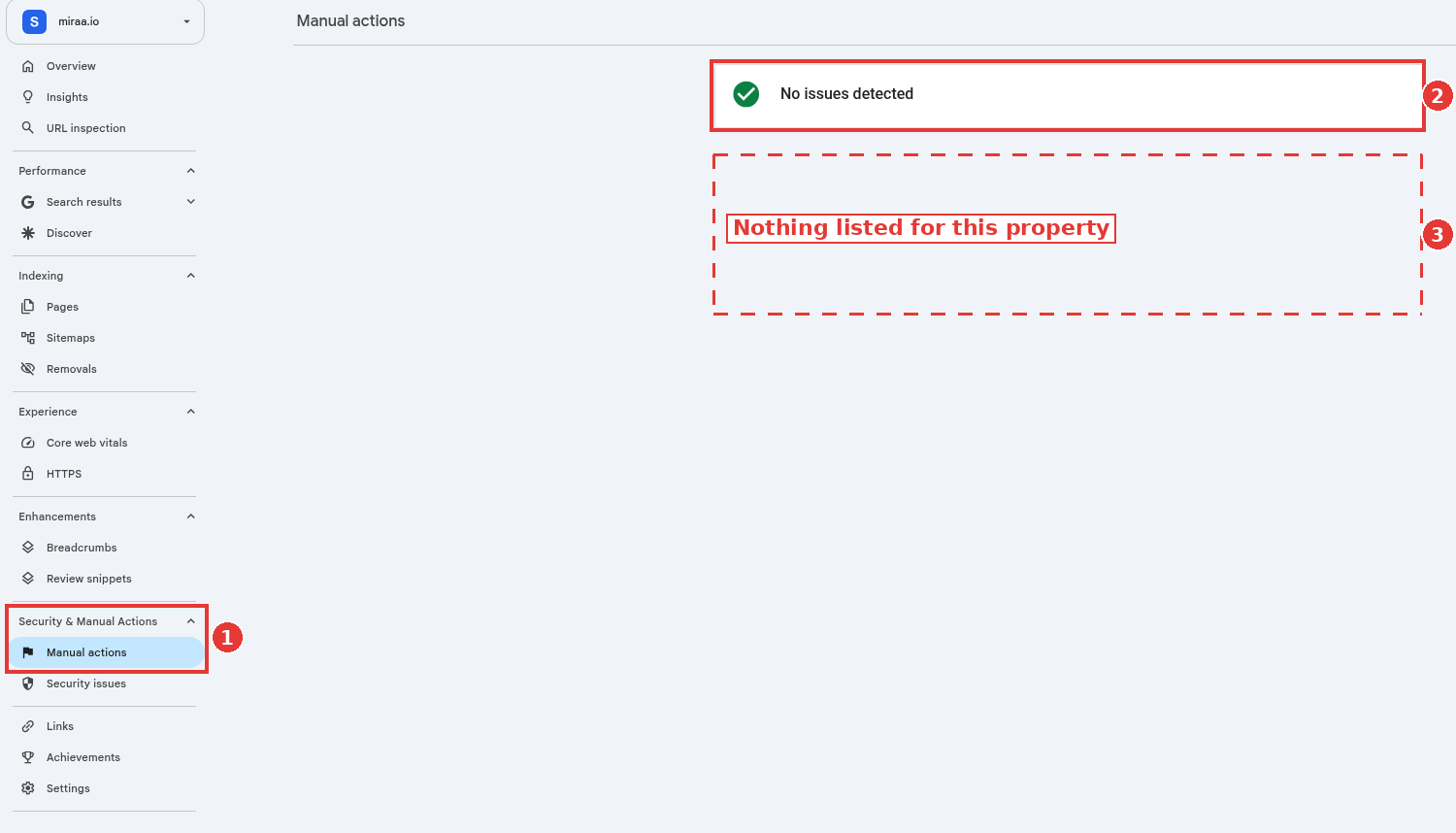
Manual actions report with no issues, captured Nov 14, 2026.
If your report also reads "No issues detected", I treat the drop as the automated side and move to step 2. If it lists an issue, handle that first; step 5 covers the dated guidance for that case.
Step 2: Line the drop up with a spam rollout
Three of the four 2026 spam windows lasted under three days, so a date range that's off by a week can hide what happened. Use the dashboard's start and end times, then compare equal windows on each side of the rollout and leave the rollout days out of both.
The organic traffic drop checklist covers setting up Compare mode in Search Console, so this section covers only the spam-specific part. For the September 2026 update, which ran September 24 to October 8, a clean pair is August 27 to September 23 against October 9 to November 5.
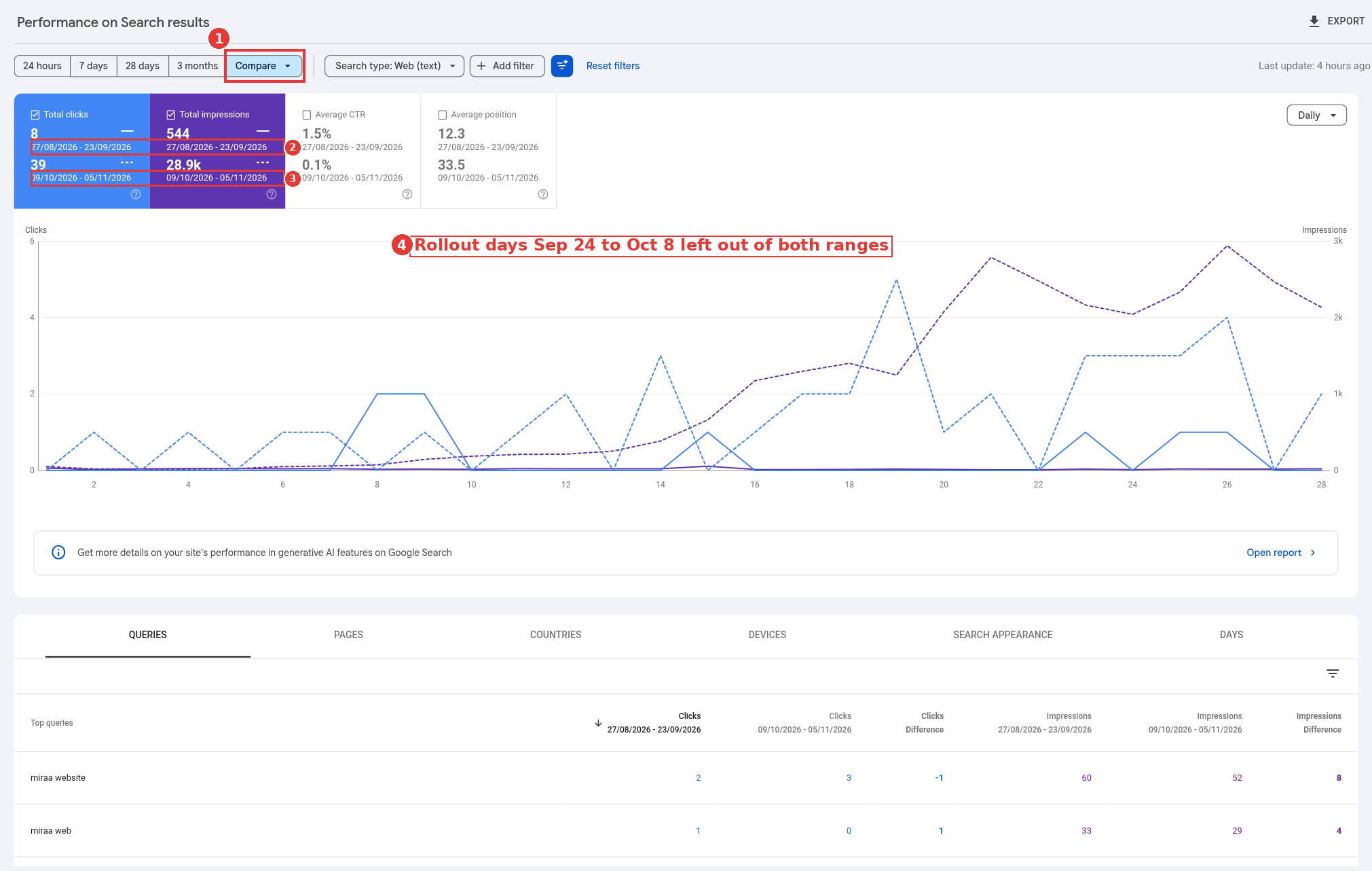
Compare view around the September 2026 spam update, captured Nov 14, 2026.
The property in that capture didn't drop, which is what a clean result looks like: totals in the after window match or beat the before window, and no page type loses ground. On a site hit by the update, look for losses concentrated in one section. Switch to the Pages tab, sort by the change in clicks and write down which folders or templates the losers share. That pattern points you to the policy.
Step 3: Match the losses to one spam policy
Google's spam policies page (last updated August 28, 2026) lists more than a dozen policies. Four of them map to the kinds of sites SaaS and content teams build, and they're the ones this guide covers.
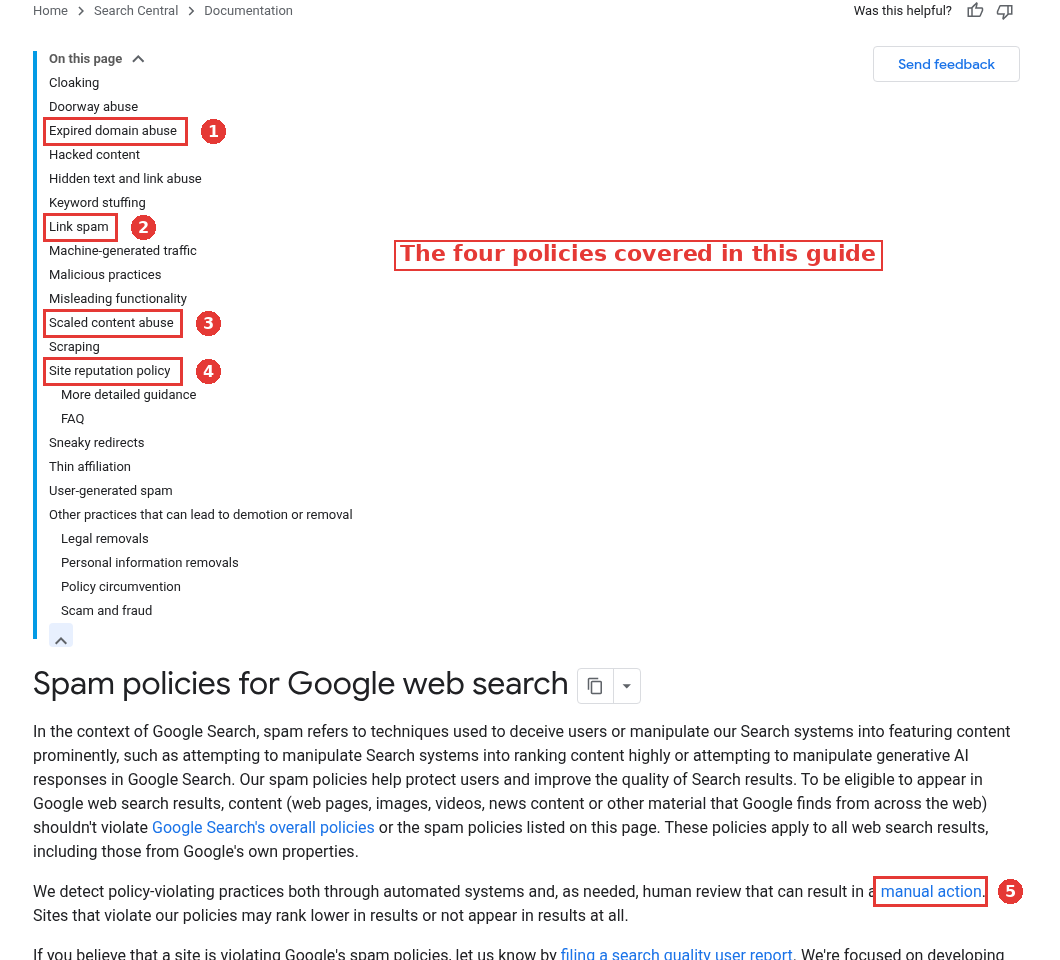
Spam policies contents, four policies numbered, captured Nov 15, 2026.
Scaled content abuse
Google defines this as producing many pages mainly to manipulate rankings, however they're made. One of its listed examples is using generative AI tools to generate many pages "without adding value for users". Others include scraping feeds and stitching content from several sources together.
Look for losing pages that share a template: hundreds of location pages, integration pages with one changed sentence, or glossary entries nobody edited. If your losses cluster on a template like that, this is your likely match. AI use on its own isn't the trigger; we covered that line in does Google penalize AI content.
Site reputation abuse
This covers third-party pages published on a host site to borrow its ranking signals, such as a coupon section run by an outside partner on a news site. Google renamed it the site reputation policy and, from August 30, 2026, enforces it differently by region, per its August 28, 2026 Search Central post.
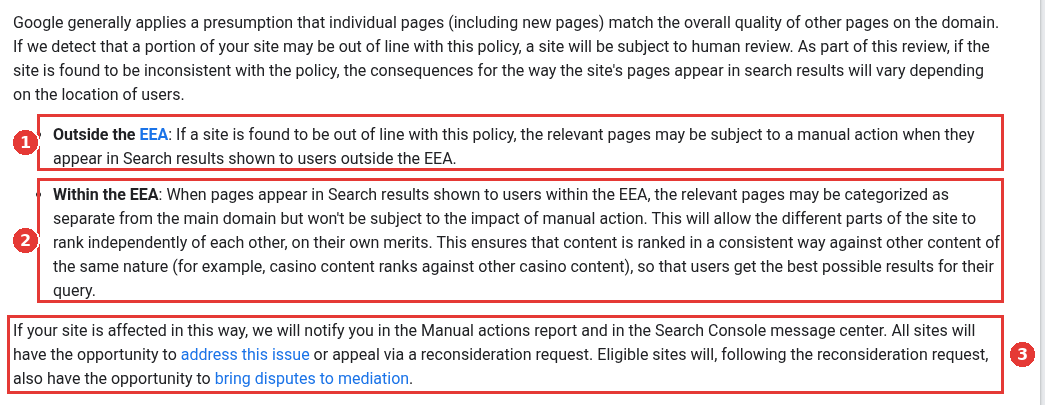
Site reputation policy, EEA rules numbered, captured Nov 15, 2026.
Outside the European Economic Area, pages found in breach after human review can get a manual action. Inside the EEA, Google treats those pages as separate from the rest of the site, so they rank on their own merits without a manual action. Either way, Google notifies the owner in the Manual actions report and the message center, and the owner can appeal. If you host partner content in a subfolder, check whether your team controls it closely. If it doesn't, move it to a separate site or put it under noindex.
Expired domain abuse
This means buying a lapsed web address and reusing it mainly to rank low-value content on its old reputation. For SaaS teams, one case to check is an acquired site that was redirected or rebuilt with content that has nothing to do with what it covered before. If your losses started on pages that live on a bought site, compare what it published before you owned it with what it publishes now.
Link spam
Buying or selling links that pass ranking credit, large-scale link exchanges and automated link building all fall here. Link spam updates are the harshest case for recovery. The spam updates documentation (last updated December 10, 2025) states that ranking benefit from spammy links that the systems neutralize "cannot be regained". Removing the links stops future risk; it won't bring the old positions back.
Outside vendors deserve a direct question. In a January 8, 2026 Search Central video on working with third parties, Google advises site owners to ask anyone working on their SEO whether a recommendation goes against Google's guidance, and points out that going against it can lead to a spam action (13:41 to 14:07). Put that question in writing for every link-building or content vendor you use.
Step 4: Clean up across the whole site
Fixing only the pages that lost traffic leaves the pattern in place. The spam updates documentation explains that improvement can come once Google's automated systems learn "over a period of months" that the site complies. That learning is site-wide.
Work in this order:
List every URL that matches the pattern you found in step 3, including pages that didn't lose traffic yet.
For each one, decide whether it can be made useful with real effort. If yes, rewrite it with information a reader can't get from the template. If no, remove it, merge it into a stronger page or set it to noindex.
Remove or neutralize paid and exchanged links. Ask the linking sites to add rel="sponsored" or remove the link; for links you can't get removed, use the disavow links tool and keep a log of what you submitted.
Move third-party content you don't control off the main site, or noindex it.
Log every batch of changes as a Search Console annotation with the date and a short note, so you can match later movement to a specific batch.
Two habits slow recovery down. Changing the same pages again every week resets your read on what worked. Swapping thin pages for a new set of thin pages with different wording keeps the same pattern the systems already flagged.
Step 5: Handle a manual action and the reconsideration request
If step 1 turned up a manual action, it comes before the update work. Google's spam policies page spells out the process only for the site reputation policy. Google notifies the owner in the Manual actions report and the Search Console message center, and every site can fix the issue or appeal through a reconsideration request. Eligible sites can then take a dispute to mediation. For sites in the EEA, the policy's FAQ describes a new reconsideration process in which Google commits to answering within a short timeframe and explaining more of its reasoning.
For a manual action under any other policy, match it to the policy it falls under and apply steps 3 and 4 to that pattern across the site. Keep a record of every URL you changed and every link you removed, so the evidence is ready if you need it.
How long Google spam update recovery takes
There's no fixed date. Google's spam documentation talks about months, and the link spam case may never return to where it was. A practical timeline looks like this:
Weeks 1 to 2: confirm the cause and build the full URL list.
Weeks 3 to 6: ship the cleanup in two or three batches, with annotations.
Months 2 to 6: watch the affected section against the clean baseline, without rewriting the same pages again.
The full week-by-week version, with a tracker, is in our 90-day SEO traffic recovery plan for this cluster.
A worked recovery, with our math
Take a hypothetical SaaS site with 400 integration pages built from one template. Sixty of them have real setup steps, screenshots and support links. The other 340 change only the partner name. After the September 2026 spam update, weekly clicks to the integrations folder fall from 900 to 250, while the blog and product pages hold steady.
Our math for the plan: the 340 thin pages are 85% of the folder (340 / 400). Suppose the 60 strong pages earned 40% of the folder's clicks before the update, so about 360 a week. A realistic first target after cleanup is getting back toward that 360, the share the useful pages earned on their own. The other 540 weekly clicks came largely from pages that matched the scaled content pattern, so I wouldn't plan on those 540 weekly clicks coming back.
The cleanup itself: keep and expand the 60, merge 90 near-duplicates into category pages, noindex or remove the remaining 250, annotate each batch, then leave the folder alone for at least two months while you watch it.
If it's a core update instead
Core updates reassess how useful pages are compared with everything else that ranks for the same queries, so there may be no policy breach to remove at all. If the dashboard shows a core update in your window, and no spam update, the cleanup steps above are the wrong tool. This cluster also has a later guide on why sites don't recover from core updates.
For SaaS sites where the problem pages are tangled up with templates, redirects and indexing rules, the cleanup tends to be engineering work as much as content work, and it's the kind of project a technical SEO agency can scope with the product team.
FAQ
Does Google notify you after a spam update?
Google's spam updates documentation doesn't mention a per-site notice. It tells sites that see a change after a spam update to review the spam policies. The notice Google does describe, in the Manual actions report and the Search Console message center, is for site reputation actions on the spam policies page.
Can I file a reconsideration request after a spam update?
Google's dated guidance ties reconsideration requests to manual actions; the spam policies page covers one for site reputation actions. For an update, the spam updates documentation describes a different path: change the site, and improvement may come as automated systems learn over a period of months that it complies.
Should I disavow links after a link spam update?
Disavowing links you paid for or can't remove is reasonable, and logging what you disavowed helps later. It won't restore ranking benefit those links once passed, because Google states that benefit is lost.
Will deleting AI-written pages fix a spam update hit?
Only if those pages are the scaled pattern the systems flagged. Deleting good pages along with weak ones costs traffic you didn't need to lose. Sort first, then delete what can't be improved.