
Last updated: November 18, 2026
The May 2026 core update finished on June 2. The next web core update began 161 days later, on November 10, 2026, according to the public ranking-status log. Guidance on core updates notes that if improvements have not shown an effect after a few months, the wait may run until the next core update. So the first check for a site not recovering from a Google core update is the calendar. The content comes after.
Confirm the drop first with the five signs a Google algorithm update hit your site. If the window matches a spam rollout, switch to the spam update recovery guide. Once the cause is clear, the week-by-week work lives in the 90-day SEO traffic recovery plan.
To set Compare dates, search type and annotations in the Performance report, use the organic traffic drop checklist. On top of that setup, the core updates documentation asks for one comparison: a full week after the rollout ends, set against a week before it started.
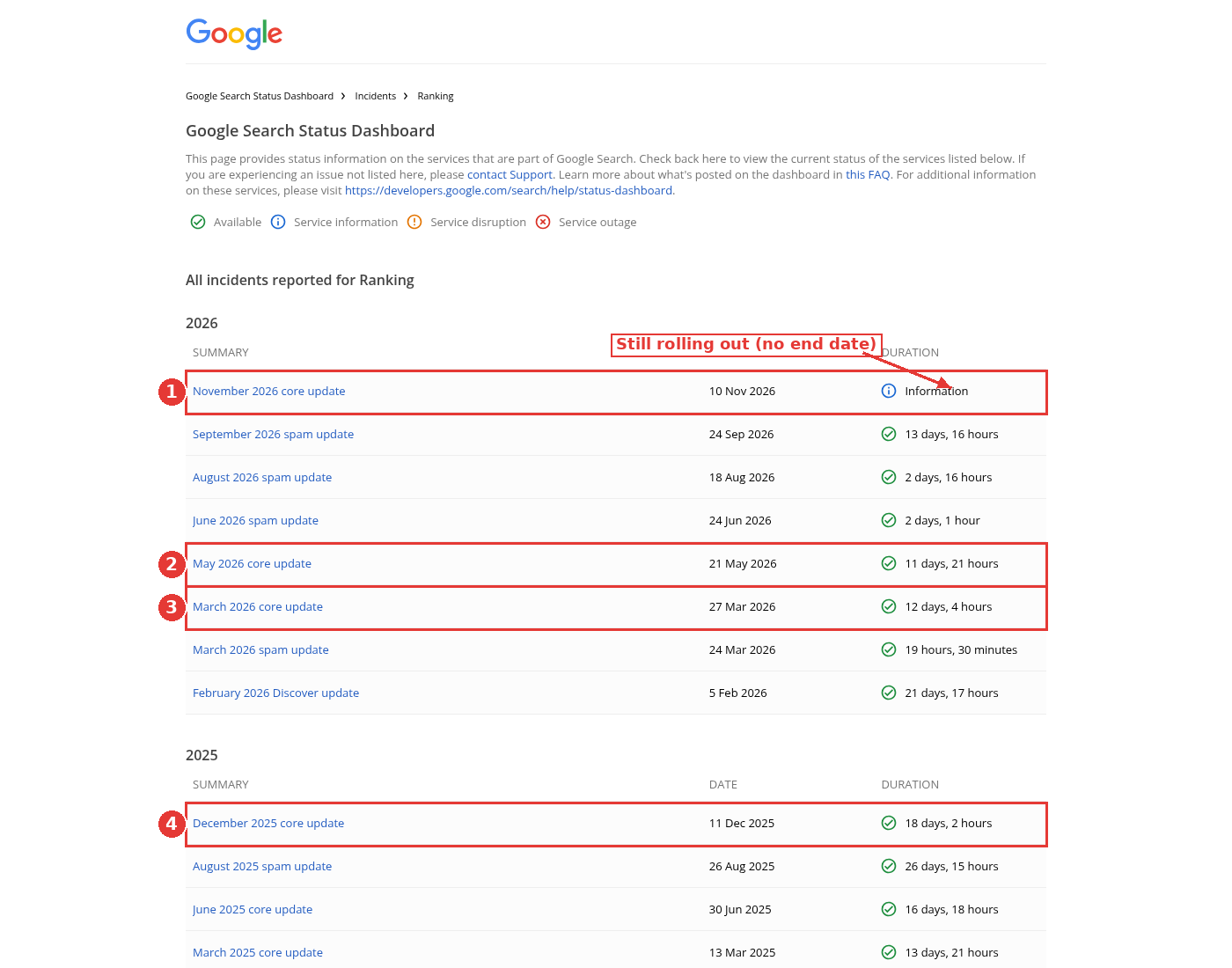
Ranking status log, four core updates boxed, captured Nov 15, 2026.
1. You're reading the chart before the rollout has ended
The first step in the core updates documentation is simple: confirm the update has finished, and write down the start and end dates from the status log. As of November 15, 2026, the November 2026 core update still has no end date. The incident record puts the start at November 10, 2026 at 10:06 US/Pacific, and the release note puts the rollout at up to two weeks.
Traffic that moves during those days is not a recovery reading. I would not call a mid-rollout bounce a comeback, and I would not call a mid-rollout dip a final loss. Wait until the log shows an end date, then wait the extra week the documentation asks for before you judge the new baseline.
2. The before and after windows are the wrong weeks
The same documentation is specific about dates. Wait at least a full week after the core update completes, then compare that week with a week before the rollout started. Include the rollout days in either side and you mix unstable days into the result.
A December 10, 2025 Search Central post on weekly and monthly views in the Performance report is useful here too. Daily charts can make a week-to-week comparison look noisier than it is, because weekends do not line up. Switch the chart from Daily to Weekly once the windows are set, then look at the Pages and Queries tabs.
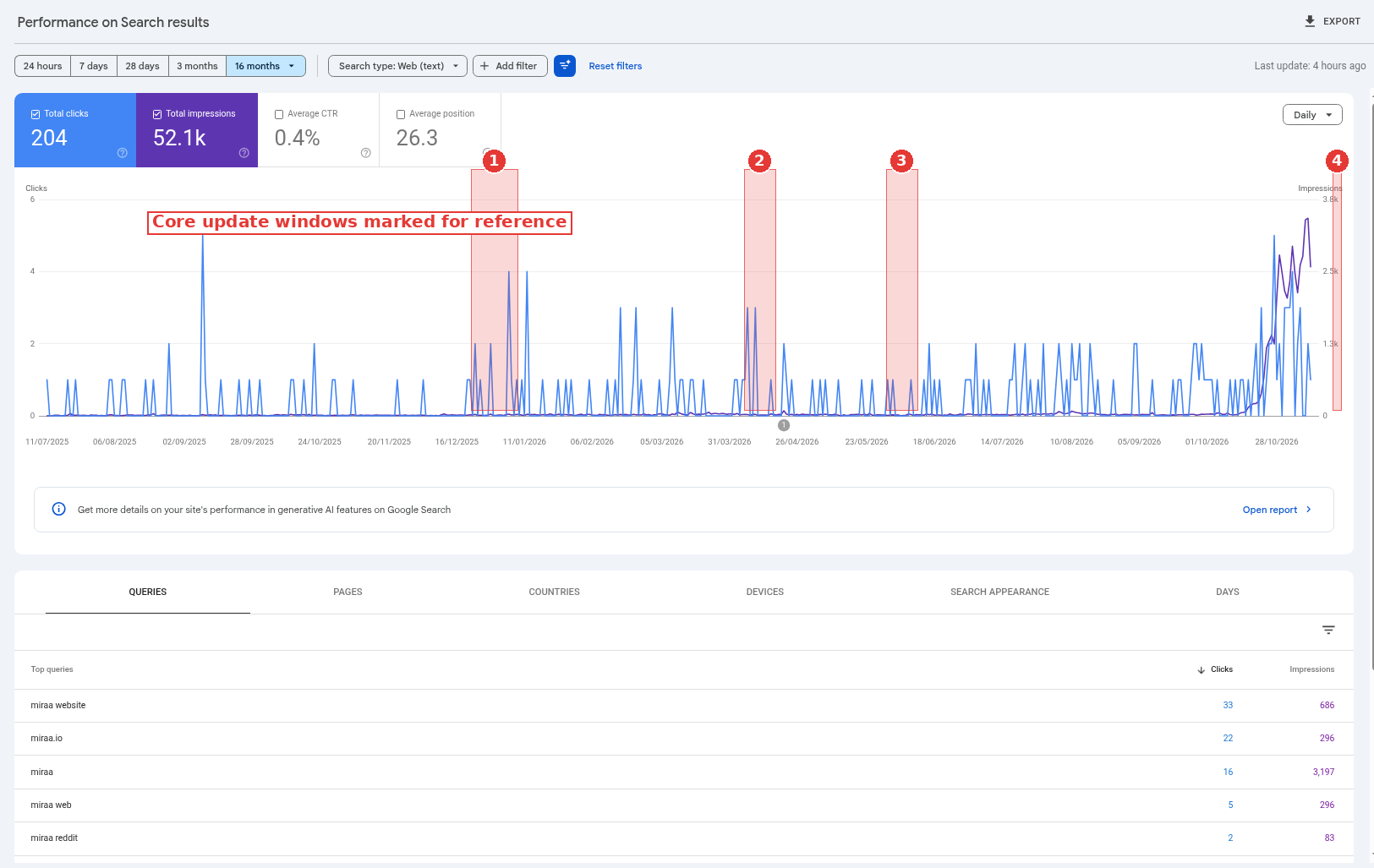
16-month Performance report, core update windows marked, captured Nov 14, 2026.
The 16-month view is the place to mark those windows, so a yearly dip cannot pass for a recovery stall. The property in the screenshot is a healthy baseline, not a hit site. The shaded bands are there so you can see where the last four core updates sat on a long chart, not because this site lost clicks in those windows.
A Queries comparison filtered to one page is the next click. The November 2026 core update is still rolling out, so the official method, a full week after the end against a week before the start, cannot be run on it yet.
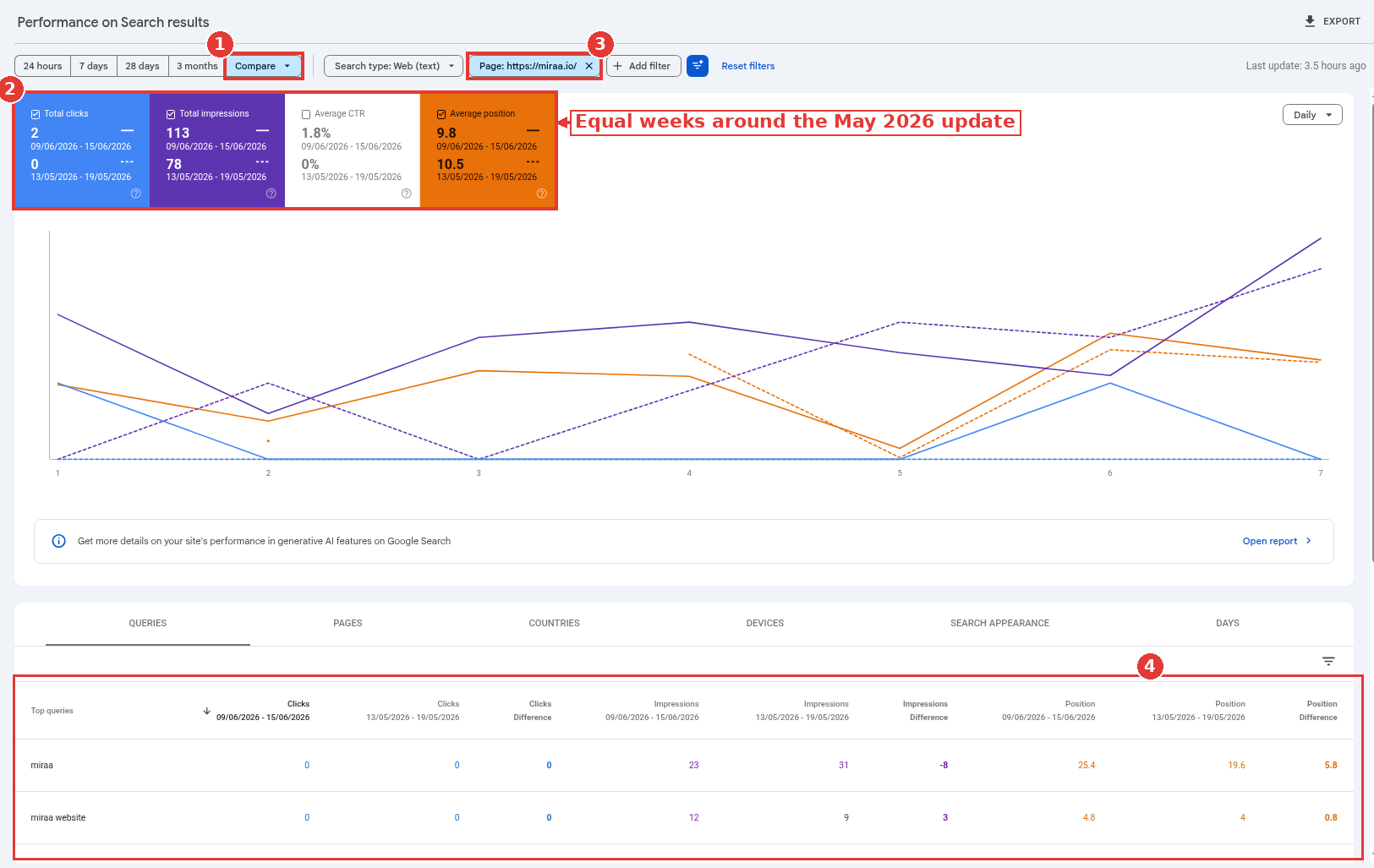
Equal weeks around the May 2026 update, captured Nov 15, 2026.
The screenshot uses the May 2026 core update instead: one full week after that update ended on June 2, set against a week before it started on May 21.
3. The drop was never a core update
The status log lists more than core updates. In 2026 it also logged four spam updates, a February feed-surface update, and the November core update still in progress. A drop that starts on September 24, 2026 is in a spam window, not a core window. A feed-only slide will not show up the same way in the Search results Performance report.
If the five signs in the diagnosis guide do not hold, stop treating this as a core update problem. Technical faults, seasonality and reporting glitches have their own checks in the traffic drop checklist. Core-update recovery work will not fix a noindex tag.
4. The position drop is small, and a rewrite would be the wrong move
The documentation splits the outcome in two. A small drop, such as position 2 to 4, does not need drastic action; it even warns against changing content that is already performing well. A large drop, such as position 4 to 29 across a wide range of terms, is the one that gets a deeper look.
I would leave a page that slipped two spots alone, at least through the first comparison week. Chasing a small move with a rewrite creates a second change to read, on top of the update you are trying to understand.
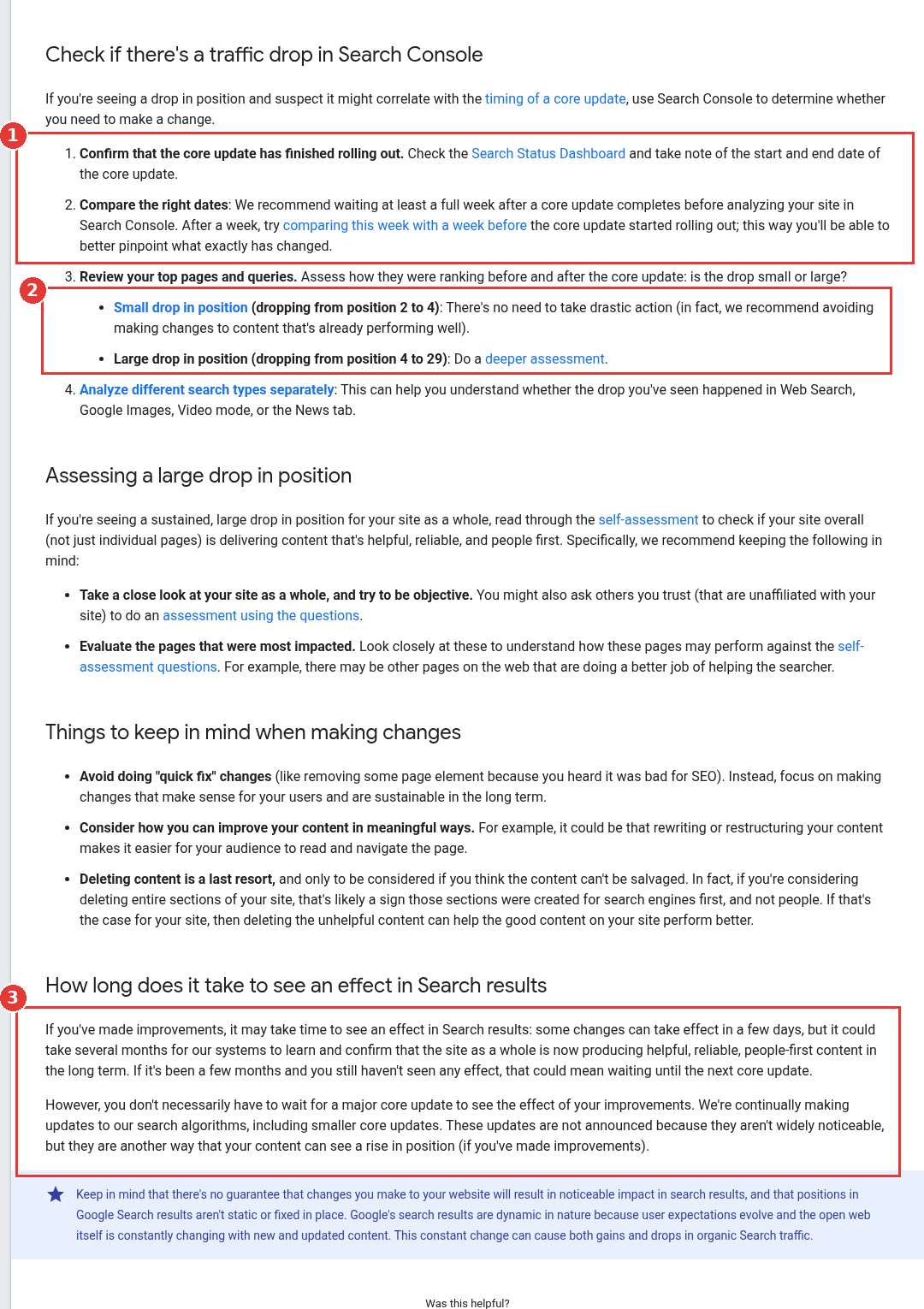
Core updates documentation, wait and timing steps boxed, captured Nov 15, 2026.
5. Site-wide totals are hiding a clustered loss
Step 3 of the official check is to review top pages and queries, and step 4 is to split search types. Web, Image, Video and News do not have to move together. A blog template can fall while the pricing page holds. A site total that looks "still down" can be five URLs, or it can be everything.
Google's December 2025 Performance report walkthrough moves from the chart into the tables, looking for expected queries that never appear and for important pages missing from the Pages list (08:14 to 08:31). That is the right next click after the site total: sort the Pages tab by how much clicks moved, then open the same compare on Queries, Countries and Devices.
If the loss is one template, the fix is the template. If it is one country or one search type, a site-wide rewrite is the wrong unit of work.
6. The changes were quick fixes, not durable ones
The documentation tells site owners to avoid "quick fix" changes, such as pulling a page element because someone heard it was bad for SEO. It asks for changes that make sense for users and can last. Rewriting a title every other day, stripping a section on a rumor, or shipping a new H1 without touching the page body all count.
A week of tiny edits is itself a reason recovery has not shown up yet, because you no longer have a clean before and after. The 90-day plan is built around batches and a change log for this reason. Annotate each batch on the day it ships, then leave the pages alone long enough to read the result.
7. Not enough time has passed for the systems to learn
Some changes can take effect in a few days. The same paragraph allows several months for the systems to learn and confirm that the site as a whole is now producing helpful, reliable, people-first content. If it has been a few months with no effect, that could mean waiting until the next core update.
That second sentence is why the 161-day gap matters. A plan that only ends when the next core update lands has no fixed date. The documentation also notes you do not have to wait for a major core update to see an effect, because smaller, unannounced core updates run in between. I still would not use "the next named update" as the only checkpoint.
8. Only a few pages were patched, and the site as a whole was not
For a sustained, large drop, the documentation points to a self-assessment of the site overall, not the hit URLs alone. The questions live on the "creating helpful, reliable, people-first content" page, last updated October 5, 2026. It also asks you to evaluate the pages that were most affected, and notes that other pages on the web may now be doing a better job of helping the searcher.
A new introduction on two posts will not carry a site that still has thin supporting pages, copied sections or titles that over-promise. Ask someone unaffiliated with the site to run the same questions. If they would not bookmark the page, the official test is already failing.
9. Deleting sections, or only waiting, took the place of the actual work
Deleting content is a last resort, and only for pages that cannot be salvaged. The documentation is blunt: if you are considering deleting entire sections, that is likely a sign those sections were created for search engines first. In that case, removing the unhelpful content can help the rest of the site. It is not the opening move.
The other stall is doing nothing and waiting for the next core update. Officially, there is no guarantee that the changes you make will produce a noticeable effect, and positions are not fixed, because the open web keeps changing. That is a reason to measure, not a reason to freeze. The work still has to happen on your calendar.
How to respond when you're not recovering from a Google core update
Once the rollout has an end date, run the official comparison, then sort the losses. Small, isolated moves can wait. Large, site-wide or template-wide moves go into the 90-day plan: freeze the baseline, label every URL, ship fixes in batches and measure week 12 against that baseline.
For SaaS teams whose losses sit on comparison, integration and pricing pages that feed pipeline, the work of improving weak pages and merging overlapping ones is the expensive part, and it is the kind of program a B2B SaaS SEO agency can take on alongside an in-house team.
A worked recovery stall, with our math
Take a hypothetical B2B SaaS help center that lost 40% of clicks after the May 2026 core update, which ended on June 2. The team rewrote 12 article titles in the second week of June, then watched the site total through August. Clicks stayed flat, so they assumed they were stuck until the next core update.
Our math on that scene: the official comparison should have been a week after June 2, so June 9 to 15, against a week before May 21, so May 13 to 19. Title-only edits on 12 of 80 lost URLs are not a site-wide improvement. By September, only three months had passed, which is still inside the "several months" window, and the next web core update was still two months away. The stall was the method, not a closed case.
FAQ
How long should I wait after a core update before judging recovery?
Wait until the status log shows an end date, then wait at least one more week and compare that week with a week before the rollout started. After you ship real improvements, give the systems weeks to months, not days.
Can I recover before the next core update?
Yes. The core updates documentation is clear that you do not necessarily have to wait for a major core update, because smaller, unannounced core updates run in between. There is still no guarantee of a visible lift.
What if only some pages recovered?
That is expected. Review the pages and queries that moved, and the ones that did not, then assess the site as a whole. A mixed result is not a reason to rewrite the URLs that held.
How do I tell a core update stall from a spam update?
Use the status log and the five-sign diagnosis. Spam rollouts have their own dates and their own cleanup. If the window is a spam update, follow the spam recovery guide.