

Last updated: November 17, 2026
The biggest search engine released its May 2026 core update on May 21 and its next one on November 10. By our count from its public status log, that's 173 days apart. The gap before that, from the March 2026 core update on March 27 to May 21, was 55 days. The one before it, from the December 2025 core update to March 27, was 106.
Google's own guidance on core updates notes that if improvements haven't shown an effect after a few months, the wait may run to the next core update. With gaps between 55 and 173 days in the last year alone, a plan that hangs on "the next update" has no fixed end date. A 90-day SEO traffic recovery plan works the other way round: it sets the work, the checkpoints and the measurement on your calendar, and treats any update as something that lands inside it.
This plan assumes you already know why traffic fell. If you don't, work through the organic traffic drop checklist first, then use the five signs of an update hit to decide whether a Google update caused it. The plan below starts the week after that diagnosis.
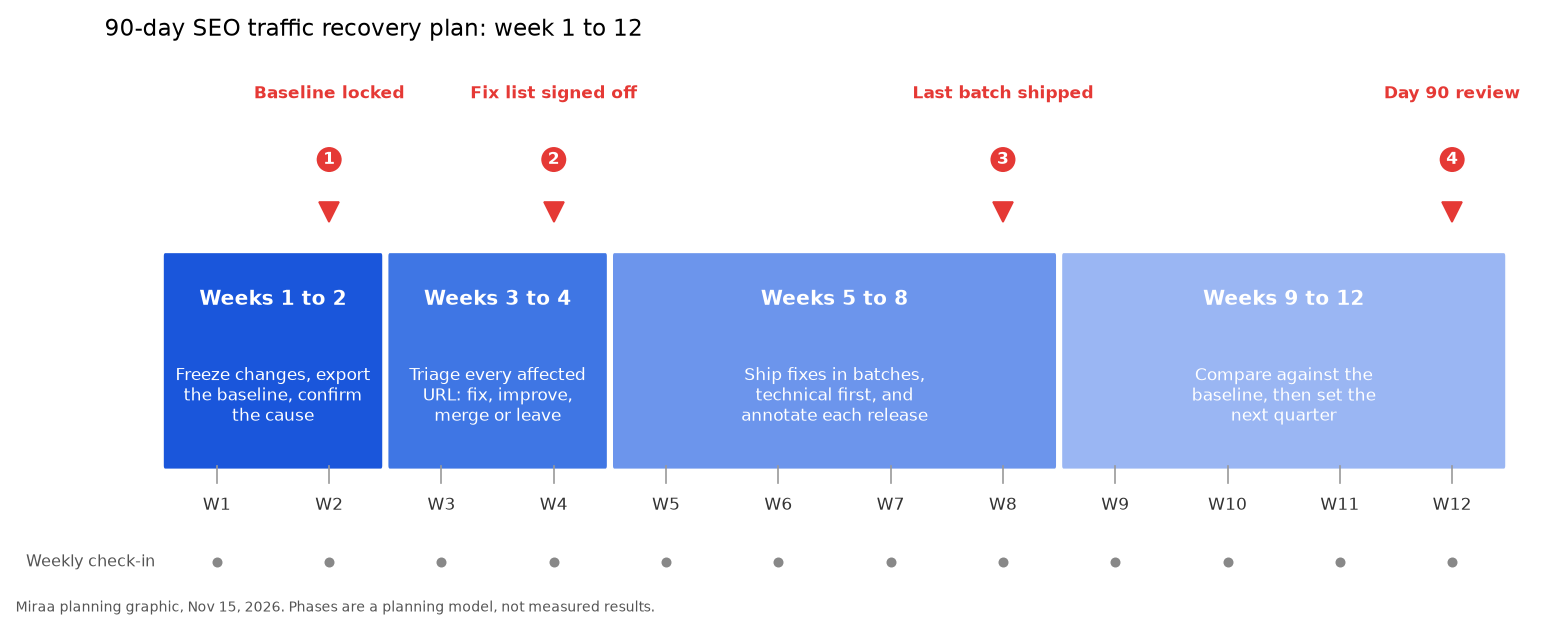
Week 1 to 12 recovery plan, Miraa graphic, built Nov 15, 2026.
Weeks 1 to 2: freeze changes and lock the baseline
The first two weeks are about keeping the evidence clean. Every redesign, migration or bulk content edit you ship now makes it harder to tell later what moved the numbers.
Freeze site-wide changes that aren't fixes. Template changes, URL changes and large content edits wait until week 5.
Export 16 months of Search Console data. In the Performance report, set the date range to 16 months and use Export to save it to Google Sheets or as a CSV. Search Console doesn't keep data past 16 months, so this export is your permanent record of the before period.
Pick a baseline window. A clean choice is the last three complete months before the drop. Write down average weekly clicks, impressions and average position for the whole site and for each affected folder.
If the drop lines up with a core update, wait. Google's core updates documentation (last updated December 10, 2025) recommends waiting at least a full week after a rollout completes, then comparing that week with a week before the update started.
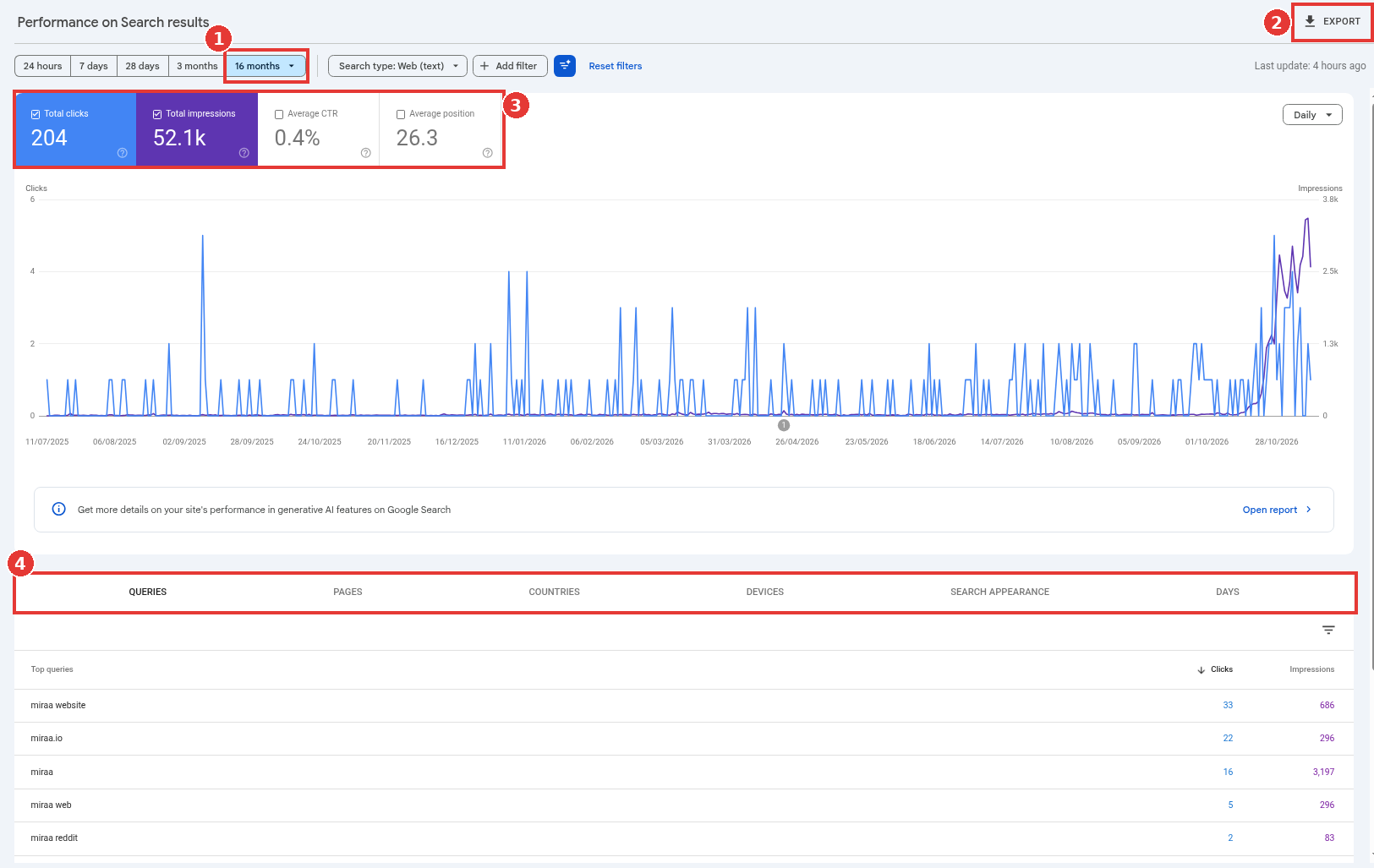
Performance report, 16 months and Export boxed, captured Nov 14, 2026.
The export holds the tables from the report tabs, so you get queries, pages, countries and devices in one file. Save it somewhere your whole team can reach, and name it with the export date.
A baseline only works if it reflects normal months. The chart below shows a healthy property's monthly click-through rate and average position, with a three-month window marked. The red line is the window's average click-through rate, the number later weeks get compared against.
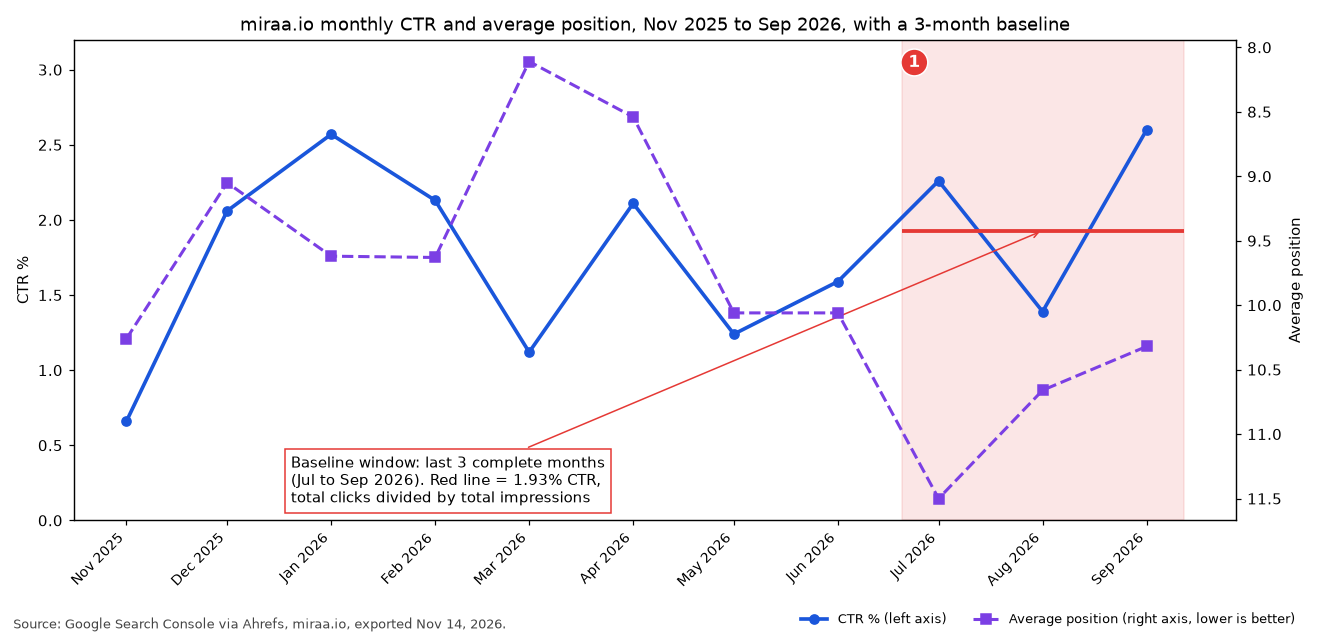
Baseline window on GSC via Ahrefs data, built Nov 15, 2026.
If one of the three months had a holiday dip, a launch spike or a tracking problem, swap in the next clean month and note why.
Milestone 1, end of week 2: baseline locked, cause confirmed in writing, and the team agrees on both.
Weeks 3 to 4: triage every affected URL
Recovery plans stall when the team argues about pages one at a time. Sort them in bulk instead.
Pull every page that lost clicks between the baseline window and the after window, then add the pages that share a template or folder with the losers even if they held up. For each page, look at the size of the ranking change. Google's guide to debugging traffic drops (last updated December 10, 2025) separates a small drop, such as position 2 to 4, from a large one, such as 4 to 29 across many terms. A small drop may only need a better page. A large one across a whole template points at the template.
Give every URL one of four labels:
Fix: a technical fault, such as a noindex tag, a broken canonical, a redirect loop or a page that renders empty.
Improve: the page answers the query but falls short of what ranks above it now.
Merge: two or more pages compete for the same query, and one stronger page would serve readers better.
Leave: the page was never a good match for the queries it lost, or the loss is too small to act on.
Removal goes last. The core updates documentation calls deleting content a last resort, for pages that can't be salvaged.
Milestone 2, end of week 4: the fix list is signed off, each row has an owner, and the order of batches is set.
Weeks 5 to 8: ship fixes in batches and log each one
Ship technical fixes first, because they're quick to verify and they affect how every other page gets crawled. Then move to content, one folder or page type per batch.
Log each batch as a Search Console annotation on the day it goes live. In its Q4 2025 Search Central update, Google announced that custom annotations in the Performance report were open to everyone and are shared with the property's other Search Console users (01:00 to 01:10). That makes them a shared changelog: your writers, your developers and any outside partner with access see the same dates on the same chart. The traffic drop checklist covers how to add one.
A few rules keep the batches readable:
One batch per week at most, so each annotation lines up with one change.
Don't touch a batch again for at least three weeks after it ships.
Request indexing in URL Inspection only for a handful of key pages; sitemaps cover the rest.
Keep a short note in the tracker of what each batch changed and why.
Milestone 3, end of week 8: the last batch has shipped, and the freeze lifts for unrelated work.
Weeks 9 to 12: measure against the baseline
Now compare. For the site and for each folder you worked on, put weekly clicks, impressions and average position next to the baseline averages from week 2. Read impressions and position alongside clicks, since a recovering page can gain both before its clicks catch up.
Expect uneven results. The core updates documentation notes that some changes take effect within days and others can take several months for Google's systems to confirm. A folder that's flat at week 12 might still be in that window. A folder that has fallen further since its batch shipped needs a second look at the fix.
Milestone 4, day 90: write a one-page review. List what recovered, what didn't, what you'd change, and the plan for the next quarter.
The tracker: one row per week
Keep the whole plan in a single Google Sheet. The template below has one row per week, with columns for the workstream, the URL group, what shipped, whether you annotated it, the week's Search Console numbers and a comparison with the baseline.
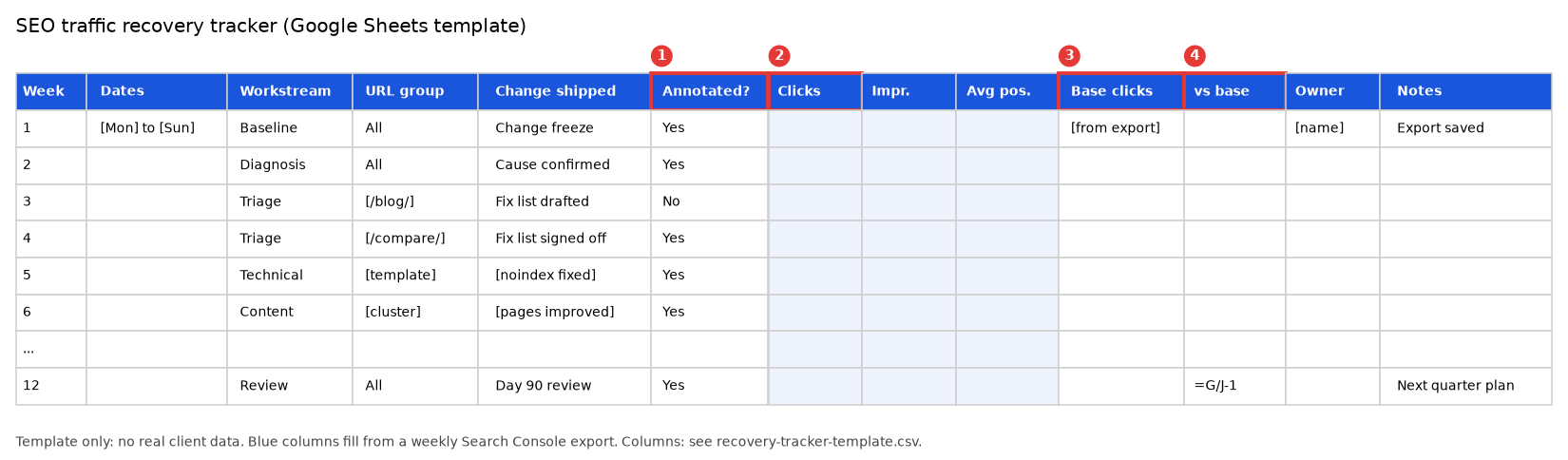
Recovery tracker template, no client data, built Nov 15, 2026.
The four numbered columns do most of the work. The annotation column keeps the chart and the tracker in step. Clicks come from a weekly export. Baseline clicks stay fixed from week 2. The comparison column divides the week's clicks by the baseline and subtracts one, so a week at the baseline reads 0%.
What to report each week
Leadership doesn't need the whole tracker. A weekly update of five lines is enough:
Clicks this week against the baseline, as a percentage.
What shipped, with the batch number.
What's next week.
Anything that moved the wrong way.
Any Google update that started or ended this week, from the dashboard.
That last line matters during long rollouts. The November 2026 core update was still rolling out as of November 15, 2026, so for plans starting now, weeks 1 and 2 overlap it.
A worked 90-day plan, with our math
Take a hypothetical SaaS site with a baseline of 3,000 weekly clicks. After a core update finishes, the site settles at 2,100, a 30% drop (900 / 3,000). The Pages tab shows that comparison and alternatives pages lost 700 of the 900 clicks, and the blog lost the other 200, spread thinly.
Our math for the targets: the comparison folder is where the loss is concentrated, so it gets the content batches in weeks 5 to 8. A realistic week 12 target is winning back half of that folder's loss, 350 clicks, which brings the site to 2,450 a week, about 82% of baseline (2,450 / 3,000). The blog losses get the Leave label unless a page fell from the top three. If impressions for the comparison folder are back near baseline by week 12 and clicks lag, the next quarter's plan looks at titles and what now sits above those listings.
Even if traffic isn't fully back by day 90, the plan leaves a clean record of what was done and when, so the next decision rests on evidence.
How the plan changes by cause
The twelve weeks stay the same. The work inside weeks 3 to 8 changes with the cause:
Spam update: the triage becomes a policy audit, and every page matching the flagged pattern gets cleaned up, including ones that didn't lose traffic. Our guide to recovering from a Google spam update covers that audit.
Core update: most of the work is in Improve and Merge, and results can trail the work by months. Why some sites never recover from a core update gets its own guide later in this cluster.
Lost rankings without an update: start with Fix, and check for technical faults and competitor changes. A guide to recovering lost rankings is coming.
Site migration: the triage starts with redirects and old URLs that still get impressions. A guide to traffic drops after a website migration is scheduled.
If the clicks went to AI answers on the results page instead of to other sites, the same weekly rhythm applies, with different work inside it; our 90-day GEO plan covers that side.
For SaaS teams where the losing pages are comparison, integration and pricing pages tied to pipeline, the Improve and Merge work is the expensive part, and it's work a B2B SaaS SEO agency can run next to the in-house team.
FAQ
How long does SEO traffic recovery take?
Technical fixes can show up within days of recrawling. Content and quality changes take longer, and Google's core update guidance mentions several months. Ninety days is long enough to see which way each change is heading.
Should I wait for the next core update before doing anything?
No. The last three gaps between core updates ran from 55 to 173 days, and Google notes that improvements don't necessarily have to wait for a major update to take effect. Do the work now so it's in place whenever the systems reassess.
What if traffic keeps falling during the plan?
Check the dashboard for a new update, then check your annotations for a batch that shipped just before the fall. If neither explains it, rerun the traffic drop checklist on the new dates.
Can I run a recovery plan and new content at the same time?
Yes, outside the affected folders. Keep new launches away from the pages you're measuring so the tracker stays readable.