

Last updated: November 21, 2026
Strip the near copies out of a 30 million page sample of a public web crawl, and 40.66% of it goes. Computer science researchers at two Canadian universities and an industry lab reported that share in a preprint first posted on June 2, 2026. They counted a page as a near copy when most of its text matched another page in the sample. The crawl snapshot itself dates from 2024. The paper is about cleaning data for AI training, so treat the number as a sign of scale only.
Search engines deal with the same problem across the whole web. Google groups pages that look the same and keeps one of them, the canonical, in its results. Some duplicate content on a site is normal and does not break Google's spam policies.
Your job is narrower. Make sure Google keeps the URL you want, and stop your own site from making thousands of extra copies. The eight fixes below cover both. For crawl and index basics, the SaaS technical SEO checklist is the place to start.
One cause, seen from three sides
Duplicate content, canonical errors and index bloat are one cause seen from three sides.
Duplicate content: the same or nearly the same main text at more than one URL. It can be on your site or on someone else's.
Canonical errors: your signals and Google's choice do not match. You named one URL as the main one, and Google picked another, or your own signals point in two directions.
Index bloat: far more URLs known to Google than pages you wrote. Filters, sort orders, tracking tags and internal search results are the usual source.
All three come from many URLs serving one piece of content. So the fixes overlap, and most sites need more than one of them.
Duplicate reasons in the Page indexing report
The Page indexing report shows duplicates as reasons a page is not indexed. Three reasons matter here.
Status in the Page indexing report | What it means | Fixes to look at |
|---|---|---|
Alternate page with proper canonical tag | Google agreed with your canonical tag | None, if the main URL is indexed |
Duplicate without user-selected canonical | Google found copies and you named no main URL | 2 and 3 |
Duplicate, Google chose different canonical than user | Google ignored the URL you named | 3, 4 and 8 |
Many indexed URLs with parameters or filters | Your site makes more URLs than pages | 5, 6 and 7 |
The first status is the healthy one. Google found a copy, read your tag and agreed with it. A Google search advocate spoke about this in a Search Off the Record episode posted on July 16, 2026. He said Google often picks another URL on your own site as the canonical. He called it normal, because the content can still be found.
To see what Google picked for one URL, open it in the URL Inspection tool. Compare the user-declared canonical with the Google-selected canonical. If they match, there is nothing to fix for that page.
The eight fixes
1. Redirect copies you no longer need
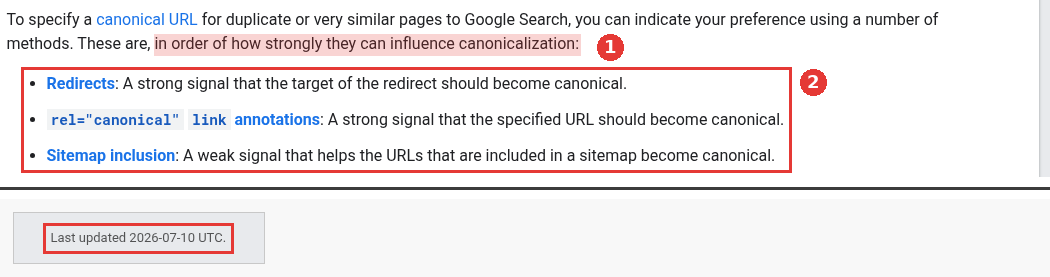
Google's guide to canonical methods lists them in order of how strongly they can influence canonicalization. Redirects come first, as a strong signal. Next come rel="canonical" link annotations, also a strong signal. Sitemap inclusion comes last, as a weak signal. The guide adds that these methods can stack and work better combined.
Use a 301 when the old URL has no reason to exist. Old blog paths, retired campaign pages and http versions of pages all qualify. Point it at the closest matching page.
Canonical methods, two parts of the same page, captured Nov 18, 2026.
2. Add one canonical tag to every copy, and to the main page
When a copy must stay live, add <link rel="canonical" href="..."> in its <head>, pointing to the main URL. Put the same tag on the main page, pointing at itself, as the same guide recommends.
Pick one way to send it. You can use the HTML tag or an HTTP header. Using both is more error prone. If your site renders with JavaScript, set the canonical in the HTML source and do not let scripts change it.

A self-referencing canonical tag in page source, captured Nov 18, 2026.
3. Make every signal name the same URL
Google weighs many signals, and it trusts them more when they agree. The canonical guide warns against naming one URL in a sitemap and another in the canonical tag.
Check four places for each important page:
The canonical tag.
The sitemap entry.
Internal links in menus, footers and body text.
hreflang tags, if you have language versions.
Internal links are the one most teams forget. If the nav links to /pricing/ and the canonical points to /pricing, you are sending two answers.
4. Fix protocol, www, case and slash variants at the server
These copies come from server settings, so fix them once at the server. Pick https, one host (with or without www) and one trailing slash style, and redirect everything else.
Case matters too. Google treats /APPLE and /apple as two different URLs in its URL structure guide. If your server serves the same page for both, convert URLs to one case. Microsoft Bing's webmaster team lists the same causes in a December 19, 2025 post on duplicate content.
5. Strip tracking and session parameters
Links from emails, ads and partner sites often carry utm_, gclid or session tags. Each tag makes a new URL for the same page. The URL structure guide asks you to trim parameters that do not change the content.
Keep these URLs out of your sitemap and internal links. Give each page a self-referencing canonical, so a tagged copy points back to the clean URL. On SaaS sites, check the pricing page toggles too: monthly and yearly views often load at separate parameter URLs.
6. Stop crawling of filters and sort orders you never want indexed
Filters on a docs library, template gallery or integrations list can combine into thousands of URLs. Those URLs cause overcrawling and slow the discovery of new pages.
If you do not need filtered views in search, block them in robots.txt with rules such as Disallow: /*?*sort=. Some filtered views may deserve to rank. Keep those crawlable, use & between parameters and keep the filter order fixed. Return a 404 when a filter combination has no results.
A robots.txt block stops crawling. It does not pick a canonical. Google may still index a blocked URL without its content. Use it for URLs that were never indexed, or after the copies have left the index.
7. Keep internal search results out of the index
Search boxes create a new URL for every query, and people can link to any of them. In a July 30, 2026 episode on site search pages, a Google search advocate gave two options. Block the search path in robots.txt, or serve those pages with noindex.
He also flagged two mistakes. The removal tool in Search Console hides URLs in search but does not stop crawling. A 500 error on search pages makes Google slow down crawling of the whole site. For the robots.txt rule, one clean pattern such as Disallow: /search? is easier to maintain than a file full of special cases.
8. Merge pages written for the same intent
Some duplicates are pages your team wrote twice. Think of two posts on the same question, or a campaign page that repeats the product page. A location page with one word changed belongs here too.
Pages leave a duplicate group faster when they differ in a clear and significant way, which Google covers in its canonical troubleshooting guide. If you cannot make them that different, merge them into one page and redirect the other. The keyword cannibalization guide covers how to choose which page stays.
Which fix fits which URL pattern
URL pattern | Example | Fix |
|---|---|---|
Old path after a move | /blog/2023/post-name | 1 |
Copy that must stay live | Print view, partner landing page | 2 |
Main URL linked in two forms | /pricing and /pricing/ | 3 and 4 |
Tracking or session tags | ?utm_source=newsletter | 5 |
Filters and sort orders | /integrations?category=crm&sort=new | 6 |
Site search results | /search?q=sso | 7 |
Two pages for one question | Two posts on the same setup task | 8 |
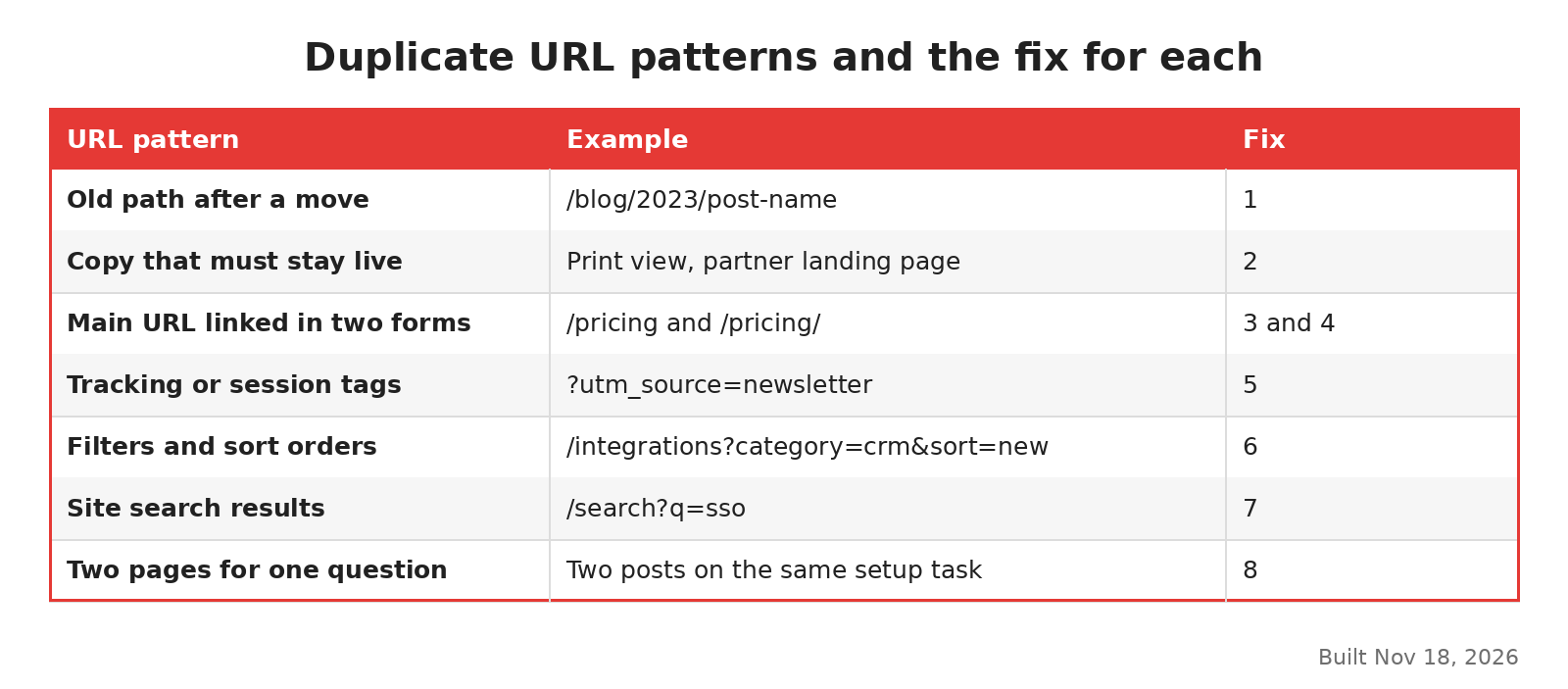
Which fix applies to each duplicate URL pattern, built Nov 18, 2026.
On most SaaS sites I would start with fix 3, because mismatched internal links are cheap to correct. The tree below asks the same questions in order, starting from one URL.
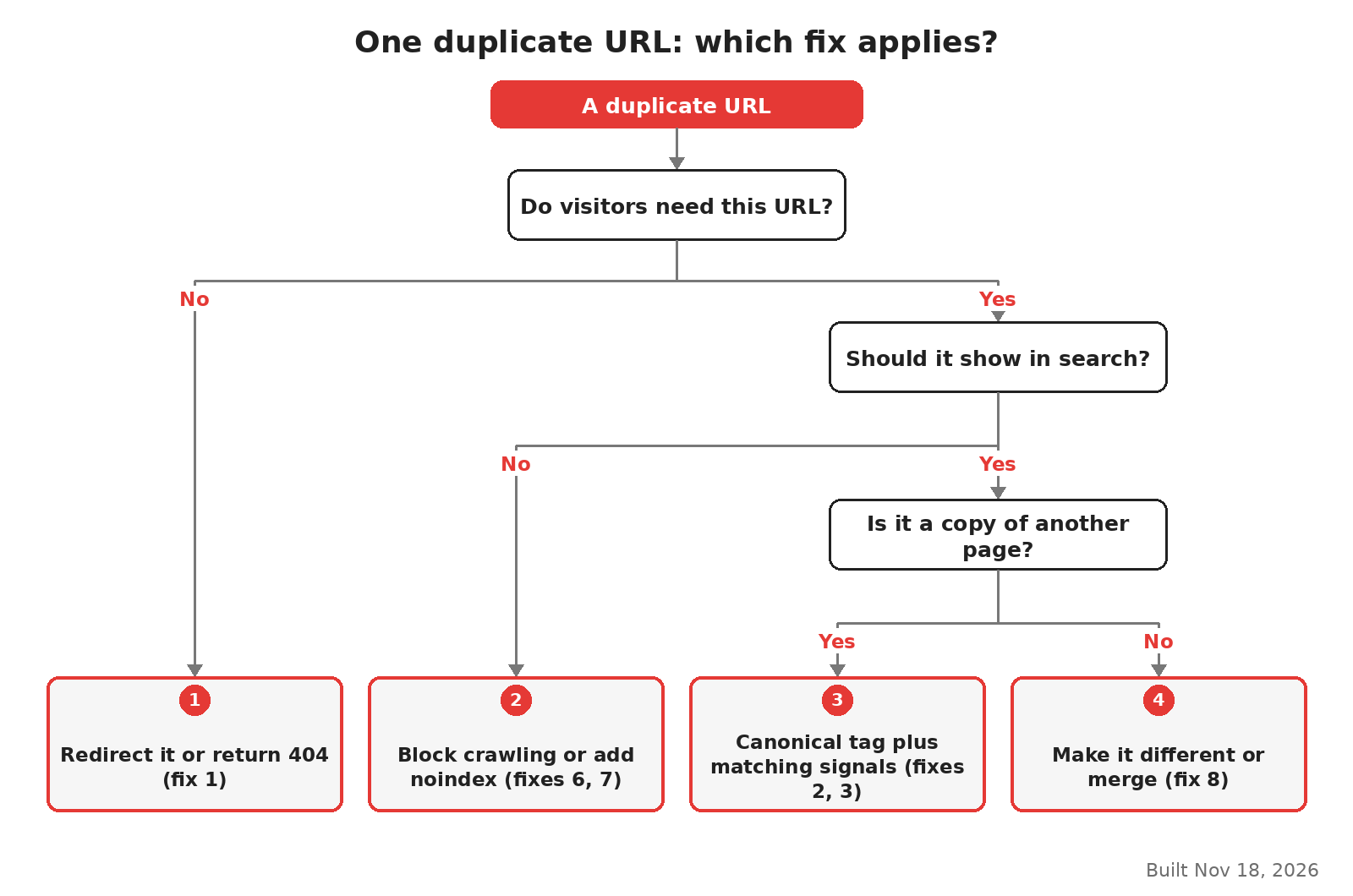
From one duplicate URL to the right fix, built Nov 18, 2026.
Programmatic pages need extra care, because one template can create hundreds of near copies at once. The programmatic SEO guide covers how to index those in stages.
How long the change takes to show
Google may keep pages in a duplicate group for up to two weeks after you fix them. After a real fix, use Request Indexing in URL Inspection for your most important URLs. The tool has a quota, so save it for pages that matter.
Then check two things. The Google-selected canonical in URL Inspection should match your choice. In the Page indexing report, the Duplicate reasons should shrink over the following weeks. Alternate page with proper canonical tag may grow at the same time. That shift is the sign Google now reads your signals the way you meant.
If the duplicates come from templates across a large site, the work is mostly server and CMS changes. That is the kind of project a technical SEO agency or your own developers should scope first.
FAQ
Does a robots.txt block remove duplicate URLs from Google?
A block only stops Google from crawling them. Google can still index a blocked URL without its content, and it cannot see a canonical or noindex tag on a page it cannot fetch. Use a canonical tag or a redirect for URLs that are already indexed.
Can I put noindex on the copies?
Google's canonical guide advises against using noindex to choose a canonical within one site, because noindex removes the page from search completely. Use it for pages that should never appear in search, such as internal search results.
Do AI search engines care about duplicate pages?
Yes. In its December 2025 post, Microsoft Bing's webmaster team described how AI systems often group near-identical URLs. They then pick one page to stand for the group. If the pages barely differ, the system may pick an outdated version. The same fixes apply.