
Last updated: November 21, 2026
In checks run between January and September 2026, 28% of the pages site owners tested from their own sites were not in Google. That share comes from a paid indexing tool's study published on October 1, 2026. Most pages were checked once, often a few days after they were added, so some of them may have been indexed later.
So some gap between what you publish and what Google keeps is normal. A gap of 80 pages out of 100 is not. When the share drops that low, there is usually a reason you can find. Search Console tells you which group of URLs to start with.
Work through the nine checks below in order. Each one ties to a reason shown in the Page indexing report. For crawling, rendering and site structure in general, the SaaS technical SEO checklist covers the rest.
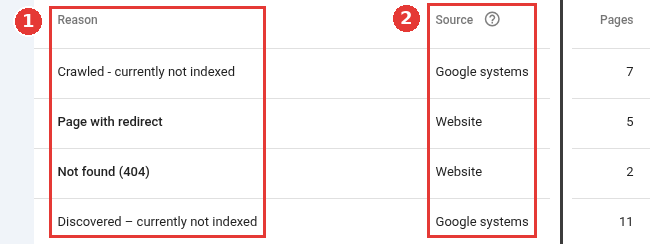
Page indexing reasons, two parts of one page, captured Nov 18, 2026.
Start with the right count
A site: search on Google is a poor way to count indexed pages. On Google's Search Off the Record podcast of July 16, 2026, a Google search advocate called the site query an artificial type of query. He said Search Console is the source of truth. Google sometimes leaves indexed pages out of site queries, and sometimes it shows URLs that are no longer indexed.
Open Indexing, then Pages. The top chart splits known URLs into indexed and not indexed. The table under it, "Why pages aren't indexed", groups the missing ones by reason.
Some URLs should stay out: tag archives, filtered lists, paged archives, login pages and old campaign pages. If they fill the "not indexed" side of the chart, your indexed share will look low and nothing is wrong. Compare indexed pages only against the pages you submitted.
Use the filter above the chart to switch from all known pages to all submitted pages. Submitted pages are the ones in your sitemaps. That view answers the question you care about: of the pages I asked Google to index, how many made it? Then open the Sitemaps report and check that each sitemap reads Success.
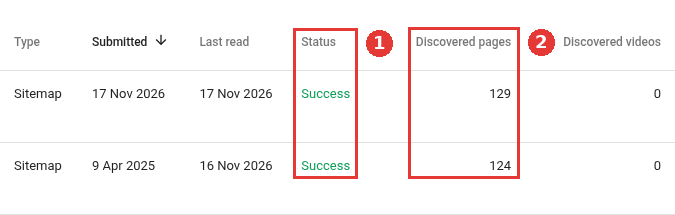
Submitted sitemaps in the Sitemaps report, captured Nov 18, 2026.
The same podcast made a point that applies to every check below. The report shows patterns across groups of URLs. Use it to spot a sudden rise in one reason, then look at a few example URLs from that group.
Each report reason points to a check
Each reason in the table points to one or two of the checks below.
Reason in the Page indexing report | Check to run first |
|---|---|
Blocked by robots.txt | Check 1 |
Discovered, currently not indexed | Checks 2, 3 and 9 |
Excluded by noindex tag | Check 4 |
Alternate page with proper canonical tag, or a Duplicate reason | Check 5 |
Page with redirect | Check 6 |
Not found (404) or Soft 404 | Check 7 |
Server error (5xx) or Blocked due to access forbidden (403) | Check 8 |
Crawled, currently not indexed | Check 9 |
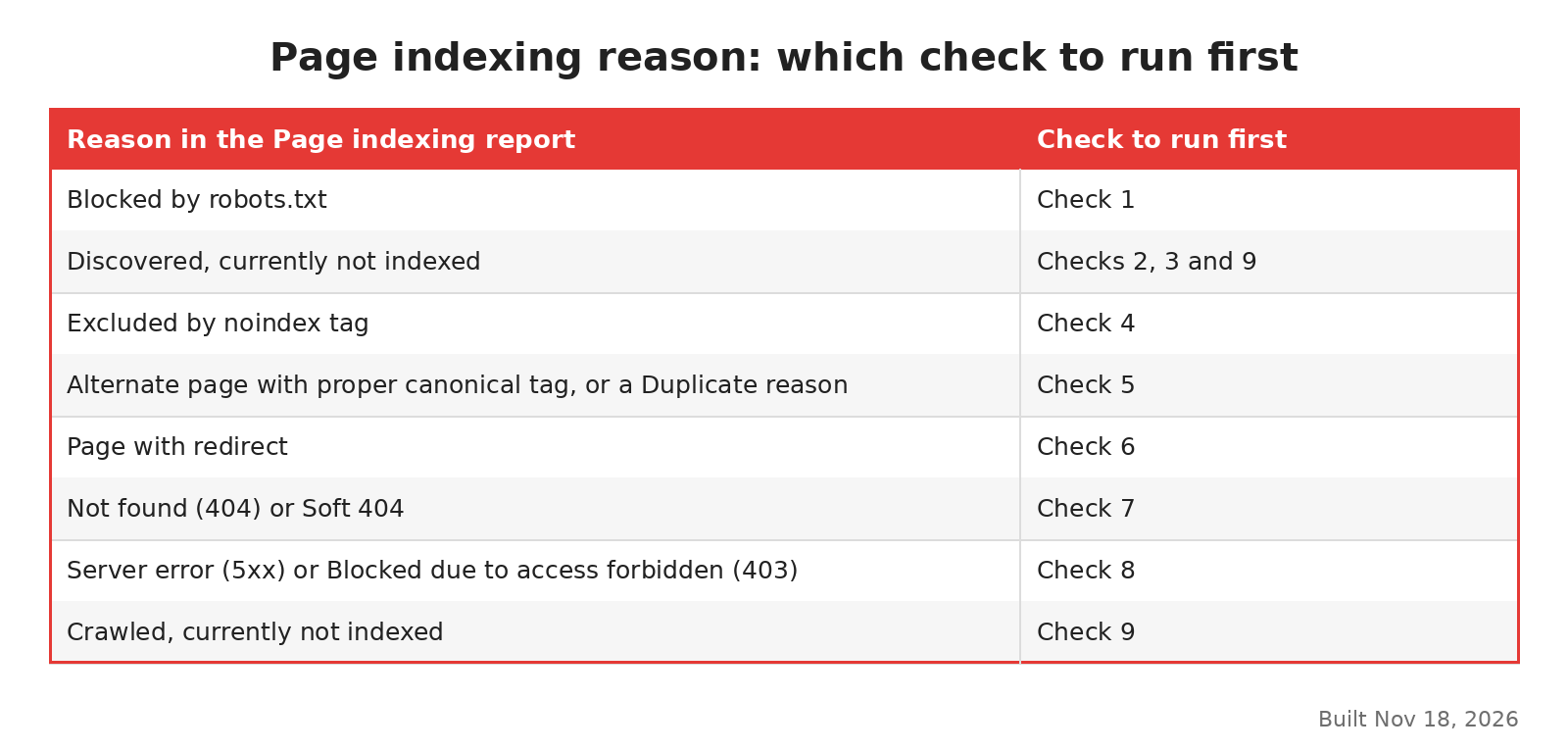
Which check to run for each report reason, built Nov 18, 2026.
Can Google find and fetch the page?
1. Is robots.txt blocking the folder?
A Disallow rule stops Googlebot from fetching the URL. It does not always keep the URL out of results, and it hides any noindex tag on the page. A noindex tag asks Google to keep a page out of its results. Google's guide to blocking indexing says a noindex rule only works if the page is not blocked by robots.txt.
Look for broad rules such as Disallow: /blog or Disallow: /*? that were added for a reason nobody remembers. On new SaaS sites, one cause is staging rules copied to production.
2. Is the page in a sitemap Google can read?
List only the URLs you want indexed: the final, canonical version of each page, with no redirects and no tracking tags. A Google search advocate made that point in an October 1, 2026 episode on sitemaps. He added that Google also uses sitemaps when it picks a canonical, so the version you list is a little more likely to be chosen.
If the Sitemaps report shows "Couldn't fetch" for a valid file, the same episode gives two causes. Google may not have had time to crawl it because of host load. Or Google may see little need to crawl more from the site, and that need is often based on how Google rates the site's quality. In that second case, fixing the file will not change much.
3. Does any indexed page link to it?
Google uses links to find new pages. Its link guide asks for a link to each important page from at least one other page of the site.
New integration pages, comparison pages and docs are often only in the sitemap. They can stay under "Discovered, currently not indexed" for a long time. Add links to them from pages that already get search traffic, using <a href> links with clear anchor text.
Is the page sending the right signals?
4. Is there a noindex tag on the page?
Check both places a noindex can live: a <meta name="robots"> tag in the HTML and an X-Robots-Tag header in the response. The header is easy to miss, because it does not appear when you view the page source.
On SaaS sites, one cause is a CMS setting left on after launch. A template shared with gated pages, or a deploy that copied staging settings, can do the same. If dozens of pages in one folder carry the tag, look at the template first.
5. Is Google treating it as a copy of another URL?
Three reasons in the report mean Google grouped the URL with others and kept a different one. "Alternate page with proper canonical tag" means Google agreed with your canonical tag, so it needs no fix. The two Duplicate reasons need a closer look.
This is normal in most cases. Google picked another URL on your own site, and the content is still in the index. It matters when Google keeps a page you do not want shown, or groups pages that are meant to be different.
6. Does the URL redirect?
"Page with redirect" is often expected. After a migration, the podcast advocate said a steep rise in this reason is exactly what you want to see. Google's redirect guide explains which redirect types Google treats as permanent.
The problem is the sitemap. If it still lists old URLs that now redirect, you are asking Google to index pages that no longer exist. Update the sitemap to the new URLs. The website migration guide covers the rest of a move.
Does the server or the page itself fail?
7. Is it a real 404 or a soft 404?
A 404 for a page you removed on purpose is fine. A Google analyst covered this in an October 28, 2026 Search Central video. A 404 brings no penalty and has no effect on the rest of the site.
A soft 404 is different. Google's page on HTTP status codes says it shows this when a page returns 200 but looks like an error or an empty page. Empty search results, out-of-stock pages and thin location pages often get this label. Give those pages real content or return a proper 404.
8. Does your server or CDN block Googlebot?
A 5xx error is a server error, and it tells Google's crawlers to slow down. The status code guide adds that Google drops URLs that keep returning server errors. A 403 means the server refused the request.
Watch for bot protection. A CDN is the network that delivers your pages to visitors. In the July podcast, an advocate described CDNs and hosts that switch on bot protection during heavy crawling. They then serve 403 or 404 to Googlebot. Run a live test in the URL Inspection tool on one affected page. If the live test fails while the page loads fine in your browser, ask your host or CDN to allow verified Googlebot traffic. AI crawlers can hit the same block.
9. Is the page worth a place in the index?
If checks 1 to 8 find nothing, the cause is usually the page itself. Pages listed as "Crawled, currently not indexed" were fetched, read and left out for now. That status has its own set of fixes, from canonicals to internal links to rewriting.
For "Discovered, currently not indexed" on a large share of the site, look at crawl demand. The sitemap episode linked crawl demand to how Google rates the site's quality. Adding more thin pages makes that worse. Merging weak pages and improving the ones you keep usually helps more than any technical change.
Running the checks on a 100-page site
The table uses example numbers, made up to show the order of work. A SaaS site lists 100 URLs in its sitemap, and the submitted view shows 20 indexed. The other 80 split into five groups.
Report reason | URLs | What the check found |
|---|---|---|
Page with redirect | 25 | Old blog paths still in the sitemap after a move |
Discovered, currently not indexed | 22 | New integration pages with no internal links |
Excluded by noindex tag | 18 | A template setting copied from staging |
Alternate page with proper canonical tag | 9 | Tracking versions of URLs in the sitemap |
Crawled, currently not indexed | 6 | Short posts on topics the blog already covered |
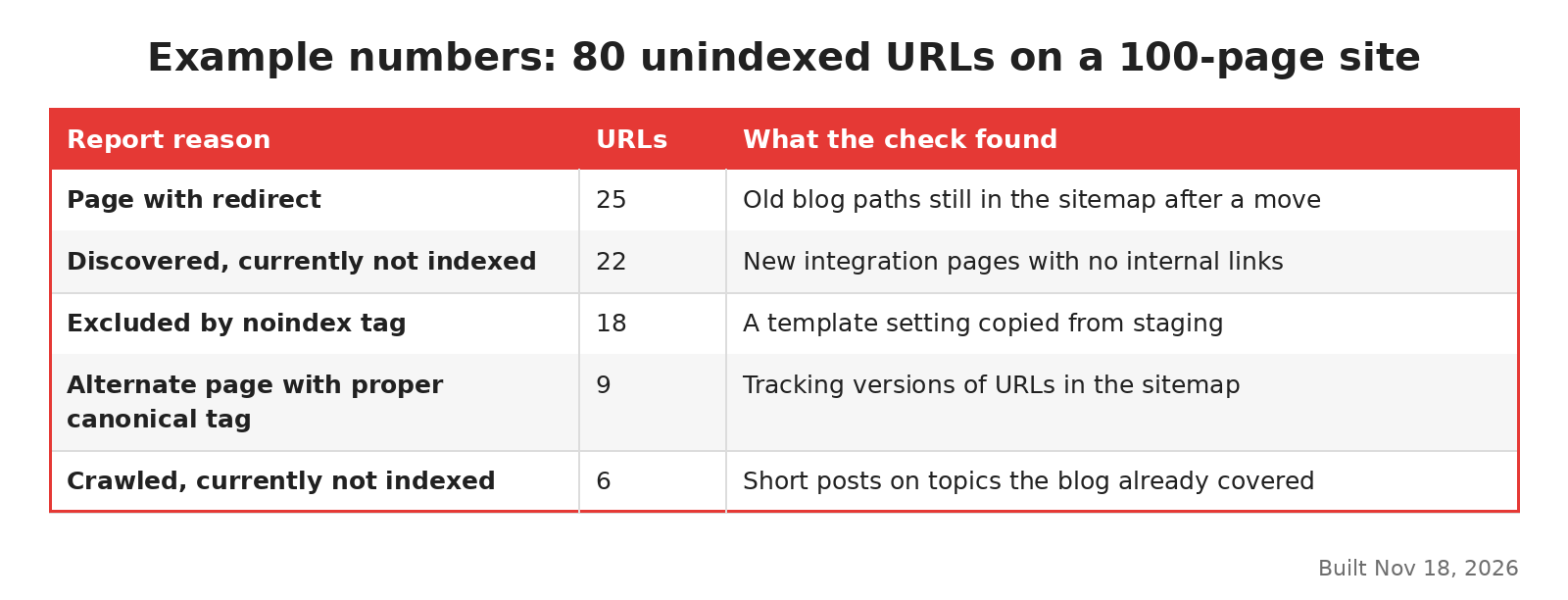
Example numbers for a 100-page site, built Nov 18, 2026.
Fixing the sitemap removes 34 URLs from the submitted list, because 25 redirect and 9 are tracking versions. Neither group needs any other work. Now 66 real pages are submitted.
Removing the noindex from the template is one change that affects 18 pages. Linking the 22 integration pages from the integrations hub is a day of work. The 6 short posts need a decision: merge them or improve them.
So the real problem was 46 pages, and only 6 needed new writing. That is the reason to run checks 1 to 8 before anyone rewrites the content.
Sometimes the checks point to a template, server or CDN problem across hundreds of URLs. Then a developer or a technical SEO agency should look at it. For one or two folders, the nine checks above are usually enough.